Screen Layout
The main interface displays essential gameplay information. You can monitor your current Score and Player status.
Keep track of your Power Meter and the number of Ships Remaining. The High Score is also displayed for reference.
How to Play
Insert the Game Pak securely into the Game Boy Advance and turn on the power switch. The title screen will appear after the opening demo.
Press START to display all game modes. Select a mode by pushing the A Button. The opening demo can be skipped by pressing START at any time.
Game Modes
The following options are available on the main menu:
•
START: Starts the game from the first stage.
•
CONTINUE: Starts the game from a chosen stage.
•
HINT: Displays hints for the completion of each stage.
•
OPTIONS: Changes various game settings.
NOTE: The CONTINUE and HINT options can only be accessed for stages that have already been reached.
Options Mode
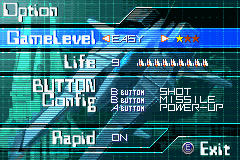
Various game settings can be changed in Options Mode. You can customize the difficulty, starting lives, and controller configurations.
Game Settings
Adjust the following parameters to suit your playstyle:
•
GAME LEVEL: Set the game's level of difficulty to EASY, NORMAL, or HARD.
•
LIFE: Set the initial number of ships to 1, 3, 5, 7, or 9.
•
CONTROLLER: Change the functions of controller buttons.
•
SHOT: Fires shots and lasers.
•
POWER UP: Employs power ups.
•
RAPID: Hold this button down to fire shots, lasers, and missiles continuously. NOTE: Saved data can be erased by moving the cursor to EXIT, holding down the L, R, and B Buttons, and pressing START.
Continues
After GAME OVER has been displayed, CONTINUE will appear on the screen. To continue the game, select YES and press the A Button.
To end, select NO and press the A Button; the RANKING screen or NAME ENTRY screen will appear.
NOTE: When you CONTINUE, your score will not be considered in the high score category because high scores are based off of one credit.
Name Entry
The player's initials can be entered if the final score ranks in the top ten. Enter 3 initials and select 'END' using the A Button to display the RANKING screen.
Press START on the RANKING screen to return to the title screen. The following example shows a top entry:
Power Up Select
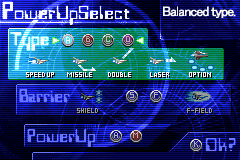
Choose a POWER UP system before starting the game with START or CONTINUE. You must select the Power Meter type, Shield type, and Power Up Method. 1. Power Meter Select
Choose from four kinds, labeled A through D:
2. Shield Select
Choose from two kinds, labeled S or F:
•
S. SHIELD: Strong forward-facing shields. •
F. F-FIELD: Surround shields.
3. Power Up Method Select
Choose from two kinds, labeled A or M:
•
A. Semi-auto power up: Computer assisted power up.
•
M. Manual power up: Player controlled power up.
Start the game by selecting OK when power up selections are complete.


.png)
