Copying an Ability
Kirby can copy an ability by inhaling and swallowing an enemy who has an ability. Enemies with abilities are always flashing. To copy an ability:
•
Press A or Down to swallow
•
Press Y to use the copied ability
Kirby's Abilities
There are more than 20 different abilities. Depending on the button operations, each ability has many different attack methods. For example, if you dash and attack, your attack power is improved.
To see the explanations of these various attack methods, press START when Kirby has an ability, then press the B Button. Some of Kirby's abilities include: •
Cutter: He uses a cutter that moves like a boomerang to cut his enemies.
•
Cook: Kirby cooks up an enemy (One-shot ability). •
Sword: There is nothing a sharp sword can't cut.
•
Fighter: Kirby knocks out enemies with a severe punch or kick. Kirby's Helper
When Kirby has copied an ability, he can produce a helper. The helper becomes Kirby's ally and will help him defeat any enemy that stands in his way. When Kirby loses a life, the helper will disappear. To produce a helper in a 1-Player game:
•
Press the A Button to make a helper born
In a 1-Player game, the helper is operated automatically.
Canceling a Helper
To get rid of your helper, hit him with the "Suppin Beam" by pressing the A Button. Your helper will turn back into an ability item. If you leave the ability item alone, it will disappear.
When you turn your helper back into the ability item, you can inhale it and swallow it again to re-copy the ability. Then, by pressing the A Button, you can make your helper reappear.
Helpers in a 2-Player Game
When Kirby is in a copy ability condition, press any button on the second controller. Player Two will now be able to control the helper. Before Starting the Game
Correctly insert the Kirby Super Star Game Pak into your Super Nintendo Entertainment System and move the POWER switch to the ON position. When the title screen appears, press either START, the A or Y Button to move to the next screen. File Select Screen
With the +Control Pad, select from one of three save files and press either START, the A or Y Button. Game progress will be saved in the file selected.
•
Clear %: To get 100%, you must finish every game.
•
Stages Clear: A number is displayed on the file screen for every game cleared.
To erase saved data, select a save file and press SELECT. Follow the instructions on screen to delete the save file:
Cork Board Screen
On the Cork Board Screen, four main games are displayed: "Spring Breeze," "Dyna Blade," "Gourmet Race" and "The Great Cave Offensive." Use the +Control Pad to select a game and confirm by pressing the A Button. As you complete the four games, the other two, "Revenge of Meta Knight" and "Milky Way Wishes," will appear. The option to switch from mono to stereo and the two sub games, "Megaton Punch" and "Samurai Kirby," are also on the board. The screen features:
Story Screen
On each story screen, the objective, difficulty level (indicated by the number of stars) and high score are displayed. Press START, the A or Y Button to advance to the next screen. To return to the Cork Board Screen, press either the B or X Button.
Title Screen
•
Press START, the A or Y Button to advance to the next screen.
•
Press the X Button to view the demo.
•
Press the B Button to return to the Cork Board Screen.
The Beginner's Room
If you select "Yes" on the entrance screen, you will go to the Beginner's Room. Confirm by pressing START, the A or Y Button. It will explain various functions of the controller where you can actually play and learn.
Information Panel
•
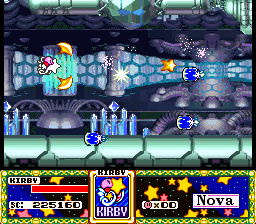
Life Meter: When Kirby (or his helper) hits an enemy, his life meter will be reduced. When Kirby's life meter is depleted, the number of remaining Kirbys will be reduced by one. •
Score: Current score for the game.
•
Remaining number of Kirbys: If you run out of Kirbys, the game is over.
•
Condition Panel: Kirby's current condition. A Bit of Advice
If Kirby takes damage, make sure to look for food to help replenish the life meter of Kirby or his helper. Remember, too, that Kirby's abilities and helpers can come in handy! Dyna Blade Story & Rules
A strange bird, named Dyna Blade, has come from the mountain and ruined the crops! Unless Kirby can stop him, Dream Land will be devastated! Defeat enemies for score and clear all five stages. Once a stage has been cleared, Kirby will appear on a map. Move Kirby with the +Control Pad to the next desired stage and press any button to enter. If you're lucky, you might find a hidden route on the map! Bonus Chance
After each stage is completed, you'll play a bonus game. When the meter is full, press any button to launch Kirby. The type .png)

.png)



_1.png)


_1.png)


.png)