Getting Started
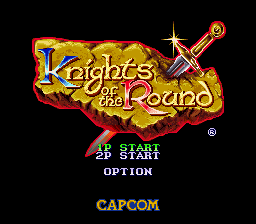
1. Insert your KNIGHTS OF THE ROUND Game Pak into your Super Nintendo Entertainment System and turn the power ON. 2. When the title screen appears, use the control pad to highlight 1P GAME or 2P GAME and press the START button.
•
1P GAME: A one player game
•
2P GAME: A two player game
•
OPTION: Allows you to change button and difficulty settings.
3. When the next screen appears, push left or right on your control pad to select your character. Once you have chosen your character, press the B button to start the game. Listen closely to Merlin, for the fate of the Grail and all of Britain lies in your hands.
4. To end your adventure at any time, simply turn your Super Nintendo Entertainment System OFF and remove your Game Pak. Note: During the game, a small black bar will appear above and below the game screen. This is normal.
Using the Options Screen
When the title screen appears, push the control pad up or down to move the marker next to OPTION MODE and press the START button. When the next screen appears, push the control pad up or down to highlight the option you wish to change.
Game Level
This option determines how hard the game is. There are 3 different settings: EASY, NORMAL, and HARD.
Press the control pad left or right until you find the difficulty settings you wish to use.
Key Config
This option allows you to change the buttons used in the game.
Press the control pad up or down until you highlight the action you wish to change. Once the action is highlighted, press the button you wish to use for that action and it will automatically change. Music
This setting allows you to hear the various music used in the game.
Press the control pad left or right to change the music number and then press the A button to hear the music.
Sound
This setting allows you to hear the various sound effects used in the game.
Press the control pad left or right to change the music number and then press the A button to hear the sound.
.png)

.png)
