Starting a New Game
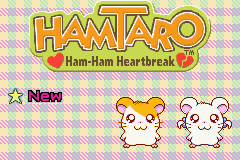
Insert your Hamtaro Game Pak into your Game Boy® Advance and turn the power ON. The Game Boy® logo will appear, followed by the Hamtaro title screen. Select New, then press START or the A Button to begin your game. Continuing a Game
Your progress is automatically saved. If you choose Continue on the title screen, you will begin playing from the place you were when the power was turned off.
•
Only one game can be saved at a time.
•
Once a game is erased, it can never be restored.
•
If you choose New on the title screen, your old game and any Ham-Jam data that you've received will be erased. Be careful!
Entering a Name
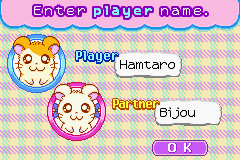
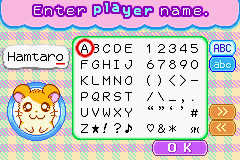
You can change Hamtaro's and Bijo's names if you'd like. You can enter any name you want, up to seven characters long. Use the + Control Pad to choose letters and press the A Button to confirm the selections. When you're finished, select OK. •
ABC......Select upper-case letters
•
abc......Select lower-case letters
•
>......Move cursor to the right
•
<......Move cursor to the left
After you choose OK, you will be asked to confirm the names you have chosen. Choose either Yep-Y (Yes) or No-P (no) and press the A Button to confirm.
•
Press the B Button to erase a single letter.
•
Press SELECT to switch between upper-case and lower-case menus.
Welcome to the Clubhouse
There are many places you can get to from the Clubhouse. You also have many friends here who will give you helpful hints. Try talking to everyone.
Clubhouse Locations
•
Rubrub Room Door (see pg. 28)
•
Dance Hall Entrance (see pg. 32)
•
Photo Studio Entrance (see pg. 30)
•
Stairway to the 2nd Floor
Clubhouse Characters
•
Postie: Always eager to help, he'll take your contest entry card and deliver any prizes you win. •
Boss: He will send you on errands and teach you some Ham-Chat words to help you along the way.
•
Snoozer: Wake this sleepy guy for some very important game hints and other information. •
Harmony: She can sense Spat's location and point you in the right direction to find him. Check out the Clubhouse
In the Clubhouse you can Ham-Jam in the Dance Hall, try on new outfits in the Photo Studio, and polish rocks in the Rubrub Room. There's even a room on the 2nd floor!
Say "hamhal" to Ham-Chat
Ham-Chat is the secret language that's popular among hamsters. Be sure to use it when talking to hamsters you meet. Sometimes they'll even teach you new Ham-Chat words. To begin with, you will memorize these four basic Ham-Chat words.
•
Hamha (Greet Others): Greet other hamsters with this popular greeting.
•
Hif-hif (Sniff): Hif-hif items to pick them up. You can also use hif-hif to sniff out hints.
•
Tack-Q (Roll): Curl into a ball and roll into things using "tack-Q." Items sometimes fall out of trees if you roll into them.
•
Digdig (Dig): Find buried treasure by digging in special areas of soft dirt. Use digdig over entrance/exit holes to leave an area and return to the main map.
Learning Progress
There are so many Ham-Chat words to learn. You'll know you've learned all the Ham-Chat in an area when you see a spinning sunflower icon above that area on the main map.
Ham-Ham Dictionary
When you learn a new Ham-Chat, it's automatically recorded in your Ham-Ham Dictionary. You can call up your dictionary by pressing either START or the R Button on the game screen. Use the A Button to open your dictionary and check the meaning of the Ham-Chat words you've learned so far.
•
Up and down on the + Control Pad: Move the cursor
•
Left and right on the + Control Pad: Turn the pages
•
A Button: View the selected Ham-Chat animation
•
START / R Button: Close the Ham-Ham Dictionary
•
SELECT / L Button: Sort the Ham-Chat display screen
You can display the Ham-Chat words you learned either in the order in which you learned them or alphabetically.
Lots of Ham-Chat Words
As you explore, talk to all the hamsters you meet. They'll teach you new Ham-Chat words and give you game hints, too!
Mystery Ham-Chat
Sometimes, a question mark may appear in the Ham-Chat Window. It means that you haven't learned the Ham-Chat you need yet. Get another hamster to teach you the word, then try again.
The Status Screen
On the game screen, press SELECT or the L Button to view the status screen. From here, you'll see the number of Ham-Chat words you've learned, the items you've collected, and many other things.


.png)
 (En,Fr,De,Es,It).png)
