The Tournament of Champions
Four brave young fighters have answered the call to enter the tournament. Cammy, Fei Long, Dee Jay, and T. Hawk each have their own reasons for entering and will let nobody stand in their way.
To begin, choose SUPER BATTLE on the main game selection screen to select your character. Your fighter will then travel the globe to meet one of the sixteen other fighters.
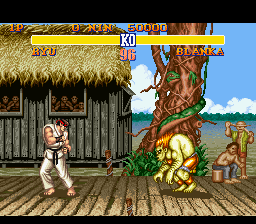
When the match begins, use all your fighting skills to defeat your opponent. Each time you hit, kick, or throw your opponent, their energy meter decreases. Once the meter is totally red, the opponent is knocked out and you are declared the winner. Win two out of three rounds to earn the right to face the next challenger on your way to facing M. Bison.
The Super Battle Mode
In Super Battle Mode, you choose a fighter and attempt to defeat all other challengers. Success allows you to face M. Bison and the other Grand Masters.
If you succeed, you will see a story ending for your character which completes their quest for the championship.
A second player can join in and fight against you at any time. The second player must hit the START button on their controller. After a moment, the game returns to the character selection screen to allow the new player to choose their character.
The V.S. Battle Mode
V.S. Battle allows two players to battle head-to-head in a series of matches. From the title screen, move the pointer next to V.S. BATTLE using the control pad and press START.
On the next screen, each player chooses their character and presses any button to continue. The following options appear:
•
HANDICAP: Set the ATTACK LEVEL using the control pad. The number of stars determines damage; more stars mean greater damage from punches and kicks. This allows players of different skill levels to have an even match.
•
STAGE SELECT: Select the match location by pressing left or right on the control pad.
After all choices are made, Player One presses START to begin the match.
The Group Battle Mode
Group Battle allows two players to have Street Fighter characters team up against each other. Select GROUP BATTLE on the main screen and press START. On the rule screen, use the control pad to select the tournament rules and press START.
•
MATCH PLAY: Both players must select the same number of characters. Teams battle character by character, starting with the first character of each team. This continues until all characters have fought.
•
ELIMINATION: Each player chooses up to eight characters, but not necessarily the same number. A winner can continue using their current character until defeated. The first player to lose all characters loses the match.
Players then select the number of characters to use. If playing an elimination match, each player sets their own number. Use the control pad to increase or decrease the count, then press START.
Both players then select their characters using the control pad. Player One selects first, followed by Player Two. Highlight a character and press any button to make the selection.
After both players have chosen all characters, the Handicap and Stage Select screen appears automatically. Use these settings just as in V.S. Battle mode and press START to begin the tournament.
The Tournament Battle Mode
Up to eight players can compete for the Street Fighter Championship in Tournament Battle. Select TOURNAMENT BATTLE from the main screen. Player One selects their character, followed by Player Two, and so on. When everyone has selected, highlight END and press START.
If you do not have eight people playing, the computer will automatically pick and control the remaining fighters.
Each player is assigned a preliminary match. Before each match, you can select the attack level, just as in V.S. Mode. Press START to begin.
Each match consists of only one round. If you lose, you fight the losers of other matches to decide your final ranking. If you win, you advance to the semi-finals and closer to the championship.
The Time Challenge Mode
The Time Challenge tests your speed as you try to knock out a computer opponent in the fastest time possible. Select TIME CHALLENGE and press START.
Choose your character and the character for the computer-controlled Player Two, then press START.
You have one round to knock out your opponent as quickly as possible. If you break CAPCOM records, you can enter your initials as one of the greatest Street Fighters in the world.
The Option Mode
Option Mode allows you to change certain aspects of the game. From the title screen, move the marker next to OPTION and press START.
Highlight the option you wish to change using the control pad:
•
DIFFICULTY: Change the computer opponent's difficulty. More stars indicate more difficult opponents.
•
TIME LIMIT: Toggle the time limit on or off. Selecting YES gives fighters 99 seconds to knock each other out. Selecting NO allows the fight to continue until a knockout.
•
CONFIGURE: Change the button configuration for punches and kicks. Highlight the desired punch or kick and press the new button.
•
POWER STICK: If using a Capcom Fighter Power Stick, highlight SET and press any button to automatically configure the buttons to the optimum setting. •
STEREO: Switch between STEREO or MONAURAL sound.
To leave Option Mode with new settings, simply press START on your control pad.








.png)

 (En,Fr,De).png)