The Main Menu
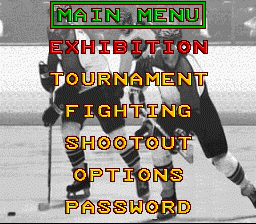
The Main Menu screen contains the following options: Exhibition, Tournament, Fighting, Shootout, Options, Password.
Use the control pad to highlight an option from the main menu. Select the option highlighted by pressing the START button.
The Exhibition Option
Select the Exhibition Option to play either a one or two player single game of hockey.
Once you have selected the Exhibition Option, the Exhibition Screen will appear. Highlight either ONE PLAYER, TWO PLAYERS or DEMO with the control pad and press the START button to select your choice.
A list of teams will appear. Use this list to select which teams you wish to play with and against. Moving the control pad left or right will cycle through the available teams.
Choose the displayed team by pressing the START button. Note that in a TWO PLAYERS Tournament only the second controller's START button can be used to choose the second team.
After both teams have been chosen, a final screen will appear with both teams displayed. If you would like to make any changes, you can return to the previous screen by pressing the SELECT button. Press START to begin the Exhibition game. You will return to the Main Menu when the Exhibition game is completed.
The Tournament Option
Selecting this option allows one or two players to enter themselves into a 16 team tournament. In Tournament play the 16 teams are separated into four divisions. The four teams of each Division always begin a Tournament with the same matchups.
There are four separate rounds of Tournament play:
Advancement during the playoffs is set on a round by round basis to be the first team to win three games against the other (a "Best of 5" or "3 out of 5" series). For each round, two teams will continue to play each other until one of the teams wins three games. That team then advances to the next round while the other team is eliminated.
The winners of the first round divisional matchups advance to the second round and play for their Division Title. The four teams that win their Divisions then advance to the third round and play the other Divisional winner from the same Conference.
The resulting two winning teams (The Conference Champions) then advance to the fourth and final round to play for the Championship. That winner receives the coveted Virgin Games Cup. Playing in a Tournament
Highlight either ONE PLAYER, TWO PLAYERS or DEMO with the control pad and press the START button to select your choice. A list of teams will appear. Move the control pad left or right to cycle through the available teams.
Choose the displayed team by pressing the START button. Note that in a TWO PLAYERS Tournament only the second controller's START button will be active to choose the second team.
After both teams have been chosen, a final screen will appear with both teams displayed. If you would like to make any changes, you can go back to the previous screen by pressing the SELECT button.
You will then be presented with the Tournament Tree. The Tree will display all game matchups and team victories as the Tournament progresses. To view all of the Tree, press the controller pad to the left or right. Your teams will be flashing; to begin the next scheduled game, press the START button.
At the end of every tournament game you will be supplied with a new password. Write it down, then press START to return to the Tournament Tree.
•
Note: Once in a Tournament, you can only return to the Main Menu by resetting the Super NES game console. Be sure to write down the latest password if you want to return to the Tournament in progress.
•
Note: Only human controlled team games will be playable or can be watched. After each human controlled team has played a game, the computer will automatically generate the results of all other games scheduled to play in the current series. Then the human controlled teams will be scheduled to play again.
The Fighting Option
Selecting the Fighting Option gives you the chance to practice your brawling skills. If you lose the fight during the game you'll go to the penalty box and give the opposing team a three minute power play!
When practicing fighting, Player One is on the left and Player Two is on the right. This is not necessarily true during an actual game.
Each fighter will have a Strength Bar on their respective left or right hand sides of the screen. When the Strength Bar is illuminated all the way to the top, the fighter is at 100% strength. As the fighter begins to lose and continues to be punched, his Strength Bar will lose its illumination. When a fighter's Strength Bar reaches zero, the fight is over and that fighter has lost.
Punches and Defense
A fighter has four types of punches:
•
The jab: Use when the opponent is farthest away.
•
The roundhouse: Use when at mid-distance.
•
The low blow: Use when at mid-distance.
•
The uppercut: Use when up close.
Defensively, a fighter can protect his body with a cover-up or a duck. Duck when you can to avoid getting clobbered.
Fighting Strategies
Each punch has specific attributes to consider:
•
Punch Speed: Each punch takes a different length of time to complete. In descending order of quickness: jab, roundhouse, uppercut, and low blow. Slower punches are easier to defend against or counter.
•
Power: Each punch packs a different wallop. In descending order of hurt potential: low blow, uppercut, roundhouse, and jab.
•
Fatigue: Every time you throw a punch or push your opponent by grabbing, you use up small amounts of energy
.png)

.png)
.png)
.png)
