Getting Started
Insert your Kirby: Nightmare in Dream Land Game Pak into your Game Boy Advance system and turn the power ON. Once the title screen appears, press START to view the File Select screen. Use + to choose one of the three available files and press START or A to begin your game. Kirby: Nightmare in Dream Land saves your game data to that file automatically while you play. Choose this to embark on Kirby's latest adventure, Nightmare in Dream Land. Choose One Player to begin your game. See pages 32-35 for more information on multiplayer games. Choose this mode to have fun with some simple minigames. See pages 24-27 for details.
Listen to the game's sound effects. See page 36 for details.
Choose this option to erase a file. You should only do this if you want to start your game over from the beginning and have no other unused files. Once a file has been erased, it cannot be recovered. Don't erase a file unless you're absolutely sure you want to.
The File Select Screen
When you choose a file that has saved data on the File Select screen, you can continue playing your saved game. The name shown here changes depending on how well your adventure is going.
This percentage shows how far you've gone through your adventure. Once you totally clear all stages, your quest will be 100% complete!
Movement
Walk: Kirby walks in the direction that you press +. Climb Up & Down Ladders: Press up on + when standing in front of a ladder to make Kirby climb the ladder, and press down to make him climb down. Run: Kirby runs when you double-tap + in the direction he is facing. Press and hold + down after double-tapping to make Kirby keep on running. Enter Doorways: Press up on + when standing in front of a doorway to make Kirby enter the doorway. Jump: Kirby jumps when you press A. If you press A while walking or running, you'll jump farther. You can float, too! If you press A or up on + while jumping, you can float in midair!
Duck: Kirby ducks when you press down, which is great when you're trying to dodge enemy attacks! Slide: While you're pressing down on + to duck, press A or B to slide. Sliding into enemies and blocks is an effective attack!
Adventures Aplenty
Many exciting adventures await Kirby. This section gives you an idea of what they might be like. 1 Enter the Stage
There are many different levels in this game, and each level has many stages. Kirby's adventure begins on Stage 1 of Level 1: Vegetable Valley. 2 Get Through the Stage
Once Kirby enters a stage, his adventure has begun! Head for the end of the stage, and steer clear of anyone who tries to attack you. 3 The Next Step
Each stage is broken up into several steps. The steps are linked together by doorways, like the one shown on the left.
4 Set Your Sights on the Goal!
The picture on the left marks the end of the first stage. Your goal is to reach the end of every stage, so enter the doorway, and get ready to take the challenge!
5 The Goal Game
When Kirby reaches the lowest point in the clouds, press A and try to jump as high as you can. Once the goal game has ended, you'll go back to the level map. 6 On to the Next Stage!
Once you clear a stage, some of the walls on the level map crumble so that you can go on to the next stage. Adventure awaits, but you'll have to clear the rest of the stages on your own!
Next up, we'll explain how to read your game screen and the level map. Get ready!
Viewing the Game Screen
Game Screen
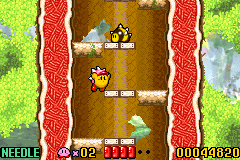
1. Kirby's Ability: The name of Kirby's copied ability appears here. If he doesn't have any copied abilities, there won't be anything here. 2. Kirby's Remaining Lives: If Kirby has no lives remaining, your game ends when his vitality reaches zero. Game over! 3. Kirby's Vitality: As Kirby takes damage, his vitality (the red bar) drops. When his vitality reaches zero, he loses a life. 4. Your Score: Your score appears here. During boss battles (see page 20), the boss's vitality appears here instead.
The Pause Screen
Press START while playing to bring up the pause screen. On the pause screen, you can read Kirby's own description of the special ability he copied. You have two options on the pause screen. Continue Game
Return to your game and continue playing.
Leave Through a Door
Leave the current stage and return to the level map.
These options won't appear on stages you've entered for the first time.
Continuing
When Kirby's vitality reaches zero and he has no lives remaining, your game is over and you'll see a screen like the one below. This screen gives you two options. •
Continue: Resume your game from the stage that it ended on.
•
Quit: Quit playing and return to the title screen.
Cleared Levels & Stages
You can return to any level or stage that you've cleared as many times as you want, which is good, since you might want to go back to get an item you forgot to pick up or to copy a special ability that you can't find elsewhere.
**Doorways on the Level Map


.png)
_1.png)
_2.png)
.png)
 (En,Fr,De,Es,It).png)
.png)




 (En,Fr,De,Es).png)

.png)
