GETTING STARTED
1. Turn OFF the power switch on your Nintendo® Game Boy® Advance. Never insert or remove a Game Pak when the power is on.
2. Insert the Game Pak of Star Wars®: The New Droid Army™ into the slot on the Game Boy Advance. To lock the Game Pak in place, press firmly.
3. Turn ON the POWER switch. The credit screens will appear (if you don't see them, begin again at step 1).
4. When the title screen appears, press START to proceed to the Main Menu.
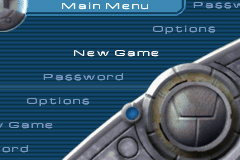
MAIN MENU
Use the Control Pad to highlight a selection and press the A Button to confirm. Press the B Button to return to a previous menu.
•
New Game - Begin a new game of Star Wars®: The New Droid Army™. Choose from three difficulty levels:
•
Password - Enter a password to continue a previously played game. See SAVING AND LOADING on page 15 for more information.
•
Options - Customize the game with the following options:
•
Music Volume - Adjust the in-game music volume.
•
Sound FX Volume - Adjust the sound effects volume.
•
Credits - View the game credits.
ATTACKING AND BLOCKING
While moving through each level, you must learn when to attack an enemy and when to block their attacks. Conserve your Force Power to battle multiple enemies.
To Attack
When an enemy is within striking distance, press the A Button to attack. To initiate a combo attack, press the Control Pad UP/DOWN/LEFT/RIGHT and the A Button while Anakin is making his initial swing or any swing thereafter. Anakin can continue his combo attacks until he runs out of Force Energy.
Note: Some Force attacks drain more Force Energy than others.
To Block
Anakin has the ability to deflect laser fire back at enemies. This can be done one of two ways. The first method is to use the basic block (B Button). This will deflect laser fire back at the opponent if timed correctly. The block needs to be performed just as the laser fire approaches Anakin. If the block is performed too soon, the laser fire will be deflected, but they won't bounce directly back and may or may not hit the opponent.
The second method involves batting away laser fire while Anakin is attacking, and occurs automatically. Anakin will automatically deflect incoming shots that make contact with him while he is in the middle of an attack.
Note: The Flip Attack, and the Power Down Slash will not deflect shots.
Note: The Twirling slash will deflect all shots that approach Anakin from any angle, but the shots will not be deflected back at a specific enemy. Use this when Anakin is surrounded by multiple opponents.
THE FORCE
As a Jedi Knight using the Force, you have more weapons available to you than merely a lightsaber. In Star Wars®: The New Droid Army™ you can utilize different Force abilities to aid in vanquishing your enemies. These abilities drain from the available Force Power Meter in varying amounts.
As you progress through the story, you will be rewarded with additional Force Powers to aid you in your quest. The available Force Powers are different based on whether you have your lightsaber drawn (combat or non-combat mode).
NON-COMBAT MODE
•
Speed - Gives Anakin a brief burst of Force Speed that allows him to escape dangerous situations when necessary.
•
Hide - Renders Anakin invisible. Use this to sneak by enemies unseen.
•
Meditation - Restores health and Force Energy at an accelerated rate.
•
Jump - Allows Anakin to perform a Force Jump. Use this to clear jumps and to close distance to an opponent.
COMBAT MODE
•
Speed - Gives Anakin a brief burst of Force Speed that allows him to escape dangerous situations when necessary.
•
Jump - Allows Anakin to perform a Force Jump. Use this to clear gaps and to close distance to an opponent.
•
Push - Send forth a wave of pure Force Energy, affecting everything in front of Anakin.
PAUSING THE GAME
Press START at any time to pause the game and access the following options.
•
Continue - Return to battle!
•
Comlink - Read hints and view objective/tasks.
•
Map - View the map of the current area that Anakin is in.
•
Level Password - Get the password for the current level.
•
Sound Options - Access the Sound Options menu.
•
Quit - Exit the game and return to the Main Menu.




 (En,Fr,De,Es).png)




 (En,Fr,De,Es).png)

.png)
