Flying Nightmares
Taking Off
You start in the cockpit with the engine running, positioned on the flight deck of the Tarawa. Release the wheel brakes and set thrust to maximum (96). As you reach the end of the deck, pull up the nose and retract the undercarriage.
•
Wheel Brakes: Right SHIFT + Button B
•
Increase Thrust: Left SHIFT + Pad UP (Joystick - THROTTLE)
•
Nose Up: D-Pad DOWN (Joystick - Pull BACK)
•
Gear Up: Right SHIFT + Button A
Navigating to Target
Check your cockpit displays, known as MFDs (Multi-Function Displays), for navigation and threat information. The right-hand MFD shows the EHSI navigation display with waypoint 1 selected as your target. Cycle the scale so the top right of the EHSI reads '7', then turn the aircraft so the waypoint line is vertical in the display.
When the line shortens and the waypoint marker is about halfway between the display's outer edge and the aircraft symbol, you are approaching the target and should see it forward.
•
Cycle EHSI Scale: Left SHIFT + Button B
Attacking the Target
Use Hydra unguided rockets to attack the target. Select Hydras by cycling through available weapons until "HYD" and the carried type appear at the bottom left of the HUD. A T-shaped marker will appear near the center of the HUD, indicating the predicted impact point. Fly until this marker is visually over the target, then fire.
•
Fire Weapon: Button A (Joystick - Fire Button)
Returning to Tarawa
Cycle through waypoints on the EHSI display until a 'T' appears at the top right, indicating the TACAN navigation beacon carried by the Tarawa. Select Autopilot to land the aircraft, which allows you to experiment with outside views or speed up time by 3x using Fast Time.
Upon landing, you return to the Tarawa Command Center where a mission summary appears on the Pilots Briefing Screen.
•
Cycle Waypoints: Left SHIFT + Button C
•
Outside Views: Button PLAY
Main Menu Options
After the introductory sequence, you will see the main screen with several options:
•
Combat: Initiates a full campaign to defeat rebel forces on Barcala Island over 3 days and 36 missions. Early missions have one sortie, but later ones require 4-5 sorties. You have 20 Harriers total for the campaign, so you may need to re-fly missions to manage losses.
•
Arcade: Allows you to fly any mission in any sequence for instant action or practice. Points are earned for destroyed targets and deducted for lost aircraft. This mode is easier to fly and good for practice.
•
Training: Activates the Harriers Part-Task Simulator for beginners to practice Take Off/Landing, Air to Air, and Weapons practice in a closed environment.
•
Load Game: Restores a previously saved game state to get straight back into the action.
•
Joystick: Analog joysticks must be calibrated before use. Settings are saved automatically unless trim pots are moved. If the aircraft rolls or pitches sharply without input, click here to recalibrate.
Command Center and Screens
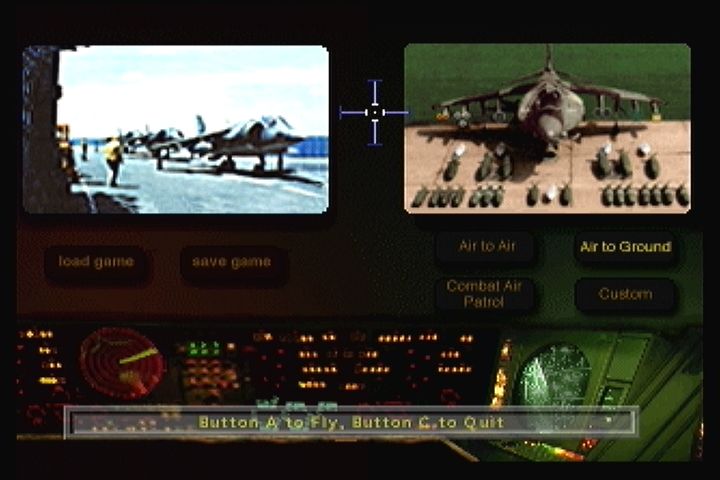
Welcome to the USS Tarawa Command Center, the nerve center for Operation Ocean Saber. You can pan the view by pushing the joystick/pad left or right to see more of the room behind the Command Console screens.
•
Briefing Screen: Click the island to receive the latest briefing from the White House.
•
Mission Screen: Displayed pictorially above Load/Save icons. In Arcade mode, choose which day and mission to fly. In Campaign mode, this shows your progress.
•
Weapons Screen: Click to load the Harrier with appropriate weapons for the mission. See the Pilot's Manual for custom loads.
•
Pilots Briefing Screen: Click to fly the displayed sortie. This also contains the pre-flight briefing.
Save and Load Games
To save, you will see a screen with 10 'Dogtags'. Your last save is automatically highlighted. To select a different Dogtag, press Button B to cancel, move the cursor using UP/DOWN on the D-Pad, and press Button A. Use Button A to enter letters for your call sign, then press Button C to save.
To load a game, click on the appropriate 'dogtag' to automatically restore the mission.
Pre-Flight Procedures
Before starting a mission, note the identity of every waypoint programmed into the NAV system. Time moves fast at low levels above 500kts, and struggling with waypoint selection can leave you vulnerable to fighters, SAMs, or AAA batteries.
The current mission is displayed on the large projected screen in the Command Center, listing primary/secondary targets, waypoints, and intelligence on anti-aircraft defenses and interception risks.
Post-Flight Debriefing
After a successful sortie, you return to the Pilots Briefing Screen for debriefing information. Clicking the screen brings up the next sortie or offers a chance to re-fly if unsuccessful.
If all objectives are completed, you receive a commendation and the campaign moves to the next phase. Check progress on the Mission Screen.
Mission Types
As an AV-8B pilot in Operation Ocean Saber, you have three mission types:
•
Close Air Support: Provides fire support for US forces. Targets may be laser designated for Maverick missiles and laser-guided bombs.
•
Waypoints: Automatically programmed by TAWADS over targets described in the briefing.

.png)
.png)
