Quick Start
Can't wait to play? Already familiar with the 3DO system? Default options OK? Then just wait for the introductory movie to begin, press X, wait a second, press A, wait another second, press A again. Good Luck on Matinicus!
Oh...wondering what's "Matinicus"? You might just want to watch that intro after all...
Setting Up
1. Check to see that your Control Pad or FlightStick is connected to the Control Port on the front of the system.
2. Turn ON the power switch of your 3DO system. The READY light indicates that the unit is on. 3. If you have a 3DO system with a disc tray, press the OPEN/CLOSE button and place your Killing Time CD on the tray with the label facing up. Press OPEN/CLOSE again to retract the tray. If your 3DO system is top-loading, open the pop-up lid, insert the Killing Time CD with the label facing up, and close the lid. You should see the 3DO logo on your screen within a few seconds. If the 3DO logo does not appear, turn the system off and repeat the process from step 1. The Main Screen
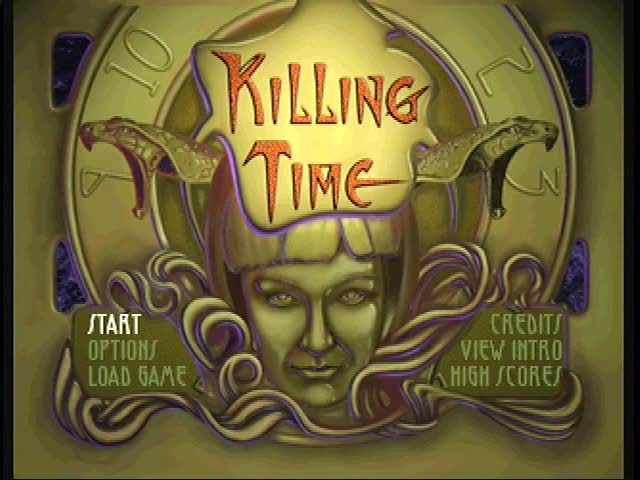
After the Studio 3DO logo appears and some brief loading time, Killing Time will begin with a movie. Sit back for a moment and learn about your fate, or-if you're feeling especially invincible-press A to get to the Main Screen. This screen offers six choices. To select any one of these choices, use the D-Pad to highlight it and press A.
•
Start: Start a new game by going to the Player's Name screen.
•
Options: Set your sound, control device, and button configuration preferences.
•
Load Game: Resume a previously saved game.
•
Credits: Find out who's responsible for Killing Time. Press A to exit, P to pause. •
View Intro: Take another look at the introductory movie. Press A to exit, P to pause.
•
High Scores: See who's survived the longest...so far. Press A to exit.
Start, Options, and Load Game are explained in greater detail later in this manual. To return to the Main Screen before making any choices on any of these 3 screens, press X.
Moving Through the Estate
Moving through the grounds and buildings of the Conway Estate is as easy as pressing the D-Pad in the direction you want to go. Because precise control can be a matter of life and death, it may help to master some of the nuances:
•
For a quick slide to the left or right (useful for getting out of the way of oncoming enemies) press the Left-Shift or Right-Shift Key at the top edge of your control pad.
•
To round corners, press the D-Pad diagonally, or use the Shift Keys in combination with D-Pad left/right.
•
Both the D-Pad and the Shift Keys can be nudged with short taps for extra-fine movement and aiming.
•
To do a quick 180-degree about-face, simultaneously press B and D-Pad Left or Right.
•
Press C to open closed doors. If the door is locked, and you don't have the right key, a colored gem will flash in the Left Status Wing (if you have the wings displayed) and a similarly colored face will appear showing you the color and pattern of the key you must find to open the door.
Looking Up and Down
While exploring the estate don't forget to enjoy the amazing architecture-press B+D-Pad to look up and down! If you release the D-Pad at any non-level position, you will continue to play Killing Time with that angle of view. This may help you defend against enemies on different elevations. To return to level, just press B at any time. Objects
As you move through the Conway Estate, you'll encounter many types of objects. Along the way, you'll have to discover exactly what all these objects are and how they may help or hurt you. Two guidelines:
•
To see if you can pick up an object, simply walk over it-if it's collectible, it will become part of your inventory.
•
Try interacting with objects by pressing C. Chances are you'll just be Killing Time, but you never know... Your Personal Inventory May Eventually Include:
•
Keys: With all the valuables they kept around the estate, the Conways were big on security. Find all the keys to unlock the mysteries of Matinicus.
•
Conway Crates: Smugglers frequented the Conway Estate in the early 1930s and shipments arrived by boat every week. If you're low on ammo, but high on health, confiscate some contraband from the “mystery boxes” spread throughout the Conway Estate.
•
Apparitions of Tess: In various areas of the Estate, you may notice ghostly appearances by your long-dead hostess, Tess Conway. Listen carefully for her calling out to you. By all means go to her-but be prepared for the unworldly! •
Ammunition: Ammunition can be found all over the Conway Estate (exactly why is part of the mystery you will solve). Dead enemies may also drop bullets and shotgun shells, so keep an eye open. Walk over ammo to fill your weapons and pockets with as much as they can hold.
Using the Map
To get a bird's eye view of your immediate surroundings while on Mat

.png)
