STARTING THE GAME
Press the START button at the Title Screen to enter the Main Menu. Press the /O button to choose an option.
GAMES
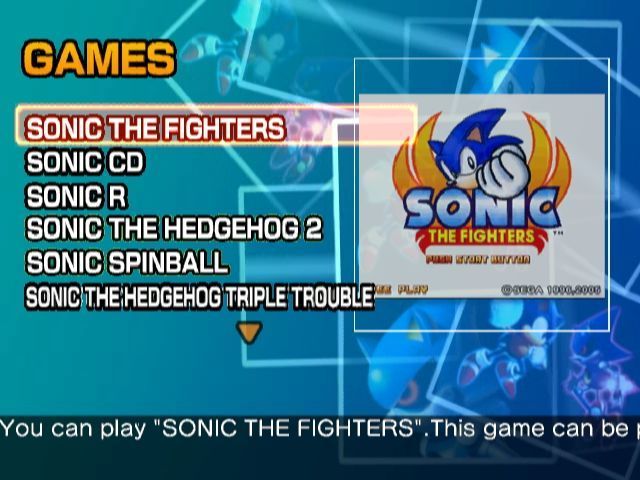
Select GAMES from the Main Menu to enter the Game Menu. Select a title of your choice and press the button to display the information screen, then start the game.
Games listed as ??? will be unlocked once you clear certain requirements.
MANUALS
Select MANUALS from the Main Menu to enter the Manual Menu. Select a title then press the / button to access the original game manual from its original platform.
Use the following controls to browse the manual:
•
1/4/-/- right analog stick (left/right)
•
PREVIOUS PAGE / NEXT PAGE
MUSEUM
Select MUSEUM from the Main Menu to access your growing collection of Sonic artwork, movies, music, and more! When a new item is unlocked, you will receive a message upon entering the Museum. To open an item, press the button. To view an illustration, use the following controls:
•
1/4/-/- right analog stick (left/right)
•
PREVIOUS ITEM / NEXT ITEM
Once you meet certain requirements, you can listen to the soundtracks of your favourite Sonic games whilst browsing the Museum. The Audio Player will become available when you unlock your first track. •
Press the R2 button to open and close the player.
•
Use / to select the track.
•
Press the button to play.
•
Press the / button to stop.
EXTRAS
Select EXTRAS from the Main Menu to enter the Extras Menu. HINTS contains a list of secret commands and other useful tips that become available based on your progress. CREDITS lists the staff that made this game possible.
PAUSE MENU
Press the R1 Button during a game to access the Pause Menu with the following options. This menu is not available for Sonic The Fighters, Sonic CD, and Sonic R. •
RESUME: Continue the current game.
•
RESET GAME: Reset the current game - start over from the Title Screen.
•
QUICK SAVE: Temporarily save current game progress.
•
QUICK LOAD: Load a temporarily saved game.
•
SAVE GAME DATA: Save the current game (up to 8 different games).
•
LOAD GAME DATA: Load a previously saved Game Data (must be Game Data of the game you are currently playing).
•
VIEW HINTS: Secret commands and other information based on your progress.
•
EXIT: Quit the current game and return to the Game Menu.
SYSTEM FILE
On loading Sonic The Fighters, the game will search for an existing Sonic The Fighters SYSTEM FILE from the inserted Memory Card (8MB) (for PlayStation®2). If you are playing for the first time, it is a good idea to create a SYSTEM FILE from the SYSTEM in the OPTIONS menu to store your settings and records of the game. Sonic The Fighters only supports MEMORY CARD slot 1. MAIN MENU (Sonic The Fighters)
Press the START button during the demo screen to enter the Title screen with the following options. To return to the demo, press the / button.
•
ARCADE MODE: Single player mode against CPU characters.
•
VS. MODE: Two-player mode between you and a friend. The second player can always enter the game in the middle of a single player game (Arcade Mode) by pressing START for a two-player (VS. Mode) match.
•
OPTIONS: Change various game settings. Also check your fight records, and save or load your SYSTEM FILE. Details on P.12 & 13.
•
RETURN: Quit the game and return to the Game Menu.
You are notified whenever you attempt to exit the game without saving the latest settings and records. Select "YES" to save (overwrite) the SYSTEM FILE before returning to the Game Menu of Sonic Gems Collection. CHARACTER SELECTION (Sonic The Fighters)
Select Arcade Mode or VS. Mode from the Main Menu and enter the Character Select screen. Move the left analog stick to select a character for the fight. The AUTOMATIC/MANUAL control option will also be decided here if you have turned on this setting from the GAME SETTINGS in the OPTIONS (P.12).
GAME DISPLAY (Sonic The Fighters)
•
TIMER: Remaining time of the current round.
•
ENERGY GAUGE: Gauge will decrease when character takes damage.
•
NAME: Name of the character.
•
MATCH COUNTER: Number of rounds you won in the current Match - one star per victory.
•
OPPONENT'S INFO: CPU's or Player 2's information.
•
BARRIER COUNTER: Number of Barriers remaining.
PAUSE MENU (Sonic The Fighters)
Press the START button during a match to pause and access the following options. Press START again to resume your current fight.
•
RETURN TO MAIN MENU: Quit the match and return to the Main Menu of this game.
•
RETURN TO CHARACTER SELECT: (Only for VS. Mode) Quit the match and return to the character selection screen.
•
COMMANDS: (for your character) List of commands for the character(s) currently played.
OPTIONS (Sonic The Fighters)
Select OPTIONS from the Main Menu to access the Options Menu detailed below. Use ▲/▼ to move the selection, and ◄/► to change the highlighted
.png)


.png)

_1.png)



_1.png)

_1.png)


_1.png)


_1.png)

_1.png)