Play Screen Composition
•
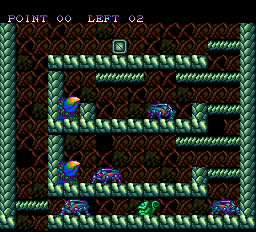
Insect-eating plant: When you shoot insects at this, it will eat them.
•
Anvil: You can bring out its tail and wrap it around.
•
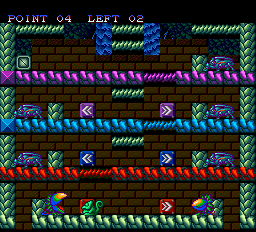
Arrow Plate: When you stand in front of this plate and hold the lever up (or down), the corresponding colored blocks will scroll in the direction of the arrow.
•
Exit: If you enter the opened exit, you will clear the 1st stage.
•
Point Display: When you let the insect-eating plants eat insects, points will be added.
•
Insect Display: Displays the insect currently held by Leon-kun.
Start
When the title screen is displayed, press the RUN button. Start or Continue will be displayed, so please use SELECT to move the cursor and confirm.
•
Start: Begins from Stage 1.
•
Continue: Moves to the password input screen.
Passwords are displayed at the beginning of each screen from Stage 2 onwards, so please memo it so you don't forget.
Items
When you let the insect-eating plants eat insects, points on the screen will increase. When a certain point is reached, an item will appear above the player's head. When the player catches this (points become 0), beneficial phenomena will appear in the game.
Rainbow Ball
Sometimes placed within the screen, it acts the same as the ball Leon-kun spits out. It will be used up after a certain number of uses, but until then it can be used freely to swallow or spit out. Also, if you let it be eaten by an insect-eating plant, points will be added.
Insect Item Effect
As long as the player is swallowing an insect, transformations will appear for the player or insects, etc. This is called "Insect Item Effect" and its effect changes depending on the insect the player is swallowing.
.png)
.png)



_1.png)

.png)

_1.png)
.png)

