Beginning a Game
1. Make sure that your Game Boy® Color system is switched off.
2. Insert the "Gold and Glory: The Road to El Dorado™" game pak into your Game Boy® system with the game label facing outward.
3. Turn the POWER switch to ON.
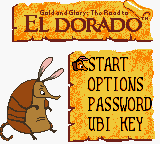
4. As soon as the main screen appears, press START.
If you want to continue a game that has already been started, select the PASSWORD menu and enter the password obtained at the end of a level.
How Do I Transfer the Ubi Key?
Once you find the key, a brief explanation is displayed on-screen.
•
Place two Game Boy® Colors a few inches apart with the infrared transmitters facing each other.
•
Press the A Button and keep it pressed to send the key.
•
The player who receives the key must have selected the UBI KEY option in the game's main menu. The player must keep the A Button pressed until the key is transferred.
•
Once the transfer is complete, the player is automatically taken to a secret level in the game.
.png)




 (En,Fr,De,Es,It,Nl).png)
