How to Start a Game
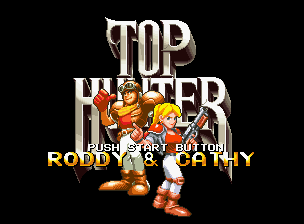
When you insert the cassette and turn on the power, the title and demo screen will be displayed. Press the controller's start button to switch to the options screen.
Game Level Settings
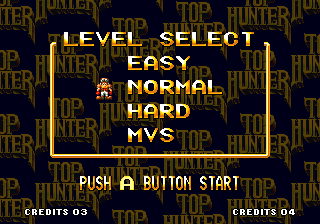
You can set and change the game difficulty in 4 stages. The initial setting is Normal. Select your desired level with the lever up/down and confirm with the A button.
After this, a gameplay demo will be displayed. If you want to skip it, press the A button.
•
Easy Mode (EASY): For beginners
•
Normal Mode (NORMAL): For intermediate players
•
Hard Mode (HARD): For advanced players
•
MVS Mode (MVS): Close to arcade version (Intermediate level between Normal and Hard)
Memory Card Load (Recall) Selection
If you are using a separately sold memory card, the "Load Selection Screen" will be displayed. Select "YES" or "NO" with the lever and confirm with the A button. You can continue playing from the next stage.
Stage Selection
Select the stage you want to play from the 4 planet stages using the lever, and confirm with the A button.
Game Start
After the demo of the selected stage is displayed, the game will finally start. You can skip the demo by pressing the A button.
Now, do your best to defeat "Force Clapton"!
2P Simultaneous Play / Mid-game Participation
If you connect two controllers and press the start button on both, two players can play simultaneously. You can also join the game mid-way in the same manner.
Please connect a separately sold controller to the main unit.
Continue
When you run out of remaining players, a continue count will be displayed. You can continue by pressing the start button before the count reaches "0".
Both 1P and 2P can continue up to 3 times. Exceeding that will result in a game over.
Player Controls
A Button
Mainly used for attacks (punch, throw, pick up dropped enemy guns, shoot guns, etc.).
Application Technique
If you press and hold the A button, your arm will extend. For 2P (Cassie), the chainsaw will extend.
Catch and Throw Enemies
If you extend your arm and catch an approaching enemy, it will automatically lift. Press the A button again to throw it.
Pull Straps and Levers
Extend your arm and pull the straps and levers in each area. Various items will fall, and mechanisms will move.
Precautions for Use
About Memory Card Backup
This game allows you to easily back up your progress data using a separately sold "memory card." Insert the memory card securely into the memory card slot of the Neo Geo console and perform game save/load operations.
Load (Data Retrieval) Method
If the memory card is correctly set, the "Load Selection Screen" will be displayed before the game starts. Select "YES" with the lever and press the A button to continue playing from your previous save.
Save (Data Recording) Method
If the memory card is correctly set, the "Save Selection Screen" will be displayed after the game is over. Select "YES" with the lever and press the A button to record your progress data up to that point.
Some software may automatically save during the game. Normally, multiple saves for the same game are not possible. If data for the same game is saved on the memory card, the previous data will be automatically deleted, so please be careful.
About Card Formatting (Initialization)
New memory cards are not formatted (initialized). Please be sure to format them according to the following procedure before use.
•
Correctly set your Neo Geo cassette and memory card in the Neo Geo console.
•
While pressing the A~D buttons on the 1P controller simultaneously, press the reset button on the Neo Geo console.
•
When the "Data Screen" is displayed on the TV, select "Card Format" with the lever.
•
Press the A button to complete the format.


_1.png)
_1.jpg)
.png)
