System Setup
Set up your PlayStation®2 computer entertainment system according to the provided instructions. Ensure the system is turned on (on/standby indicator is green).
Insert the Fire Pro Wrestling Returns disc with the label side facing up. Attach game controllers and other peripherals as needed. Follow on-screen instructions and refer to this manual for software information. Multitap Usage (for PlayStation®2)
Fire Pro Wrestling Returns supports up to 8 players using the multitap (for PlayStation®2), sold separately. Connect the multitap to controller port 1 or controller port 2, then connect controllers to ports A through D. Players and Equipment Needed
•
1-2 players: 2 Controllers
•
3-5 players: 3-5 Controllers and multitap (for PlayStation®2) x 1
•
6-8 players: 6-8 Controllers and multitap (for PlayStation®2) x 2
There are two types of multitap (for PlayStation®2): SCPH-10090 U and SCPH-70120 U. Check your PlayStation®2 system to purchase the correct multitap.
When connecting one or two multitaps, connect the multitap to controller port 1 or connect a controller to controller port A before connecting more controllers. Do not connect unsupported products.
Starting a Game
Press the START button at the Title Screen.
Main Menu Screen
•
GAME MODES: Compete in various match modes.
•
EDIT: Edit wrestlers, referees, organizations, teams, belts, etc.
•
OPTIONS: Set gameplay settings.
•
DATA: Save/Load game data or copy data.
Game Modes
•
EXHIBITION: Single match against a CPU opponent or human players.
•
TOURNAMENT: Single-elimination matches arranged in a conventional ladder-style format.
•
LEAGUE: Set up a league and compete.
•
TEAM MATCH: Each team consists of 5 wrestlers competing as a team.
•
BATTLE ROYAL: Free-for-all with each wrestler trying to be the last man standing.
•
TITLE MATCH: Match competing for a champion belt.
•
MATCH MAKER: Become a promoter and try to produce a profit.
Game data can be saved on a memory card (8MB) (for PlayStation®2). A minimum of 917KB free space is required.
Match Settings
Match settings must be decided before a match can start. Use the up and down directional buttons to highlight selections and the Left and Right directional buttons to change selections. You can also use the button to open a menu and make changes.
Match Setting options vary depending on the game mode chosen. Press the START button to exit match settings and proceed to the wrestler select screen.
Settings
You can save up to 4 match settings.
•
Blue/Red Corner: Decide the player entry. From 1 versus 1 and up to 4 versus 4 in a tag match.
•
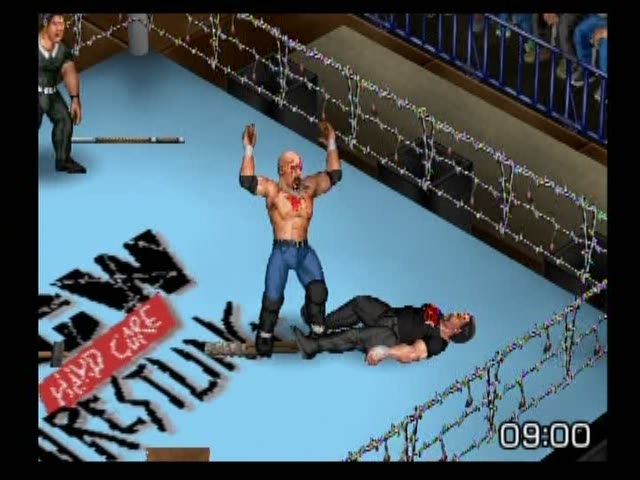
Rule: Decide the victory condition: 3 count, 2 count, Fall Only, Give Up, and Escape in Cage Deathmatch. Wrestlers can be eliminated by being thrown over the top rope.
•
Time: Decide match duration: 3, 5, 10, 15, 20, 30, 45, 60 minutes, or unlimited.
•
Matches: Set match numbers to play: 1 match or best of 3.
•
Ring: Select a ring for the match.
•
Venue: Select the venue where the match will be held.
•
COM Skill: Set CPU skill level (1 Lowest ~ 10 Highest).
•
Speed: Set match speed from 100% ~ 800%.
•
COM Skip: Set ON/OFF to skip a match between CPU wrestlers.
•
Referee: Select a referee for the match.
•
Rope: Pins and submission holds are broken if a wrestler is touching the rope.
•
Elimination: Match continues until all the wrestlers from one team are eliminated in a multi-wrestler match.
•
Lumber: Wrestlers automatically return to the ring after being thrown out or exiting the ring.
•
Tornado: All participating wrestlers in a tag match are allowed in the ring at the same time.
•
Cut Play: During a tag match, teammates are allowed to interfere if a wrestler is in danger of being pinned or under a submission hold.
•
DQ Count: The referee counts to 5 for an illegal act, and the wrestler is disqualified if the act is still present at count 5.
•
Outside: The referee counts to 20 when a wrestler is outside the ring.
•
BGM: Select the background music for the match.
•
Critical: Select the frequency rate for Critical Hits.
About Player Entry
On the Match Settings screen, move the cursor to the Blue or Red Corner and press the button.
When the cursor is on "Wrestler", press the button to open the menu window. Select "Wrestler" or "Second". Second cannot be selected as the first wrestler.
When the cursor is on "1P", press the button to open the menu window. Select the number of players that will participate in the match. Press the down directional button to increase the number of participants.
Select the participating players and "Wrestler" or "Second" for the additional participants. To finish, press the left directional button, then press the button on "Confirm.”
.png)


.png)


.png)

.png)
.png)


.png)


_1.png)


.png)


_1.jpg)






.png)
_1.jpg)
 (En,Ja).png)

.png)