Starting Up: How to Use Your Sega Saturn System
This CD-ROM can only be used with the Saturn System. Do not attempt to play this CD-ROM on any other CD player--doing so may damage the headphones and speakers. 1. Set up your Sega Saturn system by following the instructions in your Sega Saturn System Instruction Manual. Plug in Control Pad 1. 2. Place the Sega Saturn CD-ROM, label side up, in the well of the CD tray and close the lid. 3. Press the Power Button to load the game. The game starts after the Sega Saturn logo screen. If nothing appears, turn the system OFF and make sure it is set up correctly. 4. If you wish to stop a game in progress or the game ends and you want to restart, press the Reset Button on the Sega Saturn console to return to the Game's Title Screen. If you wish to return to the Control Panel, press Buttons A, B, C and Start simultaneously at any time. 5. If you turn on the power without inserting a CD, the Audio CD Control Panel appears. If you wish to play a game, place the Sega Saturn CD in the unit, press the D-Button to move the cursor to the top left button on the Control Panel, and press Start. The opening screens of a Game will appear. Important: Your Sega Saturn CD-ROM contains a security code that allows the disc to be read. Be sure to keep the disc clean and handle it carefully. If your Sega Saturn system has trouble reading the disc, remove the disc and wipe it carefully, starting from the center of the disc and wiping straight out towards the edge. ① Sega Saturn System
② Control Pad 1
The Starting Line
A screen demo and list of top times follow the Sega logo. Press Start at any time to bring up the Title screen, then press again to bring up the Game Menu. Press the D-Button UP or DOWN to select the desired feature, then press Start. •
Arcade: Play the Daytona USA game straight from the arcade! Choose one of three courses and one of two cars. A Time Lap mode is available. For details on Arcade mode, see page 10.
•
Saturn: Play the special Saturn version with extra options. Choose one of three courses and one of four cars. A Time Lap mode is available. For details on Saturn mode, see page 11. •
Ranking: See the top times for each mode, course and type of transmission. See page 15 for details.
•
Options: Use this mode to change game parameters.
Viewing Your Options
In the Options screen, press the D-Button UP or DOWN to choose an option, and LEFT or RIGHT to alter features within the option.
•
Game Mode: Alter the number of laps of each race, depending on the length of the course chosen.
*Mode: Beginner*
*Mode: Advanced*
*Mode: Expert*
Arcade Mode
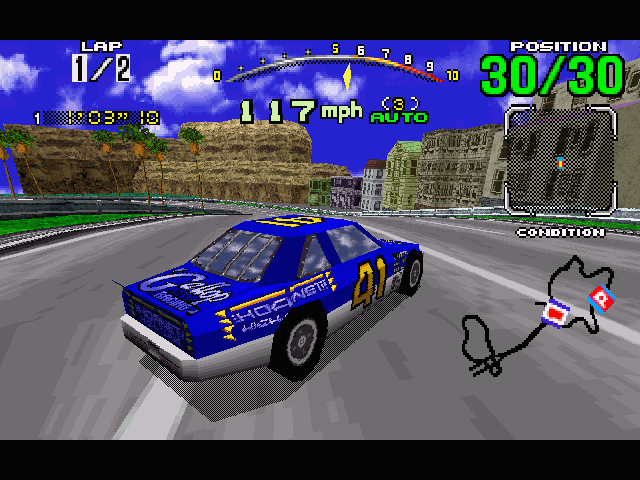
In Arcade mode, you race both against your rivals and against the clock. You start the race with an allotted number of seconds on the timer, and receive extra time (the amount depending on the race and course chosen) each time you pass beneath a Checkpoint. If your time runs out before you pass beneath a Checkpoint of the Start/Finish line, the game ends.
Once you select Arcade mode, it's time to pick a course and a transmission. Highlight selections by pressing the D-Button LEFT or RIGHT, then press Button A or C to enter the selection. Button B cancels selections and sends you to the previous screen. You have a limited amount of time to make each selection. If the timer runs out, the highlighted item will be chosen.
The Course Select screen appears first, and shows the length and difficulty of each course, and the number of laps you'll race. The Mission Select screen follows. While the 4-speed Manual transmission offers a higher top speed, the Automatic allows you to focus your full attention on the course and the drivers around you.
The Finish Line
The game ends when you complete a race, or when you run out of time. The Game Over screen appears with your position, total time and fastest lap time displayed. If you made a track record, the Name Entry screen appears next. (For details, see "Entering Your Initials" on page 14.)
Saturn Mode
The new Saturn Mode eliminates the countdown timer, gives you a wider selection of cars to choose from and offers a special Mirror Mode for each course. First, pick a course and a transmission. As in Arcade mode, highlight selections by pressing the D-Button LEFT or RIGHT, then press Button A or C to enter the selection. Button B cancels selections and sends you to the previous screen. You have a limited amount of time to make each selection. If the timer runs out, the highlighted item will be chosen.
The Course Select screen appears first, and shows the length and difficulty of each course, and the number of laps you'll race. The Mission Select screen follows. Press LEFT or RIGHT to cycle through the available cars, and press Button C to choose.
**Mirror Mode
.png)

.png)
.png)
.png)
.png)

.png)
.png)
.png)
.png)
.png)
.png)
.png)