Getting Started
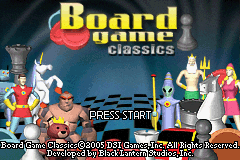
Switch the Nintendo® Game Boy® Advance system OFF. Never insert or remove a Game Pak while the system is ON. Insert the Board Games Classic™ Game Pak into the slot, pressing firmly to ensure it is correctly inserted. Switch the Game Boy® Advance ON; the title screen should appear. If it does not, return to step 1. Press START to enter the Main Menu.
Main Menu Options
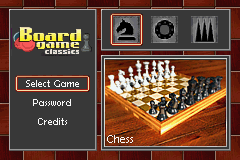
From the Select Game menu, choose whether to play Chess, Checkers, or Backgammon. You can also access the Password screen to resume play with unlocked items, and view the Credits for the team members.
Game Select Options
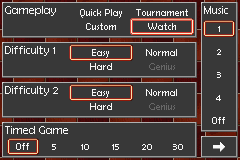
Customize your game by choosing from four modes available in all games: Quick Play, Custom, Watch, and Tournament.
•
Quick Play: Skips avatar, piece set, and board selection, going straight into the game.
•
Custom: Allows you to set further options such as choosing your avatar, board, and variant rules.
•
Watch: Sets up a game where the computer plays itself while you watch and learn.
•
Tournament: Features a series of matches against five opponents with increasing difficulty. Beating this mode on different difficulties unlocks special bonuses.
Additional options include choosing a human or computer opponent (Quick Play/Custom only), setting difficulty levels, and configuring music tracks. The music can be changed during the game via the Pause menu.
Game Modes and Settings
For Checkers and Chess, you can enable Timed Games, giving players limited time (5, 10, 15, 20, or 30 minutes) to make moves. If a timer reaches zero, that player automatically loses. In Backgammon, Timed Games are replaced by Scored Games, where players battle for points (3, 5, 10, 25, or 50) or play scoreless.
Character and Board Select
This screen lets you choose a character, which determines the piece set used. In multiplayer, the first player selects followed by the second. Selecting Quick Play skips this step, as does Tournament mode, where boards are selected for you. Each set has light and dark versions with different avatars, which have no direct effect on gameplay.
Piece Sets
•
Traditional: Everyday classic chess and checker pieces.
•
Toys: Teddy bear king, doll queen, and other toys for chess; Frisbees for checkers.
•
Science Fiction: Boy and girl in bubblehead spacesuits, aliens, and robots for chess; UFOs for checkers.
•
Fantasy: Boy king guarded by queen and dragon; mythical creatures and shields for checkers.
•
Atlantis: Merman king and mermaid queen; undersea creatures for chess; oysters for checkers.
The Fantasy and Atlantis sets must be unlocked by winning Tournament mode on Easy and Normal settings.
Variant and Other Rules
Variant rules allow you to change how each game is played, alongside general options for lighting and animation.
•
Checkers: You can turn off forced jumps, where you must take an opponent's piece if possible.
•
Chess: You can turn off castling and en passant. You can also toggle battle animations.
•
Backgammon: Options control the point value of a 'backgammon' (double for European, triple for North American rules) and Automatic Doubles.
Chess Basics
Chess is a battle where each player controls a king, queen, bishops, knights, rooks, and pawns. The goal is to checkmate the opponent's king, placing it in check with no legal moves to escape or block the attack.
Moving Pieces
•
Select: Move cursor over a piece and press A.
•
Place: Move cursor over a spot and press A.
•
Cancel: Press B to cancel a move.
Legal moves are indicated by arrows when a piece is selected. Piece portraits appear on the right to help identify themed pieces.
Backgammon Rules
•
Doubles: Rolling the same number on both dice (colored gold) grants twice as many moves as the number rolled.
•
Moving off the Bar: If a piece is hit, it goes to the bar. It can only re-enter using a roll that lands in the home area. All pieces must be moved off the bar before other actions can be taken.
•
Bearing Off: When all pieces are in the final quadrant and none are on the bar, you can remove them. You must use rolls to their full advantage; if a piece can be borne off directly, it must be used if no other piece can utilize a larger part of the roll.
Scored Games and Doubling
In Scored Games, players earn points for clearing pieces off the board until a pre-determined score is reached. The doubling cube indicates the game's point value.
•
Offering: Press R to offer the cube before rolling. If accepted, the receiver owns it and the game value doubles. If refused, the offerer wins points equal to the previous value.
•
Values: The cube sides show 2

 (En,Fr,De,Es,It).png)
.png)

.png)
 (Rev 1).png)
 (Rev 2).png)
_1.png)
 (Rev 1).png)




