Starting the Game
Turn the power switch OFF on your Nintendo Game Boy® Advance. Never insert or remove a Game Pak when the power is on.
Insert the “Dexter's Laboratory™ Deesaster Strikes” Game Pak into the slot on the Game Boy® Advance. Press firmly to lock the Game Pak into place.
Turn the power switch ON. The Nintendo logo should appear. If you don't see it, begin again at step 1.
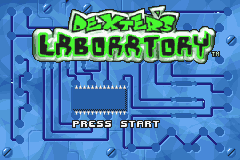
When the title screen appears, press START to begin the game.
Precautions
Always turn the power OFF before inserting or removing the Game Pak from the Game Boy® Advance.
Do not take apart, crush, bend or submerge the Game Pak.
Store the Game Pak at room temperature, avoiding extreme hot or cold conditions.
Keep the connectors clean and dry, and store the Game Pak in the case when not in use.
Take a break after playing for long periods of time.
Options and Settings
Load Game:
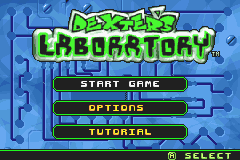
You can save up to four different games. Select this option to load a game you have already saved.
MUSIC: Turn the in-game music On or Off.
SOUND FX: Turn the in-game sound effects On or Off.
START TRIES: Select the number of 'tries' you have at the Start of the game (3, 4, or 5).
BRIGHTNESS: Increase or decrease the brightness of your Game Boy® Advance screen.
BUTTON CONFIGURATION: Select your preferred Control Method.
CREDITS: View the credits.
RESTORE DEFAULTS: Resets all Options settings to default.
TUTORIAL: Play a 'training' Level of 'Deesaster Strikes' to get used to the controls, learn how to jump, capture Dee Dees, fix machines, etc.
NOTE: On the OPTIONS screen, press the A BUTTON to Accept/Change an option. Press the B BUTTON to go back to the Main Menu.
Playing the Game
Your goal is to progress through Dexter's Laboratory catching the mini Dee Dees, fixing machines and defeating enemies. To progress through the lab you will need to operate machines that activate bridges, disable force fields and open up pathways.
You will also need to repair broken machines with assorted tools. Broken machines are easy to spot: they give off sparks! To catch the mini Dee Dees, you need to operate the Grabber Arm. Dee Dee will run away as soon as you try to catch her, so move fast.
To repair the machines you will need to find the tools that the little Dee Dees have hidden all over the lab. Standing close to a broken machine will display an icon of the tool required to fix that machine.
To find the tools, you will have to fight your way through waves of aggressive robots, carnivorous plants and strange aliens, or look inside barrels.
To defeat the enemies, you will need to jump on them, punch them, kick them or shoot them. See 'Moves' on page 13.
Your ultimate goal is to capture all the little Dee Dees scattered all around the lab.
Collecting Little Dee Dees
When you spot one, perform the following steps:
•
Select the Grabber Arm in your inventory.
•
Press the B BUTTON to activate the Grabber Arm.
•
Use the Control Pad to move the Grabber Arm around. (Note: When you are using the Grabber Arm, you cannot move Dexter until you release the B BUTTON.)
•
When the Grabber Arm comes close enough to the little Dee Dee, it will grab her automatically.
Caution: If Dexter is hurt or attacked while carrying a Dee Dee, he will drop her and he will need to grab her again!
Dexter cannot fix a machine when carrying a Dee Dee. To drop the Dee Dee, press the B BUTTON.
After Dexter has grabbed a little Dee Dee, he needs to find a Suction Tube. Suction Tubes are connected to the Holding Tank in the Hub where they will stay until Dexter has found all her clones.
Place Dexter under a Suction Tube and press the B BUTTON. This will release the little Dee Dee and she will be whisked to the Holding Tank! Congratulations . . . only a few more to go!
Fixing Machines
Dexter will need to fix broken machines that will restore power to the “Re-combinator”.
Broken machines are easy to spot: they give off sparks!
When Dexter is close enough to a broken machine, a little icon representing the tool(s) required to fix it will appear.
If the tools are not present in the inventory, Dexter needs to look for them.
If those tools are present in the Inventory, Dexter can fix the machine. Simply select the tool(s) required in the Inventory with the L BUTTON and press the B BUTTON. Dexter will then use that tool on the machine.
A progress bar is displayed to show Dexter's progress. The machine is completely fixed when the progress bar has reached 100%. If Dexter is interrupted during his task, he will need to start all over again.
Collecting Tools
To fix the broken machines, Dexter will need to find the tools that the little Dee Dees have hidden. You will find the tools on the floor or inside certain barrels (jump on the barrels to break them open) or inside certain enemies (after they have been destroyed, they will leave the tool behind them).
To pick up a tool, just move Dexter over the tool and he will pick it up automatically.
The tools collected by Dexter can be viewed in the Inventory Screen, or in the Status Bar (use the L BUTTON to scroll through the Inventory).
The Teleporters
To move around




 (En,Fr,De,Es,It).png)
 (En,Fr,De,Es,It) (Rev 1).png)
 (En,Fr,De,Es,It).png)
