Getting Started
Turn OFF the POWER switch on your Nintendo Game Boy Advance system. Never insert or remove a Game Pak when the power is ON.
Insert the DUEL MASTERS: Kaijudo Showdown Game Pak into the slot on the Game Boy Advance. Press firmly to lock the Game Pak in place.
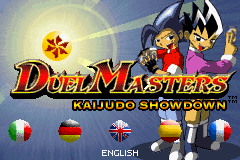
Turn ON the power switch. The main Start-up Screen will appear (if not, begin again at step 1).
Press START to proceed to the Main Menu. Use the +Control Pad to highlight New Game, Continue, Credits or Duel Room and press the A Button to confirm.
Select New Game to begin a new game. Select Continue to continue a saved game. Select Credits to view the game credits.
Note: You must unlock Duel Room before you can select this option.
Saving and Loading
You can save one game on your DUEL MASTERS: Kaijudo Showdown Game Pak. Start a new game by selecting New Game from the Main Menu.
To save your progress, press START to open your Pocket Gizmo, press the +Control Pad ▲▼ to select Save/Quit and press the A Button. Choose Save and Continue to save your game and keep playing or choose Save and Quit to save and return to the Main Menu.
To load your current game, select Continue from the Main Menu.
Welcome to Duel Masters: Kaijudo Showdown
You are a rising star in the DUEL MASTERS tournament circuit. All is well - fans adore you, magazines write about you, and celebrities are impressed with your style - or is it?
Can you duel your way to the top and solve the mystery of the missing artifacts before it's too late?
Main Menu
Press START at the Start-up Screen to display the Main Menu. Use the +Control Pad to highlight an option and press the A Button to confirm.
•
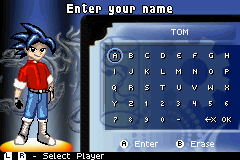
New Game: Begin a new game. Use the +Control Pad to highlight a letter and press the A Button to add it to your name. Press the B Button to erase a letter. Press the L Button or the R Button to change the appearance of your character. Press START to begin your adventure. Warning! Starting a new game will overwrite your previously saved game.
•
Continue: Continue a saved game.
•
Credits: View the game credits.
•
Duel Room: Duel a variety of opponents using any of the 300 cards in the game.
Pocket Gizmo
At the beginning of this adventure, you will receive your very own Pocket Gizmo. This device is actually a small personal computer you can use to communicate with other characters in the game and prepare for the many DUEL MASTERS challenges you will face in the game.
You can display your Pocket Gizmo at any time while playing by pressing START. Then, press the +Control Pad ▲ ▼ to highlight an option and press the A Button to select that option. Press the B Button to return to the previous screen.
The Pocket Gizmo Menu contains the following options:
•
Stats: View your current card count, number of shop tournament passes, win/loss record, time played, and the number of special items that you have collected.
•
Deck Management: View your card collection and customize your deck.
•
Cool Stuff: Access your Gizmo mail, read G-books, view articles on the Duelist Weekly Giz-site and play special DUEL MASTERS mini-games.
•
Link: Link with another Game Boy Advance for head-to-head dueling and trading with a friend.
•
Options: Change game options.
•
Save: Save your current progress.
Cool Stuff
The Cool Stuff section of your Pocket Gizmo contains strategy articles, Gizmo mail communications, DUEL MASTERS mini-games, and more.
Press START to access to your Pocket Gizmo. Press the +Control Pad to highlight Cool Stuff and then press the A Button. Press the B Button to exit Cool Stuff.
•
Gizmo Mail: Certain characters in the game will send you messages to keep informed about what's happening. To read a Gizmo mail, select it using the +Control Pad and then press the A Button to read it. Press the A Button to advance through the message. Press the B Button to stop reading.
•
G-books: Here you'll find advanced rules, civilization information and strategy articles. Use the +Control Pad to select a category and press the A Button to display the articles in that category. Select an article and press the A Button to read it. Press the B Button to return to the previous menu.
•
Giz-site: Select Giz-site to visit the Duelist Weekly Giz-site and read strategy articles. You will unlock more strategy articles as you advance through the game. Press the A Button to read an article. Press the B Button to return to the previous menu.
•
DUEL MASTERS Games: As you progress through your adventure, you will unlock a total of five DUEL MASTERS mini-games. To play a game on your Gizmo, select it using the +Control Pad and then press the A Button. Rules for the game will appear onscreen. The games can also be found in the card shops in each of the outlying towns that you visit.
Options
Press START while dueling or select Options from the Pocket Gizmo to change your game options. Press the +Control Pad to highlight and change options. Press the A Button to Save or the B Button to Cancel.
•
Text Speed: Sets the speed at which text scrolls.
•
AI Speed: Sets the speed at



 (En,Fr,De,Es,It).png)
.png)

.png)
 (Rev 1).png)
 (Rev 2).png)
_1.png)
 (Rev 1).png)




