PLAYING THROUGH THE GAME
The Empire of Dreams has 5 Worlds, and each World has 8 Visions. Klooanoo must use various skills to clear each Vision.
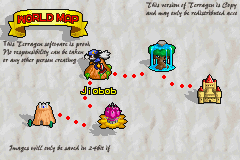
WORLD MAP
Start here by selecting the World you want to play in. You can select any World that has already been cleared. In New Games, only the first World is available. Other Worlds open up as you clear previous Worlds.
You clear a World by defeating its Boss. Even if all the Visions in that World have not been cleared, you can progress to the next World once you've overcome the Boss. You can return to the World as many times as you want in order to clear all the Visions.
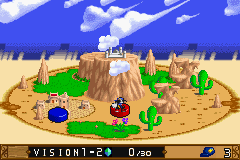
VISION SELECT
Before each Vision, a Mission Screen tells you what you must accomplish. As you clear each Vision, more Visions open up for you to try. You can replay cleared Visions without limit.
•
Collect all the ✿ and head towards the exit.
•
Stand before a sign and press ▲ on the Control Pad.
PUZZLE STAGES
The goal for Puzzle Stages is to clear different challenging puzzles using items found in the Stage. For each Stage, you must collect 3 Stars to open the Moon Door.
ACTION STAGES
Test Klonoa's powers in two types of Action Stages. In Hover Board Stages, you'll glide on a self-propelled hover board. In Athletic Challenge Stages, you make progress by overcoming obstacles. Clear both types of Stages by reaching the goal.
BOSS STAGES
These Stages consist solely of battling the Boss characters. Shoot at a Boss's weak point with enemies you capture. Clear these Stages by draining the Boss' Life Meter at the top of the screen.
•
Keep an eye on Klonoa's Life Meter.
•
If it drains first, you'll have to try again.
PAUSE MENU
Press START during the game to pause and display the Pause Menu. Select a menu item with the + Control Pad and press the A Button to confirm your selection.
•
CONTINUE GAME - Resume the game. (You can also press START or the B Button to resume.)
•
RETRY - Restart the game from the beginning of the area you are currently playing.
•
SELECT VISION - Return to the Vision Select Screen.
•
BUTTON CONFIGURATION - Reassign the button controls by pressing the + Control Pad ◄ or ► to choose Type 1 or Type 2. Press the A Button to confirm your choice.
CONTINUE SCREEN
The Continue Screen appears when Klonoa loses all of his Remaining Lives.
•
Highlight CONTINUE and press START or the A Button to continue the game from the beginning of the Vision.
•
Select QUIT to end the game.
WHAT IF YOU CAN'T PROCEED?
Sometimes a mistake you make in solving a puzzle will prevent you from going any farther. If that occurs, select RETRY in the Pause Menu. Retrying does not reduce the number of Remaining Lives you have.

.png)
.png)
