MAIN MENU
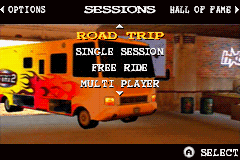
Press START to go to the Main menu from the title screen. Then use the Control Pad to make a selection, and the A Button to confirm your choice.
Select Training to learn the skills needed to become a high scoring BMX pro.
Select the 1P Games option to start a new career, load or continue a previous career or play one of the bonus games.
Select 2P Games to play Mat Hoffman's Pro BMX with a friend.
Select Options to change the music and sound effects volume and save your current game or reload an earlier saved game.
TRAINING
After selecting a rider, choose from a series of tutorial style challenges using the ◄ or ► and the A Button. These teach you everything you need to know from basic controls to advanced scoring techniques.
Just follow the instructions given and complete each challenge to learn all the skills you'll need to reach the CFB Pro Biker Tournament.
1 PLAYER GAMES
Use the Control Pad and A Button to select from the available single player games.
•
Career mode is the main part of the game where you must fulfill objectives to earn covers and medals that allow you to access locked career locations.
•
Tournament mode allows you to continue your professional BMX career in the medals circuit. Set in each of the Career mode locations, it is a series of progressively harder competitions in which you must compete for medals against seven of the greatest Pro BMX riders around. Later stages are unlocked as you win more medals.
•
Free Ride lets you ride around an unlocked level with no time limit. Practice your tricks, scoring lines and get the feel of each location's layout so you can perfect your scoring technique and get to hard to reach places in Career mode.
•
Time Trial lets you compete in a cross country dirt track race against the clock. Try to cross the finish line within the time limit by doing tricks along the way to add precious seconds to your timer; better tricks award more time.
Scoring and Judging
Try to impress the judges by mixing up your tricks and building up your Back to Back score multiplier to amass a large score. The judges will also be looking at how much of the level you are using, so try not to stay in one place.
Finally, the judges will penalize you for bailing; you may get away with falling once but repeated bails will knock a lot of points off your final score.
2 PLAYER GAMES
To play a two-player game, you'll need two Game Boy® Advance systems, two copies of Mat Hoffman's Pro BMX GBA, and a Game Boy® Advance Game Link® Cable.
When the player with the 1P Game Link® cable connection selects a two-player game, that option will automatically be selected for the other player. Each player then chooses a rider and the first player chooses the location.
•
Versus: Play a score-based competition with a friend. Whoever gets the highest score wins!
•
Bomb: Play a game of tag. One player starts with the bomb and it will be swapped to the other player if you get close to your opponent.
•
Star Hunt: Play a treasure hunt game where the winner is the first player to collect 16 stars or the player who has the most stars when the time runs out.
•
Tug-O-War: Play a tricks contest with another player. Whoever pulls off the biggest tricks in the quickest time wins. Each trick that you successfully land will move the indicator on the Tug-O-War bar closer to your side. The indicator will also show 1P or 2P and change color depending on who's winning-if it's green then you're in the lead but if it is tinted red you are losing.
OPTIONS MENU
Use the Control Pad to move between the options, A Button to accept your changes and B Button to cancel.
•
Music: Move the bar right/left to change music volume.
•
SFX: Move the bar left/right to change sound effects volume.
•
Save: Save your current game.
•
Load: Load a previously saved game.
SELECT RIDER
Choose the rider you want from the strip of portraits at the bottom of the screen by pressing ◄ or ► on the Control Pad. You can also change your chosen rider's clothing with ▲ and his bike color with ▼. Press the A Button to confirm your choice.
The four colored bars in the screen show:
•
Accel: The rider's acceleration.
•
Air: The maximum height the rider can jump from a vert ramp.
•
Landing: The rider's skill with landing after performing airborne tricks.
•
Fakie: The rider's skill with landing after performing Fakies.
STARTING OR CONTINUING A CAREER
Choose Career to begin or resume your career game and start accumulating covers to unlock later levels. When you select Career you will be presented with the following options:
•
Continue: Select this to start your saved career.
•
New: Select this to begin a new career.
•
Load: To restore a previously saved career select this option. This is useful if you accidentally selected New instead of Continue.
Important Note: Whenever you save your career status, you save data for all the riders in the game. You do not need to start a new career in order to use a different rider. Only start a New Career if you want to reset all the data in the game or if you are playing for the first time.
**C


_2.png)
 (Fr,De).png)
.png)


 (En,Fr,De).png)



.png)


.png)


