In this action-adventure game, players control
Peter Pan as he escorts Wendy's children to Never Land and must rescue their captured friends and Tinker Bell from the villainous Captain Hook. The gameplay involves exploring London and the island while overcoming obstacles and battling pirates. Without Tinker Bell's magic, players must find special items to restore Peter's powers and save the day.
Hook's Evil Plan
Peter returns to London to visit his friend, Wendy, and her children, Jane and Danny. He winds up taking the children back to Never Land for a visit of their own.
However, evil Captain Hook kidnaps Tinker Bell when they arrive. The Lost Boys are missing too, and Peter risks losing Jane and Danny if he isn't careful. Without Tinker Bell, Peter loses his magical powers, making even simple tricks like flying difficult.
Gameplay Overview
You'll control Peter Pan as he explores London and Never Land. You must help him defeat Hook and free Tink, Jane, Danny, and the Lost Boys held captive throughout the island. You may even find yourself battling pirates on the dreaded ship Jolly Roger. There are lots of places to explore and plenty of obstacles to overcome. You will discover special items to help Peter in his adventure, though getting through Never Land is trickier than it looks. Always keep an eye out for Captain Hook's pirate crew, as you never know where they are hiding.
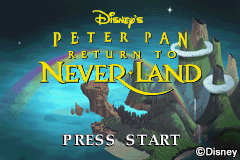
THE TITLE SCREEN
After the legal information, you'll see a picture of Never Land. Press START to open the Main Menu.
THE MAIN MENU
Use Control Pad Up and Down to highlight New Game, Continue Game, or Options, and press A Button or START to select.
•
New Game: Starts a new game.
•
Continue Game: Select this to begin where you left off by entering a password. Use the Control Pad to highlight letters and the A Button to select. Passwords are given whenever you complete the levels in a particular location (London, Mermaid Lagoon, etc.).
•
Options: Change various game settings.
Options Menu
You change several game settings from this menu. Use Control Pad Up and Down to select an option to adjust. When you have finished, press the B Button to return to the Main Menu.
•
MUSIC: Set the background music volume from Off to 100%.
•
SOUND EFFECTS: Set the sound effects volume from Off to 100%.
•
DIFFICULTY: Toggle between Normal or Hard.
•
CONTINUES: Choose between 3 or 5. More continues will give you more chances to complete a level.


_2.png)
 (En,Fr,De,Es,It,Nl).png)
 (En,Fr,De,Es,It).png)
.png)
