Menu Controls
•
CONTROL PAD: Cycle through Options
•
B BUTTON: Back to previous screen
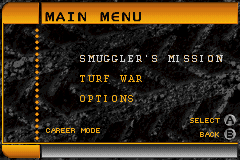
Main Menu Screen
Use the CONTROL PAD UP and DOWN to select one of the following options:
Press the A BUTTON to enter the selected option or the B BUTTON to go back to the previous screen.
Smuggler's Run™ Missions
Compete to become a top dog in the very dangerous, dark, and illicit world of international smuggling in a series of missions.
Turf War
This mode offers instant action; just jump right in and do battle. You can choose to play as a gang member and drive any vehicle in any of the three environments.
Messages will appear onscreen informing you of key events, such as successfully passing a checkpoint, snagging contraband, having it stolen, or snatching the loot back from the thief.
Vehicle Stats and Unlocks
Some vehicles are unavailable until you advance through the game and must be unlocked with a Pass Code. Pass Codes are supplied when you complete races.
Vehicle stats include:
Press the CONTROL PAD down to change the vehicle color.
Pause Menu
At any time during the game, you may press START to bring up the Pause Menu. Use the CONTROL PAD UP and DOWN to highlight the options and press the A BUTTON to select them.
The Pause Menu offers three options:
•
Restart Race: Restart Mission and return to the start of the current mission
•
Exit: Exits the game back to the menu screen
Playing the Turf War
Press the A BUTTON when 'TurfWar' is selected on the Main Menu Screen. The TurfWar Menu Screen will appear. On this screen, press the A BUTTON to start your career or the B BUTTON to return to the previous menu.
In the Turf War, you must collect contraband and deliver it to your collection point before your opponents do. Opponents can hit you and steal your contraband, but you can do the same to them. Whoever collects the most contraband at the end of the timer is the winning team.
Hint
When driving, hitting trees, objects, and other cars both slows you down and causes damage.


 (En,Fr,De,Es,It).png)
 (En,Fr,De,Es,It).png)
 (En,Fr,De,Es,It).png)
