Getting Started
Firmly insert the Game Pak into the Game Boy Advance, turn the power ON, and the Title Screen will be displayed. Use the D-Pad to highlight "NEW GAME" or "CONTINUE," then press the A Button to make your selection.
New Game
Selecting "NEW GAME" allows you to play from the beginning. Watch the story unveil as you control Yoh Asakura. Advance from stage to stage and strengthen your party by collecting spirits. Continue
If you have created a save game data file, selecting "CONTINUE" will allow you to start off from the Save Altar where you last saved your game.
Save Game Data and Status Recovery
Saving game data and status recovery can be done at the Flame Inn, found on the World Map. Only one save game data file can be created per user.
How to Play
Play as the story's protagonist, Yoh Asakura, and use spirits to battle various enemies. After winning a battle, use special items to obtain the defeated enemy's spirit. Build the strongest party possible by gathering a wide variety of spirits! Field Screen
Move your character and talk to others while on the Field Screen. Various events occur on the Field Screen, depending on which area you advance to.
Menu Screen
The Menu Screen allows you to change party members and use certain items. You can also use the Menu Screen to confirm the status of your spirits. Prepare well before going into battle!
Battle Screen
Use spirits to fight your enemies in the Battle Screen. You are able to change spirits and use different items during battle. Once your opponent's HP (health power) has decreased significantly, use a Mortuary Tablet to trap your opponent's spirit and make it your own!
World Map Screen
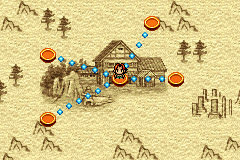
This screen is displayed when your character moves from town to town. After choosing a certain place on the World Map, your character will advance to the Field Screen. When leaving the Field Screen, your character automatically returns to the World Map.
Game Boy Advance Game Link Cable Connection
Below is an explanation of how to link to another Game Boy Advance using the Game Boy Advance Game Link Cable. For this game, the Game Boy Advance Game Link Cable is only used to trade spirits.
Required Equipment
•
Game Boy Advance or Game Boy Advance SP ... 2
•
Shaman King LEGACY OF SPIRITS Game Pak ... 2
•
Game Boy Advance Game Link Cable ... 1
Connecting the Game Link Cable
•
Make sure that each Game Boy Advance system's power switch is set to OFF before inserting a Shaman King: LEGACY OF SPIRITS Game Pak into each system.
•
Connect the Game Link Cable to each Game Boy Advance system's external expansion connector.
•
Turn each Game Boy Advance system's power switch ON.
•
Follow the instructions for link play on page 26.
The player whose system is connected to the small plug becomes Player 1.
Link Play Warnings
The following can cause Game Boy Advance systems to fail to link properly or malfunction:
•
Using a cable other than the Game Boy Advance Game Link Cable.
•
Failing to insert the Game Link Cable completely.
•
Removing the Game Link Cable while linked.
•
Failing to connect the Game Link Cable/Game Boy Advance systems properly.
•
Connecting three or more Game Boy Advance systems.
Trade Spirits
Use the Game Boy Advance Game Link Cable to link up with a friend's Game Boy Advance and trade spirits. If your friend has a spirit that you don't have, strike up a deal, and make an exchange.
•
If you own *Shaman King: Legacy of the Spirits Soaring Hawk*, you will be able to trade spirits with *Shaman King: Legacy of the Spirits Sprinting Wolf*.
•
If you own *Shaman King: Legacy of the Spirits Spring Wolf*, you will be able to trade spirits with *Shaman King: Legacy of the Spirits Soaring Hawk*.
Introduction to Trading Spirits
After carefully reading over the explanations on pages 26 and 27, link up to a friend's Game Boy Advance with a Game Boy Advance Game Link Cable. Both you and your friend must do the following:
1. Check out the Save Altar: Go to the Save Altar in the Flame Inn, and press the A Button. Highlight the “Trade Spirit” option with the D-Pad, and press the A Button again to confirm your choice.
2. Save: When asked if you wish to use the Save Altar, select “Yes” with the D-Pad, and then press the A Button to confirm. After saving is complete, the Trade Spirits Screen is displayed.
How to Trade Spirits
The spirits in your possession are displayed on the Trade Spirits Screen. Move the D-Pad Up or Down to highlight the spirit you wish to trade, press the A Button to confirm your choice, and the “Waiting for friend to start trade” screen is displayed. Once your friend chooses a spirit to trade, the transaction is complete. Pressing the D-Pad Left or Right enables you to toggle between a view of your spirits or your friend's spirits. Pressing the B Button cancels the Trade Spirit mode, and returns you to the previous screen.
After Trading Spirits
When the transaction is complete, you will return to the Spirit View Screen. If you'd like to trade additional spirits, repeat the above steps.

.png)
 (Beta).png)
 (En,Fr,De,Es,It).png)
