Starting the Game
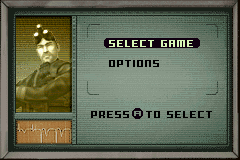
Place the Splinter Cell Pandora Tomorrow Game Pak into the Game Boy Advance system and set the POWER switch to ON. Main Menu
•
Use the Control Pad to move through the menus.
•
Press the A Button to select an option.
Select a Game
•
Use Control Pad Up or Down to move, and press the A Button to choose a saved game slot.
•
If you want to start a new game, enter a name for your game.
•
Finally, choose an available map to start your adventure.
SAM'S MOVEMENT
Crouching
Press Control Pad Down to crouch. Sam's movement is quieter and he is less visible while crouched.
Roll
When crouched, tap Control Pad Left or Right twice to execute a roll. It allows Sam to quickly move while crouched.
Grab Enemy
Grab an enemy from behind and force him to cooperate, use him as a human shield, or simply knock him down by using the A Button.
Surveillance Cameras
Standard, off-the-shelf surveillance cameras that detect movement and have the ability to directly trigger alarms. Sam can shoot the cameras to break them.
Computer
The computer provides intelligence about enemies, locations, or other key elements pertinent to the operation. Pay special attention to computers; they contain key information. There are several ways to hack a computer:
•
Press Control Pad Up to access the computer panel.
•
Depending on the type of computer, you'll need to use the Control Pad and the A Button and B Button to solve different puzzles.
Doors
Door Locked
To unlock a door, use your lock pick. You must push the pins in the correct order to unlock the door:
•
Use Control Pad Left or Right to move between the locks.
•
Push Control Pad Up or Down to unlock the pins.
Magnetic Door
To open a magnetic door, find the security-level card that will give you access and open the door.
Laser Ray
The laser rays are linked to a detonator. Be vigilant - they are practically invisible. Detect them with your thermal goggles.



 (En,Fr,De,Es,It,Nl).png)
 (En,Fr,De,Es,It,Nl).png)
 (En,Fr,Es).png)