Getting Started
Switch the Nintendo® Game Boy® Advance system OFF. Never insert or remove a Game Pak while the Game Boy Advance is ON.
Insert the Stuntman® Game Pak into the slot on the Game Boy Advance. Press firmly to ensure the Game Pak is correctly inserted.
Switch the Game Boy Advance ON. The title screen should appear. If the title screen fails to appear, return to step 1.
Select your language. When the Save screen appears, create a new game or load a previously saved game (see Saving and Loading on page 13 for details).
Note: For multiplayer games, connect two Game Boy Advance systems (each with a Stuntman Game Pak) via a Game Boy® Advance Game Link® Cable. See Multiplayer Mode on page 14 for details.
Main Menu
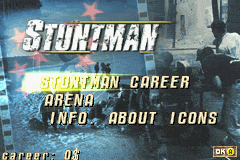
Choose Stuntman Career (to earn cash and better vehicles), Arena (to test your driving and jumping skills), or Info About Icons (to see descriptions of in-game icons).
Stuntman Career
No professional ever jumps straight into the action without doing his homework. Take the time to look over the locations where you'll perform the stunts. Make a few test runs in each location before the cameras start rolling.
You need to succeed in more than 50% of the actions during a test run before you can move on to the next. Perform the stunts for six films, each set in a different country. Start your career with B movies and finish on the blockbusters where you'll earn big bucks.
Use your money to buy cars or circuits for use in Arena Mode. The six films are:
•
Toothless in Wapping (England)
•
A Whoopin' and a Hollerin' (United States)
•
Conspiracy (Switzerland)
•
Scarab of Lost Souls (Egypt)
•
Live Twice for Tomorrow (France)
To succeed, you must correctly perform more than 90% of the actions that constitute a stunt. You can restart the stunt several times and, no matter what happens, you will always be able to continue to the end of the stunt.
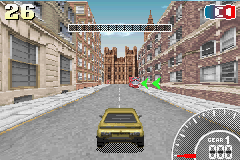
Pay close attention to your time and the condition of your vehicle. Reach the checkpoints along your route before your time runs out, and keep an eye on your damage gauge - or you risk failing the stunt.
Note: As you make more films, the director will become more demanding about the state of the vehicle you return.
While performing stunts, you will encounter the following:
•
Arrows: These show you the direction in which you need to go.
•
Checkpoints: Cross these before the countdown reaches zero.
•
Action Zone: This indicates an area where you need to perform an action.
At the end of the stunt, the Results screen appears, which displays the following:
•
Salary: Your basic income for the stunt. This increases as your skills increase.
•
Attempt Bonus: The fewer retries you needed, the more money you will earn.
•
Success Bonus: Depends on the number of completed stunts.
Note: After the Results screen has been displayed, you can choose to continue or quit your career, start the stunt again, or watch a replay of the stunt you just performed. (See Replay on page 17 for details.)
Filmography Mode
This is a practice mode that lets you go over the stunts for the films you have already completed. At the end of a stunt, your success rating and skill level are displayed.
The best scores are displayed in the Stunt Selection screen.
Arena
This mode contains a series of challenges designed to test your precision driving and jumping skills. Choose 1 Player or Multiplayer.
Note: You cannot choose your vehicle in Arena Mode and there is no money to be won.
Precision Tests
Precision Tests take place in an arena. There are six individual Tests made up of slaloms and specific maneuvers. All of the Tests must be completed within a time limit.
Start by selecting the Test that you want to take from among the Tests you have already unlocked. Each Test is divided into a number of stands presenting a particular action for you to perform. When you arrive at a stand, the elements that are relevant to the action to be performed are in color, while the irrelevant objects are greyed out. Be sure to take the stands in the correct order.
Explanations of the actions to perform appear at the top of the screen. At each stand, icons and objects will guide you.
•
The blue arrow indicates the direction to take, driving forward.
•
The green arrow indicates the direction to take, driving in reverse.
•
The flag indicates the direction to drive around a slalom pole.
•
This zone indicates that you should stop your vehicle between the four poles.
•
The yellow line indicates the Start and Finish line.
At the end of the Test, the Results screen displays the time taken and the newly unlocked Test.
Note: Once you have completed this mode, go to the Store. There's a surprise waiting ...
Jump Tests
Each Jump Test takes place in a different arena. There are five (increasingly difficult) Tests, with bigger cash rewards as you go on.
•
Before you start, buy the vehicles and arenas you want in the Store with the money you earned in Career Mode.
•
Select your car using the + Control Pad and confirm your purchase with the A Button. Use the same procedure to purchase arenas.
•
During the Test, recover the letters that appear on the course within the time limit.
At the


 (En,Fr,Es).png)
 (En,Fr,De,Es,It).png)


 (En,Fr,De).png)


