Reset Button
Power Button
Power Indicator
Disc Cover
Open Button
Memory Card Slot 1
Controller Port 1
Control Summary
•
Directional Button (D-Button)
Starting the Game
1. Set up your PlayStation™ game console according to the instructions in its Instruction Manual. Make sure the power is OFF before inserting or removing a compact disc. 2. Insert the Battlestations disc and close the Disc Cover.
3. Insert game controllers and turn on the PlayStation game console. 4. After the opening video sequence, the Main menu appears. D-Button to select a 1 or 2 PLAYER game, and press X.
At each screen, press X to continue. To bypass the demo, press X.
Note
•
Battlestations does not support turbo functions.
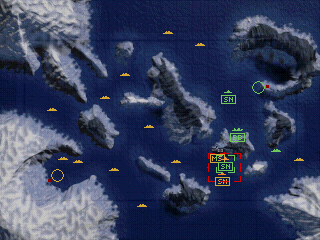
Every mission begins at the Strategic Map. Use this map of the war zone to view enemy activity and deploy and mobilize your fleet. When two opposing ships are in close vicinity, one can initiate Tactical Combat against the other.
When Tactical Combat is initiated, an overhead view of two 3-D ships replaces the Strategic Map. The goal of Tactical Combat is to sink your enemy's ship before your enemy sinks yours.
Note
•
In Arcade mode you engage immediately in Tactical Combat; the Strategic map is not available. •
For detailed information regarding the specific weapons and features of each ship, see The Scuttlebutt.
Strategic Map
A global view of the hot zone, the Strategic Map is the starting point for each mission. Select and deploy your ships from the Ship Select overlay to achieve your objective.
•
A number of friendly ships are pre-deployed and docked in your harbor. Identify and mobilize these immediately.
•
You must move the ship icon from the starting point before deploying another.
•
Ship Select overlay: Press to cycle between ship icons.
Ship Select Overlay
When you highlight the ship abbreviation, the ship information appears. This number decreases as you deploy ships from your Harbor.
To deploy a ship
1. Press SELECT to call up the Ship Select overlay.
2. Highlight your selection, and press. The overlay disappears, and a generic ship icon appears. Your icons are green; enemy icons are orange.
After you deploy a ship, it has two seconds of safety before an enemy ship can attack.
Controlling a Ship Icon
In order to secure your position on the Strategic Map, keep in mind the objective of your selected mission, then deploy your fleet accordingly. You can place single ships on Auto-pilot, send them on their way, and form Task Forces to strong-arm the enemy.
To pilot a ship
1. Press to cycle through ships. A target box surrounds the selected ship.
2. D-Button in the direction you want the ship to head.
To identify the ship you control, press R2. An abbreviation of the ship's class appears.
Task Force
A group of up to four ships that travel together—perfect for an aggressive attack.
To create a Task Force
1. Draw near a friendly ship and press. The friendly ship joins the lead ship.
2. To add a third or fourth ship, select a ship, draw near the task force, then press.
To exit a Task Force, press. The ships disband.
Note
•
Tactical Combat is always one-on-one. If you attack a Task Force, the first battle is against the ship nearest yours. If you win, the next battles are against the middle ship, then finally the outermost ship.
Auto-Pilot
Auto-pilot is essential for mobilizing a great number of ships.
To assign Auto-pilot to a single ship or Task Force, press + D-Button. The ship continues in the assigned direction until it is obstructed.
To end Auto-pilot, D-Button when the ship is selected.
Strategic Features
At the Strategic Map, the Submarine and Mine Layer each have a strategic feature you initiate by pressing R1.
•
Submerge the Submarine and send it on a stealth mission to enemy lines. If an enemy ship is in the same vicinity, the enemy's icon turns red.
•
Build up to two undetected mine fields with the Mine Layer. Enemy ships suffer damage and carry it over into Tactical Combat.
Party Time
When two opposing ships are in the same vicinity, their icons become red. At this point, either ship can initiate Tactical Combat.
Note
•
When Tactical Combat is initiated, all ship icons freeze. They resume course when you return to the Strategic Map.
To initiate Tactical Combat, press.
Land-Based Structures
Three land-based structures appear in Campaign mode only:
•
MISSILE SILO: Launches missiles at passing ships. Initiate Tactical Combat with the Silo, using a Troop Transport and your marines.
•
SHORE BATTERY: Initiates Tactical Combat with a passing ship. Any ship can engage in combat with a Battery, but not every ship can destroy it.
•
POWER PLANT: Provides power to nearby Batteries and Silos. Send in your marines and destroy a Power Plant, to disable allied structures.
Mission Debriefing
.png)



.png)




_1.png)
_1.png)
_1.png)
.png)


.png)