STARTING THE GAME
Set up your PlayStation according to its instruction manual. Ensure the power is OFF before inserting or removing a DISC. Insert the Men in Black: Crash Down DISC and close the disc cover. Insert the Controller into Controller port I and turn ON the console using the POWER button. Follow the on-screen instructions to start the game.
It is advised that you do not insert or remove peripherals or MEMORY CARDS once the power is turned ON. A Controller must always be inserted into Controller port I of the console while playing the game.
Make sure there are enough free blocks on your MEMORY CARD before commencing play. This game requires one free MEMORY CARD block to save a game successfully. Men in Black only uses MEMORY CARD slot I on the console.
PlayStation Layout
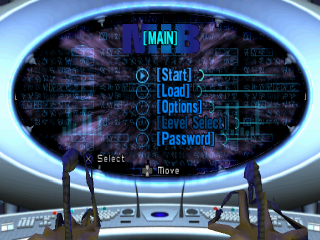
MAIN MENU
MENU NAVIGATION
Use the directional button to browse or cycle through options. Press the button to select a submenu or change the current option. Press the button to return to the previous menu screen.
START
Select this option to start a new game. You will first be presented with the name entry screen.
To enter your name, use the directional button to highlight a character and use the START or the button to input it. To erase a character press the button. When your name is complete, highlight 'Accept' and press the button to begin play.
LOAD
This option will take you into the 'Load Game' screen, allowing you to continue with a previously saved game. A list of game positions will be displayed, showing your saved games.
Highlight and select the game you would like to load from the MEMORY CARD. Once the data has loaded successfully, the game will automatically continue from the saved point.
When you've successfully completed a mission, you will see a prompt on screen asking if you wish to save the game.
OPTIONS
Selecting the 'Options menu' will present you with the following options for changing the game settings.
GAME OPTIONS
•
Auto aim: Turn the Auto-aim feature ON / OFF.
•
Invert Aim (Up/Down): When YES, reverses your up / down axis.
•
Hold button to crouch: When YES, the player must hold down the crouch button to stay in that position.
•
Controller vibration: When this setting is switched ON, your Controller will vibrate at certain points during the game, for example when you get hit or when you fire a high-powered weapon.
•
Note: The Vibration function only works with DUALSHOCK™ analog controller.
AUDIO
Select this option to modify the game's default sound effect and music settings. Use the directional button [Up / Down] to cycle through the AUDIO options and [Left / Right] to adjust the volumes and toggle between Stereo and Mono sound. Press the button to confirm your choice.
•
In-game music: This option allows the player to adjust the volume of the in-game music.
•
Sound effects: This option allows the player to adjust the volume of the sound effects.
•
Stereo / mono: Use this option to toggle between STEREO and MONO.
CONTROLLER
Select this option to choose your preferred controller setup. There are five available configurations. Use the directional button (Left / Right] to toggle through each one and the button to confirm your choice.
ADJUST SCREEN
Follow the on-screen instructions to attain the best position for the playing screen on your particular TV set. Use the directional button to adjust the screen position. Press the button to confirm the position and the button to return to the default setting. Press the button to cancel the changes.
MIB DATABASE
Select this option to learn all about the MIB universe. Use the directional button to highlight the various Database topics and press the button to make your selection.
LEVEL SELECT
After loading a game, use this screen to select the level from which you'd like to start. Levels are only 'opened' if they've already been completed. You can re-play a completed level at any time.
PASSWORD
This option allows you to enter the pass codes that you will find hidden around the levels. These pass codes activate the various cheats in the game.
To enter a pass code, use the directional button to highlight a character and press the button to input it. To erase a character, press the button. When your pass code is complete, highlight 'Accept' and press the button to begin play. If you wish to exit this option without entering a code, press the button to go back to the previous menu screen.
BASIC GAMEPLAY
Men In Black - The Series: CrashDown is an action/adventure game. You will be playing the game through the 'eyes' of an Agent (either Jay or Kay, depending on the level). Each Syndrome is divided into stages.
When the Syndrome begins, a brief movie-clip will explain the current situation, and give an insight into the lives of the Men in Black characters. You will then be briefed by Agent Zed.
Once the briefing has been delivered, it's time to review the mission objectives. An image is displayed with each objective to clarify exactly what is involved in your assigned task.
Then, on to the game! You, as Agent Kay or Agent Jay, travel around the level, blasting aliens as you
.png)

.png)
.png)



.png)


.png)
_1.png)
.png)




_1.png)
_1.png)
_1.png)
.png)

.png)

_1.png)
.png)
.png)
.png)
 (En,Fr,De,Es,It).png)

