Gearing Up
Start Game
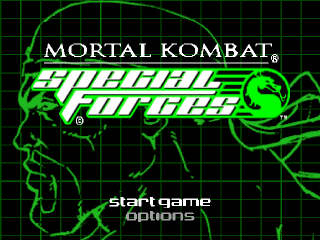
Following power up, press START during the opening cinematics to view the Start/Options screen. Select Start Game to jump right into the action, or Options to view the Options menu.
When you select Start Game, a Mortal Kombat Special Forces movie will begin. You can watch and enjoy the movie, or press to bypass the movie and begin playing. Note
Pressing START during gameplay displays the Pause menu. Select Continue or Abort Mission. The Abort Mission option exits to the Title screen.
Options Menu
The Options menu displays four options available to adjust the default game settings. Press the Directional Button UP or DOWN to highlight an option, then press to make a selection. When you're finished, highlight Exit and press to return to the Options menu.
Controller Configuration
See Controller Config, pg. 9
Sound Configuration
To make changes to the game's music or sound effects, highlight the option, then press LEFT or RIGHT to increase or decrease the sound setting. When you're finished, highlight Exit and press to return to the Options menu.
Game Settings
You can adjust the game's difficulty level or turn your DUALSHOCK™ analog controller's vibration feature on or off. Select an option, then press the Directional Button LEFT or RIGHT to make adjustments.
Load Game
See Load/Save Games, pg. 10
Inventory
The Inventory screen is used to browse items and weapons, kombos and experience, and your messages. To use the Inventory screen, press during the game. Your inventory will appear.
To select these options and any items within each inventory menu, press the Directional Button UP or DOWN to highlight an option, then press to make a selection.
•
Items/Weapons - This screen displays any guns, keys or explosive devices.
•
Kombos and Experience - All of your earned combos are displayed, as well as your current accumulated experience statistics.
•
Messages - As you get messages, they are stored and available for your review at any time. This is a nice feature for reviewing your current progress should you return to a saved game.
Using Your Guns
If you have a gun in your inventory, press L2 to draw the weapon. If you have more than one gun in your inventory, you'll need to specify the gun you want to use before you can draw that gun (see Inventory, pg. 13).
Once you have your gun drawn, you can fire it at your opponents in the game's default view, or press and hold L1 to access Target Mode for a better aim. This is probably best used when your opponent is at a distance. He may be all over you if you wait until you're closer.
When using the Sniper Rifle, press and hold L1 for Target Mode, then try pressing and to zoom in and out. You can get a clean, more accurate shot using this feature.
.png)

.png)
_2.png)
_3.png)
.png)
.png)



.png)




.png)