MODE SELECT SCREEN
At the Title Screen, press START to reach the Mode Select Screen. You can select from four choices.
•
8 PLAYER TOURNAMENT KOMBAT
Press the D-Pad Left/Right to highlight your desired option, then press any Action Button to select. KONTROL KONFIGURE
Highlight "KONTROL KONFIGURE" at the Options Screen and press the X Button to select it. At the Kontrol Konfigure Screen, press the D-Pad Up or Down to highlight the control you want to change.
Cycle through the available options by pressing the D-Pad Left or Right. To exit the KONTROL KONFIGURE Screen, highlight EXIT then press any Action Button. PLAYER SELECT SCREEN
The first three options from the Mode Select Screen will take you to the PLAYER SELECT Screen. It displays mug shots of the various Fighters available in the game.
The Mortal Kombat mode is a one or two player game. The 4-Player mode allows each player to select two Fighters. The 8-Player mode is an eight-player tournament.
Use the D-Pad to highlight the Fighter(s) you want. You can also select and fight with "Classic" Characters by pressing the SELECT Button when you highlight Kano, Kung Lao, Jax, or Rayden. Once your Fighter is highlighted, press any Action Button to select and begin your Kombat! CHOOSE YOUR DESTINY
Once you've chosen your Fighter in the 1-Player Mortal Kombat mode, you will be transported to the CHOOSE YOUR DESTINY Screen.
Press the D-Pad Left/Right to toggle between these columns: NOVICE, WARRIOR, MASTER, or CHAMPION. Press any Action Button to select. JOINING A MATCH
If a second player wishes to join the fight, they may do so once the match begins by pressing the START Button. Both players return to the MODE SELECT Screen, where they can select the desired fighting mode. After selecting the mode, both players go to the SELECT YOUR FIGHTER Screen to choose Warriors again.
FIGHTING SUMMARY
The Tournament first tests a Warrior's fighting skill by pitting him against other Tournament challengers. HEALTH METERS
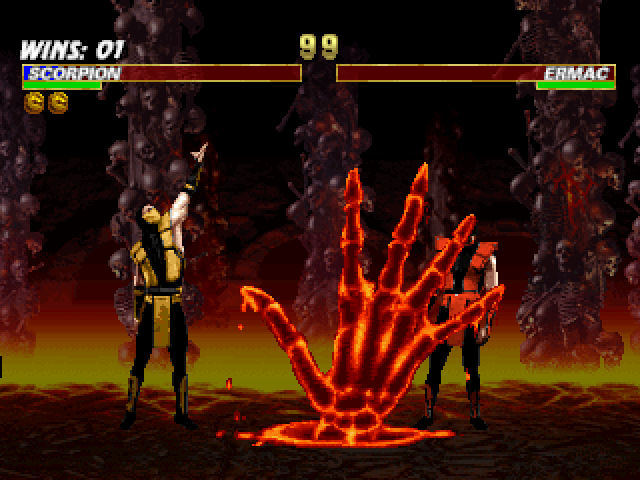
In all Mortal Kombat battles, Health Meters in the upper part of the screen measure the health of each Warrior. The meters begin each round reflecting each of the Warrior's health at 100%, but they will diminish with each blow taken.
The amount they reduce depends on the type of hit delivered and whether or not it was blocked. When a Warrior's Health Meter runs out, he/she is knocked out and the round goes to the opponent.
If the time is up before either Kombatant is knocked out, the Warrior with fewer injuries is declared the victor. The first Warrior to win two rounds takes the match and moves on to the next opponent.
RUN METERS
Pay attention to the Run Meters. They allow you to perform combos and run towards your opponent. But they're "time sensitive," so you can only activate the Run Function while the meter is green.
AGGRESSOR MODE
At the lower part of the screen, an Aggressor Meter will build up as you land more and more hits upon your opponent. Keep an eye on the meter. It grows faster if your opponent blocks attacks.
When the meter fully reads "AGGRESSOR," you'll be much stronger and inflict heavier damage on your opponent.
SOUND & MUSIC
To modify a number of the game's sound features, press the D-Pad Up/Down, then press an Action Button to highlight a selection. Next, press Left/Right to adjust settings. •
EFFECTS VOLUME - Adjust the volume of the sounds in the game.
•
MUSIC VOLUME - Adjust the volume of the music and post-match speech samples in the game.
When you're finished making changes, highlight EXIT and press any Action Button to get back to the Main Menu. GAME KONFIGURE
Modify a number of the game features. Press the D-Pad Up/Down, then press an Action Button to highlight a selection. Next, press Left/Right to adjust settings. •
DIFFICULTY - Select from five different settings: VERY EASY, EASY, MEDIUM, HARD, or VERY HARD.
•
BLOOD - Turn blood ON or OFF. When OFF, Finishing Moves, except for Babalities and Friendships, are disabled.
•
TIMER - Select ENABLED to have a time limit or DISABLED for no time limit.
•
AGGRESSOR - Toggles Aggressor mode ON or OFF.
•
COMBOS - Select ON, OFF, or AUTO for each player.
•
SHANG TSUNG'S MORPHS - Your options are, ANYONE - LOAD (this slows down game play due to loading time) or LIMITED - NO LOAD (pre-select the characters you morph into to eliminate load time.)
•
VERSUS SCREEN - Turn OFF to speed up the game by skipping the "VS" screen and taking you right to the fight. Default is ON.
•
BUY IN SCREEN - Turn OFF to skip the Buy In Screens that occur between matches. Default is ON.
•
SELECT SCREEN - Select FAST to remove character stances from the Select Screen. Default is ON.
•
MATCH RECYCLE - Select the number of matches you want to continuously fight through (1 to 4). Choose your characters, and when the selected number of matches have been completed, the option will reset back to OFF (default). Works only in 1-on-1 mode, and not against CPU.
BASIC MOVES
Each
 (Rev 1).png)


.png)
 (Rev 1).png)






_1.png)
_1.png)



.png)

.png)






.png)




.png)
.png)
