SETTING UP
1. Make sure the power switch is OFF and there is no CD in the Sega Saturn System. 2. Open the unit and insert the CD gently in the Sega Saturn System, close the cover and turn the system On. MODE SELECT SCREEN
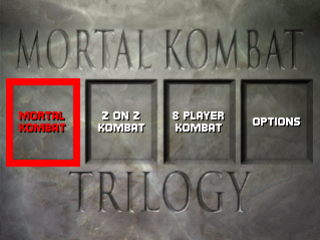
At the Title Screen, press the A Button to get to the Mode Select Screen. Select from these four choices:
Press the D-Pad Left/Right to highlight the option you want, then press the A Button to select.
KONTROL KONFIGURE
Highlight “KONTROL KONFIGURE” at the Options Screen, and press the A Button to select it. At the Kontrol Konfigure Screen, press the D-Pad Up or Down to highlight the control you want to change.
Cycle through the available options by pressing the D-Pad Left or Right. To exit the KONTROL KONFIGURE Screen, highlight EXIT then press the A Button.
FIGHTING SUMMARY
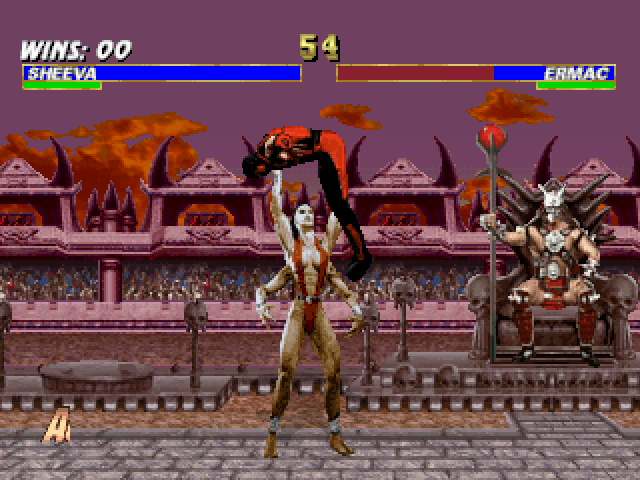
Pay attention to the Run Meters. They allow you to perform combos and run towards your opponent. But they're "time sensitive," so you can only activate the Run Function while the meter is green.
AGRESSOR MODE
At the lower part of the screen an Aggressor Meter will build up as you land more and more hits upon your opponent. Keep an eye on the meter. It grows faster if your opponent blocks attacks. When the meter fully reads "AGRESSOR" you'll be much stronger and inflict heavier damage on your opponent.
SOUND & MUSIC
To modify a number of the game's sound features, press the D-Pad Up/Down, then press the A Button to highlight a selection. Next, press Left/Right to adjust settings.
•
EFFECTS VOLUME: Adjust the volume of the sounds in the game.
•
MUSIC VOLUME: Adjust the volume of the music.
When you're finished making changes, highlight EXIT and press the A Button to get back to the Main Menu.
GAME KONFIGURE
Modify a number of the game features. Press the D-Pad Up/Down, then press an Action Button to highlight a selection. Next, press Left/Right to adjust settings. •
DIFFICULTY: Select from five different settings: VERY EASY, EASY, MEDIUM, HARD or VERY HARD.
•
BLOOD: Turn blood ON or OFF. When OFF, Finishing Moves, except for Babalities and Friendships, are disabled.
•
TIMER: Select ENABLED to have a time limit or DISABLED for no time limit.
•
AGGRESSOR: Toggles Aggressor mode ON or OFF.
•
COMBOS: Select ON, OFF or AUTO for each player.
•
SHANG TSUNG'S MORPHS: Your options are, ANYONE - LOAD (this slows down game play due to loading time) or LIMITED - NO LOAD (pre-select the characters you morph into to eliminate load time.)
•
VERSUS SCREEN: Turn OFF to speed up the game by skipping the “VS” screen and taking you right to the fight. Default is ON.
•
BUY IN SCREEN: Turn OFF to skip the Buy In Screens that occur between matches. Default is ON.
•
SELECT SCREEN: Select FAST to remove character stances from the Select Screen. Default is ON.
•
MATCH RECYCLE: Select the number of matches you want to continuously fight through (1 to 4). Choose your characters, and when the selected number of matches have been completed, the option will reset back to OFF (default). Works only in 1-on-1 mode, and not against CPU.
.png)


.png)