Audio Settings
Set the volume for both Music and Sound Effects.
•
To highlight an audio type to configure: D-Button
•
To change the volume of the audio: D-Button ↔
•
When you have modified the configuration, press ✖.
Strike Files
STRIKE files contain classified information which is only available to members of the team.
•
To play: Highlight a file and press ✖.
Classified Security Clearance
Playing the Game
QuickStart
Use the D-Buttons to maneuver your Super Apache.
Use L1/R1 to jink your chopper and avoid enemy fire.
Use the ●, ■, ▲, ✖ buttons to fire your weapons.
Press R2 to toggle the Heads Up Display (HUD) and Compass.
Press L2 to drop cargo.
Press START to pause the game and access the Super Multi-Functional Display (SMFD).
Press START to receive an Intel message when the Strike logo flashes on the screen.
Once inside the SMFD, press the D-Button ↔ to view Missions, Enemies, Assets, and Intelligence.
Hover over friendly forces, munitions, and other assets to automatically winch them up.
Drop off passengers at specified Landing Zones to restore your armor.
Supplies are sometimes hidden inside structures or vehicles. Be careful: Using too much firepower may destroy the contents.
STRIKE recommends completing your missions in order.
Return to Home Base when all of your missions are complete.
To Exit a Campaign and return to the Main Menu from gameplay, press and hold both SELECT and START.
The Super Multi-Functional Display
Use the Super Apache's onboard SMFD to access STRIKE.net. Via high-speed Satellite Communications (SATCOM) links you will get all pertinent data on your Missions, enemy threats, friendly resources, maps of the area of operations, and situation reports (sitreps).
To access the SMFD (and pause the game): Press START.
Upper Row Categories
Information in the upper row is grouped into the following categories:
Mission
Breaks down a Campaign into individual Missions. Each Mission can be completed in order...or not. Sometimes battlefield flexibility will win you the war.
Enemy
Lists all hostile equipment.
Assets
Lists all friendly assets.
Intel
Summarizes background information about the current Campaign.
Lower Row Views
Each category in the upper row can be viewed in three ways:
Map
Selecting an item shows the location of the subject on your map. Press at any time to access the Map.
When the STRIKE.net icon appears at the lower right part of the screen during gameplay, press START to access the message. Press * to bypass the movie and access the map.
Info
Press once for a brief text overview of the selected item from the upper row. Press a second time for more INFO, usually a voice annotated video file from STRIKE.net.
Status
Press to get a summary of the current status of the Mission, Enemy, Assets, or Intel categories.
More
Press if it is blinking. It will page through additional screens of text if more information is still available.
To Select an Item
1. D-Button to highlight a SMFD category.
2. D-Button to access an item within that category.
3. Press the appropriate button(s) described above.
The Heads-Up Display (HUD)
Firepower is meaningless if you can't manage your resources. Fuel, Armor, and Ammo are your life blood. Use them with care. STRIKE will pre-position fuel pods, armor crates, and ammo packs for each Campaign. You might even get lucky and find a special repair kit.
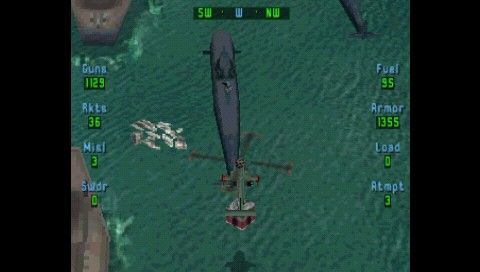
The Heads-Up Display (HUD) allows you to keep track of your Super Apache's resources and call up your Directional Compass. There are also on-board warning signals to alert you to low fuel and armor. Pay attention to them.
To cycle through the HUD and Compass views: Press R2.
Attempts
You start with three attempts per campaign. The Super Apache can withstand substantial abuse, but only to a point. Your Smart Armor will realign to the Super Apache's interior space and cover the damaged areas after your first two crashes. After your third crash, the plug gets pulled.
Fuel
You begin each Campaign with 100 units of fuel, unless you configure with the Fuel Drop Pods on your wingtips. Don't loiter. Check the HUD for your fuel status and check the SMFD to locate pre-positioned Fuel Pods. Winch these pods up when you need to refuel. If you run out of fuel and crash, the Super Apache drains its internal systems to refill the fuel tanks.
Armor
You begin each Campaign with 1500 units of Smart Armor. Each time you get hit your armor gets depleted, based on the Power (Damage) of the enemy weapon. While unloading passengers at a Landing Zone, your Super Apache will refurbish its internal armor plating. Check the HUD for your armor status. Armor Repair Crates also provide magnetic armor plates if winched aboard, although they are notoriously hard to find.
Ammo
By default you begin each Campaign with a standard loadout. Check the HUD for your weapons status and
 (Rev 1).png)

.png)
 (Rev 1).png)




.png)


_1.png)
.png)
.png)
_1.png)



_1.jpg)