Starting the Game
PlayStation®2 Setup
Set up your PlayStation®2 computer entertainment system according to its Instruction Manual. Ensure the MAIN POWER switch (located at the back of the console) is ON.
Press the RESET button. When the power indicator lights up, press the OPEN button to open the disc tray. Place the Need for Speed Most Wanted disc on the tray with the label side facing up. Press the OPEN button again to close the disc tray.
Attach game controllers and other peripherals as appropriate. Follow on-screen instructions and refer to this manual for software information.
*Note: Illustration may not match all PlayStation 2 console types. For owners of SCPH-70000 series PlayStation 2 systems, refer to the setup instructions supplied with your system.* Command Reference
DUALSHOCK®2 analog controller configurations
•
directional buttons (D-buttons)
•
left analog stick (L3 button when pushed down)
•
right analog stick (R3 button when pushed down)
Setting Up the Game
My Alias
The first time you start the game with a memory card (8MB) (for PlayStation®2) inserted in MEMORY CARD slot 1, you will be prompted to create an alias. Your game progress is automatically saved to this alias once it is created.
•
Enter an alias name using the on-screen keyboard and press the Circle button. A prompt will ask if you are sure you wish to create this alias. Select YES to create your alias.
•
To create a new alias, delete an existing alias, load an alias, or manually save your game progress, select ALIAS MANAGER in the Main menu.
Main Menu
•
CAREER: Conquer Career mode and become the Most Wanted.
•
CHALLENGE SERIES: Complete a series of tasks and races to beat the best.
•
QUICK RACE: Jump right into a race.
•
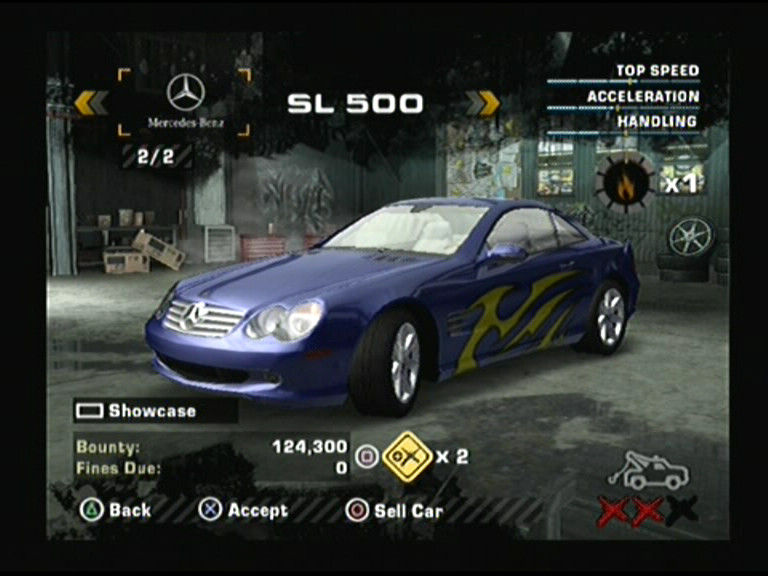
MY CARS: Outfit your ride with a variety of parts or visual and performance upgrades.
•
ALIAS MANAGER: Manage your alias and save and load games.
•
OPTIONS: Adjust audio, video, gameplay, player, and controller options, select EA™ TRAX, or view the credits.
Options
To access the Options menu from the Main menu, select OPTIONS. To access it in-game, press the START button to pause the game, then select OPTIONS.
*Note: Default options are listed in bold type.*
•
AUDIO: Set the in-game volume levels.
•
VIDEO: Adjust screen and display options.
•
GAMEPLAY: Turn the game moment camera, speedometer units, autosave, rear view mirror, explore map modes, or car damage ON or OFF.
•
PLAYER: Choose a transmission type, select a camera angle, or turn gauges, scoring, and leaderboards ON or OFF.
•
CONTROLS: (No description provided in text)
•
EA™ TRAX: Adjust and preview the soundtrack in the game.
•
CREDITS: Meet the team behind Need for Speed Most Wanted.
Playing the Game
Slide into the driver's seat. With a variety of races, neighborhoods, and modes to choose from, the race to become the Most Wanted is at your fingertips.
Game Screen
•
Heat Meter: The higher your heat is, the greater the chance that you are pursued by the police.
•
Mini Map: (No description provided in text)
•
Radar: (No description provided in text)
•
Evade Meter: Illustrates how close you are to either being busted or evading the cops.
•
Milestone Status: Illustrates the current milestones and your progress towards them.
•
Speedbreaker: (No description provided in text)
•
Tach: (No description provided in text)
•
Speed: (No description provided in text)
•
Nitrous: (No description provided in text)
Saving and Loading
Your game progress is saved automatically to your alias. A memory card (8MB) (for PlayStation®2) inserted in MEMORY CARD slot 1 is required to save game progress. Never insert or remove the memory card when loading or saving files.
To save a game:
1. Select ALIAS MANAGER in the Main menu.
2. Select SAVE. Your game is saved.
To load a game in Career mode:
1. Select CAREER in the Main menu.
2. Select LOAD.
3. Select an alias. Your alias, with all of your saved game information, is loaded.
Game Modes
Earn your place in the racing world via a variety of game options, from one-shot Quick Races to an in-depth Career mode.
*Note: For latest community events, gameplay hints, and tips, visit needforspeed.ea.com.*
Career Mode
Only the driver with the highest bounty and most impressive rap sheet will climb the Blacklist and become the Most Wanted.
To start a game in Career mode, select CAREER in the Main menu then either RESUME CAREER, START NEW CAREER, or LOAD an existing alias.
**Free
.png)

.png)
.png)
.png)
.png)






.png)
_1.jpg)


.png)


_1.png)
.png)



_1.png)