Console Layout
Getting Started
Set up your PlayStation®2 computer entertainment system according to the instructions in its Instruction Manual. Make sure the MAIN POWER switch (located in the back of the console) is turned ON.
Press the RESET button. When the power indicator lights up, press the OPEN button and the tray will open. Place the AND 1® Streetball disc on the disc tray with the label side facing up. Press the OPEN button again and the disc tray will close.
Attach game controllers and other peripherals, as appropriate. Follow on-screen instructions and refer to this manual for information on using the software.
Memory Card (8MB)(for PlayStation®2)
To save game settings and progress, insert a memory card (8MB)(for PlayStation®2) into MEMORY CARD slot 1 of your PlayStation®2 system. You can load saved game data from the same memory card or any memory card (8MB)(for PlayStation®2) containing previously saved games.
Playing the Game
Press the START button to reach the Main Menu.
Main Menu
Use the left analog stick or the directional buttons to highlight the following options, then press the Ⓧ button to select. Press the ⒳ button to go back to the previous menu screen.
•
Quick Game: Play a quick pickup game.
•
Game Modes: Access the Game Modes menu to play the AND 1 Mix Tape Tour, Pickup and Side games, or to play online.
•
Create-A-Baller: Create a custom Streetball player.
•
Create-A-Move: Create a custom Breakdown move.
•
I BALL Controls: See an interactive demonstration of your unlocked I BALL Controls.
•
Options: Access the Options menu to adjust various settings.
•
Bonus Stuff: This screen lets you view the game's unlockable videos and credits.
Game Modes Menu
On this screen, you can access the various game modes for AND 1 Streetball:
•
AND 1 Mix Tape Tour: Play the single-player campaign.
•
Pickup game: Customize a single-player or multiplayer pickup game.
•
Side games: Replay any of the side games from the Mix Tape Tour.
•
Online: Play online (requires a network connection).
•
Tutorial: Play the AND 1 Streetball Tutorial, sponsored by Dodge Caliber.
•
Practice: Work on your skills at AND 1's JB Jouthe Memorial training facility in Paoli, PA.
Progressive Scan Mode
If you have a television that supports Progressive Scan, you can hold the Ⓧ and ⒳ buttons during startup to set up Progressive Scan mode.
I BALL Moves
AND 1 is known for its outrageous trick moves, and with the I BALL control system, you too can pull off many of the same moves seen on the AND 1 Mix Tapes. I BALL moves not only look cool, they also earn your player respect and can make your defender "break his ankles," allowing for a quick opening to the basket.
You can preview your unlocked I BALL controls by going to the I BALL Controls screen from the Main Menu or Mix Tape Tour menu.
Note: I BALL moves require special timing to pull off. Please check out the in-game tutorial for more information.
How to I BALL
There are two types of I BALL moves you can perform in AND 1 Streetball, depending on whether your baller is moving or not.
Running I BALL Moves
•
Level 1 Running I BALL: left analog stick + right analog stick
•
Level 2 Running I BALL: left analog stick + right analog stick + the R1 button
Stationary I BALL Moves
•
Level 1 Setup Dribble: right analog stick
•
Level 2 Showboat Move: right analog stick + left analog stick
•
Level 3 Anklebreaker: right analog stick + left analog stick + the R1 button
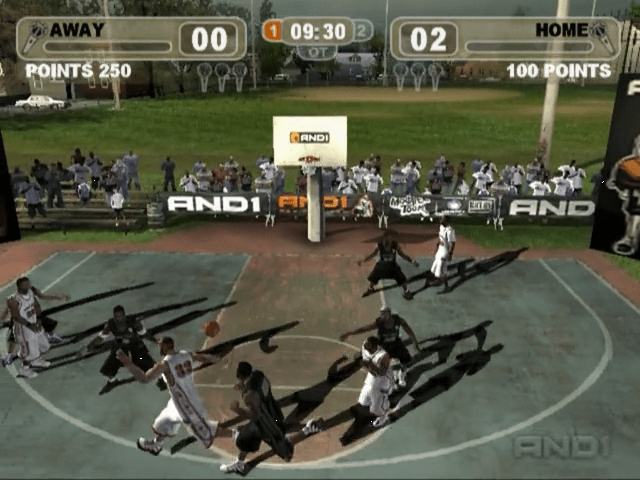
In-Game Interface
Score
Shows how many points have been scored in the current game.
Player/Team Name
Displays the current player or team.
Crowd Meter
Reflects how excited the crowd is based on your performance during the game. The more I BALL moves and anklebreakers you do, the more the crowd meter will go up. Note that you need to "finish" (i.e., score a basket) in order for the crowd meter to stay high. If you perform tricks to build up the crowd meter but get the ball stolen, the crowd meter will revert to its former level.
Once the crowd meter is full, you earn a "Mic Checka" Mic. Mics let you do one of two special things:
•
Activate On Fire mode (L1 + L2 buttons): Pressing the L1 + L2 buttons will activate On Fire mode, causing the ball to glow red and boosting your team's stats considerably. On Fire mode will extinguish when your opponent steals or turbo blocks the ball, or scores a basket.
•
Perform a Breakdown (R1 + R2 buttons): After earning a Mic, players can perform an AND 1 Breakdown move worth +3 points in half-court games, or +5 points in full-court games. To do this, press and hold the R1 + R2 buttons when your player's indicator icon is pulsating on the court. The name of the Breakdown move to be performed
.png)


.png)



.png)

.png)



.png)
