GETTING STARTED
*Note: Illustration may not match all PlayStation 2 console types. For owners of SCPH-70000 series PlayStation 2 systems, refer to the setup instructions supplied with your system.* Set up your PlayStation®2 computer entertainment system according to the instructions in its Instruction Manual. Make sure the MAIN POWER switch (located on the back of the console) is turned ON.
Press the RESET button. When the power indicator lights up, press the OPEN button and the display will open. Place the ARMORED CORE NEXUS disc on the disc tray with the label side facing up.
Press the OPEN button again and the disc tray will close. Attach game controllers and other peripherals, as appropriate. Follow on-screen instructions and refer to this manual for information on using the software.
www.agetec.com
GAME FLOW
Gameplay in Armored Core Nexus progresses as described below (both Discs 1 and 2). •
Disc 1: Select a mission circle from the world map.
•
Disc 2: Select MISSION from the main menu screen.
•
Once a mission has been selected, confirm your participation.
•
Customize an AC to best suit the upcoming mission.
•
Take part in the selected mission.
•
Accomplish the mission objective to receive your reward.
*No payment is received for completion of Disc 2 missions.*
*Failing a mission sometimes results in the client canceling the contract. When this happens, the mission you were attempting will no longer be available and another mission will have to be selected.*
Repeat the steps above on Disc 1 to gain the top position in the Arena, and on Disc 2 to complete all available mission contracts.
CLEARING MISSIONS
MISSION SUCCESS
Successful completion of a mission assignment requires that you fulfill the objective(s) outlined in the mission briefing (ex. destroying all designated targets). In some missions, the reward received at the end varies depending on whether or not certain conditions are met. Try different approaches when attempting mission assignments.
MISSION FAILURE
Mission assignments are logged as failures when any of the following take place:
AC DESTRUCTION
Occurs when the AC unit sustains enough damage to reduce its AP to 0.
LEAVING AREA OF OPERATIONS
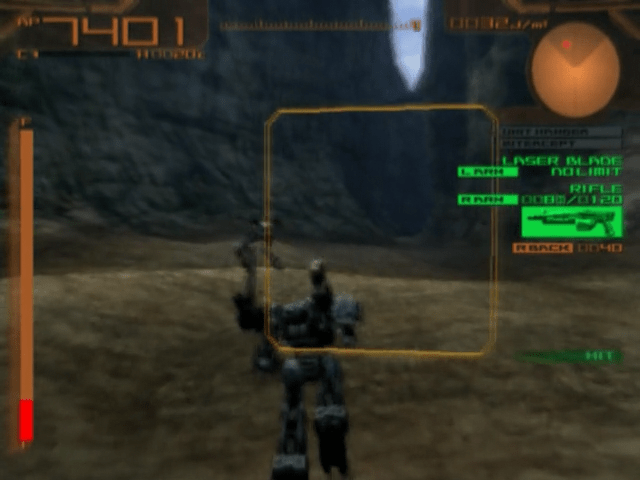
Occurs when the AC unit crosses over the designated mission area boundaries (indicated by red lines on the radar display). Keep in mind that some missions have area boundaries that extend along the vertical plane. These boundaries are not indicated on the radar.
QUITTING A MISSION
Purposely quitting a mission (press the START button and confirm) also counts as a mission failure.
MISSION INCOME & EXPENSE REPORT
The mission income and expense report is displayed after each Disc 1 mission attempt. This report details the reward received (when applicable), as well as costs incurred. The only costs incurred from a failed mission are those relating to ammunition expenditure.
WORLD MAP
SYSTEM TOPICS
This is where news updates (Reports) and mail messages (Contacts) appear as you progress through the missions on Disc 1.
LOG
A complete list of all Reports and Contacts received during the course of the game are logged here.
AREAS
The world map is divided up into different areas. Mission assignments are set in these locations.
MENU
The menu section is comprised of three sections: Ranking, Garage, and System.
RANKING
View the current Arena ranking ladder.
GARAGE
Assembly
Assemble an AC unit using available parts.
SHOP
AC parts are bought and sold here.
COCKPIT
Customize the heads up display.
PAINT
Customize an AC's paint scheme, weapon color, and emblem.
AC TEST
Test an AC design.
SYSTEM
Save Info
Save partial game progress data.
Save/Load Emblem
Access these options to save/load emblem data.
Option
Adjust various game options (button assignments, vibration, etc.).
Quit Game
Quit the game and exit to the Title screen. Always save data when prompted to avoid losing progress.
*Game data from previous titles in the series cannot be loaded or converted for use in Armored Core Nexus.* *A memory card (8MB) (for PlayStation®2) with at least 120KB of free space is required to save Armored Core Nexus game data. 60KB of free space is required to save emblem designs.* MAIN MENU
GARAGE
MISSION
Take part in mission assignments from previous games in the series. Successful mission completion opens up new missions and unlocks special features in the Archive.
GARAGE
ASSEMBLY
Assemble an AC unit using available parts.
SHOP
AC parts are bought and sold here.
COCKPIT
Customize the heads up display.
PAINT
Customize an AC's paint scheme, weapon color, and emblem.
AC TEST
Test an AC design.
ARCHIVE
Access a wide selection of bonus features from previous games in the series.
SYSTEM
SAVE GAME
Save game progress.
LOAD GAME
Load saved game data.
SAVE/LOAD EMBLEM
Access these options to save/load emblem data.
OPTION
Adjust various game options (button assignments,
 (Disc 2) (Revolution).png)

 (Disc 1).png)
 (Disc 2) (Revolution).png)
.png)


_1.png)












 (Disc 1).png)