Pause Game Menu
When you press the START button, the following options appear:
•
Continue: Return to game
•
Cancel <Current Task>: Quits your current assignment
•
Options: Controls the volume, subtitles and controller vibration
Use the left analog stick to highlight the menu options. Then use the left analog stick to change the settings for the option and press the button on 'ACCEPT' to confirm your change. The button will return you to the previous menu.
America Rocks!
Take that fashion sense on the road when Cloe, Jade, Sasha and Yasmin go truckin' across the nation to compete for national fame on the America Rocks Fashion! show. They'd better be at the top of their game, though, 'cuz the Tweevils and the Queen of Pink have returned to try and reclaim their title as reigning fashion divas!
Beginning a New Game
After the power is turned on, the title screen appears. Press the START button to go to the Main Menu. The Main Menu has four choices: New Game, Load Game, Multiplayer Games and Options.
The Options menu lets you adjust the Sound and Music Volume and Speech, as well as vibration and subtitles. For more on the Multiplayer Games, see page 9.
Options
•
Cell: Lets you know you've got a message waiting on the cell.
•
Blingz: Tracks how much cash you've earned.
•
Pet: Shows whether your pet is in stay or follow mode and how many pet treats you currently have.
•
Tokens: Shows how many specialty tokens you've collected, which lets you purchase hot new Bratz™ artwork and videos.
Home is Where the Fashion Is
The Bratz™ may be competing in America Rocks Fashion! but they still have a successful magazine to get out! Whether it's at the office or in their stylin' new touring truck, they've got lots of great assignments to work on for their fans.
•
When this appears over a computer, it means there's an awesome new assignment waiting! Each Girl has a special assignment tailored just for her.
•
Click on this icon to check out the latest layout! When all the main features are done, the magazine will be sent to print.
•
Fashion waits for no one. Click on this and change outfits for you or your pet from the Bratz™ wardrobe. The Bratz™ wardrobe has a silhouette of a girl in front of it and the pets wardrobe has a paw print.
•
Click on this and punch in secret codes for stylin' Bratz™ bonuses.
•
Click on this and save your progress to a memory card (8MB) (for PlayStation®2) using this computer.
•
Need a rockin' poster, flyer, or holiday card for that perfect event? Click on this and start creating something totally hot!
Shopping in Style
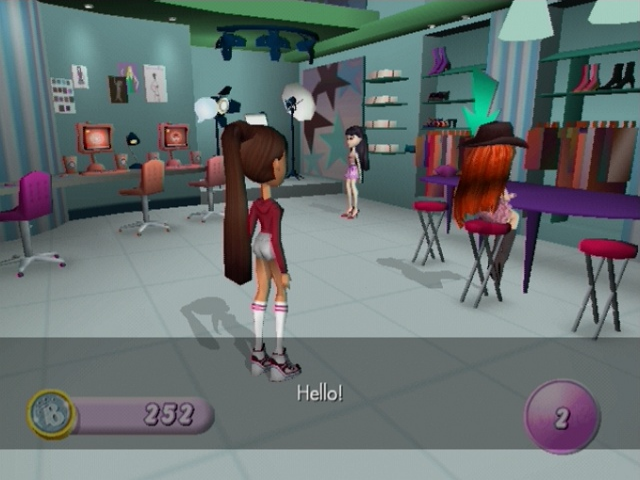
The girls are competing on a fashion show. That can mean only one thing - shopping! Hit the local stores as well as special boutiques in different cities to find the best bargains and the most stylin' fashions!
Shop Till You Drop!
So where do you find all the good stuff? Here are some icons to look for around town:
•
Get the Girls a new hairstyle to go with that new dress.
•
Sizzle through the racks searching for the perfect clothing combo.
•
They say successful fashion begins from the bottom up.
•
Just a touch of jewelry will make an outfit complete.
•
Use the game controls to customize the Girls makeup.
•
Strike a pose, and collect mad Blingz!
•
Buy things like the latest hits or ringtones for the cell, phone covers, make-up compacts and decals.
•
Pets are just the ultimate. You can take them for walks, dress them and have them compete in shows with various tricks. To teach your pet to follow or stay use the L1 button. Don't forget to reward your sweetie with a treat (by pressing the button) to keep it happy and healthy.
Keeping in Touch
•
Messages: Check for any messages from the Girls!
•
Contacts: Looking for a friendly connection? Contacts has the whole address book so the Girls can text their friends.
•
Planner: What's a Girl to do without her day planner? It will let you know what assignment or task that's currently on the schedule.
•
Photos: This feature lets you look through any cool photos saved.
•
Settings: Tired of the same old cover or ring tone? Well then, change it with this feature.
•
Info: Here's a simple feature to keep track of the Blingz and the tokens!
•
Music: Use the Music feature to arrange your songs into your own personal play list!
•
Locate: Use the Locate feature to give directions to the different shops on the list. Just select a store and follow the arrow!
•
Home: Use the Home feature to instantly take you back to the office or RV.
Multiplayer Games
If you've got a couple of DUALSHOCK®2 analog controllers plugged into your PlayStation®2, you can play the multiplayer games. Just move the halo over the Girls you want to play and press the button.
Once you've selected the Girls you want, choose one of the following options:
•
Pairz: With this game, each Girl takes turns to match pairs of picture cards. The Girl who finds the most pairs wins!
•
Top Trumps: You can 'duel' Bratz™ trading cards together; just select
.png)


.png)

.png)





.png)

.png)



.png)

.png)

.png)

_1.png)
_1.jpg)

.png)
.png)
.png)