GETTING STARTED
Note: illustration may not match all PlayStation 2 console types. For owners of SCPH-70000 series PlayStation 2 systems, refer to the setup instructions supplied with your system. Set up your PlayStation®2 computer entertainment system according to the instructions in its Instruction Manual. Make sure the MAIN POWER switch (located on the back of the console) is turned ON.
Press the RESET button. When the power indicator lights up, press the OPEN button and the disc tray will open. Place the CAPCOM FIGHTING EVOLUTION™ disc on the disc tray with the label side facing up. Press the OPEN button again and the disc tray will close.
Attach game controllers and other peripherals, as appropriate. Follow on-screen instructions and refer to this manual for information on using the software.
MEMORY CARD (8MB) (for PlayStation®2)
To save game settings and progress, insert a memory card (8MB)(for PlayStation®2) into MEMORY CARD slot I of your PlayStation 2 system. You can load saved game data from the same memory card or from any memory card containing previously saved games. The memory card must have at least 43KB of free space in order to save game data. While saving and loading, do not turn off the power to the console, reset the game, or remove the memory card, or you could damage your game data.
GETTING INTO THE GAME
STARTING THE GAME
Press the START button on the Title screen to jump to the Mode Select screen.
Select a mode (see page 6) with the directional buttons and press the button to move to player selection.
SELECTING A PLAYER
On the Player Select screen, choose a character with the direction buttons and press a button to determine your character's color. Then select a second character. After that, the match begins.
GAME SCREEN
•
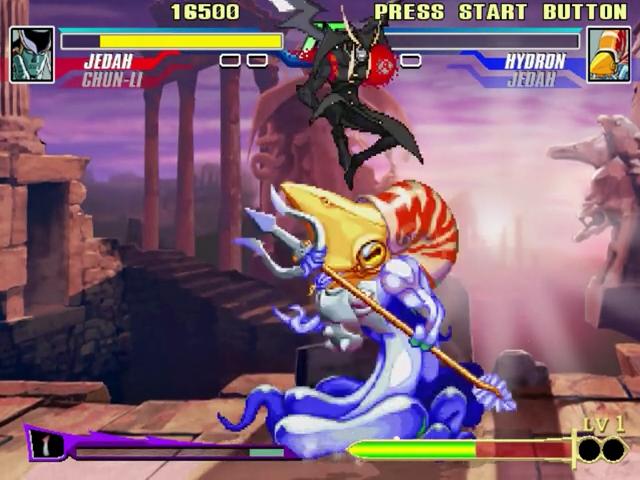
Character/Vitality Gauge
PLAYER SELECT
CHARACTER
The portrait and name show the character currently fighting. The second name is the character waiting on standby.
VITALITY GAUGE
The color bar decreases as the character is attacked. If the color bar disappears, the character is knocked out.
TIMER
Remaining round time.
WIN MARK
(not shown) Appears when a character wins a round.
BONUS MESSAGE
(not shown) Various messages appear for both fighters during a match.
SUPER COMBO GAUGE
Fill this up by attacking and taking damage. Perform special powerful moves when certain conditions are met. The name and appearance of this gauge will change depending on the system you chose. (See page 7.)
GAME RULES
CHARACTERS
After the first round, choose one of your two selected characters to begin the fight. (See page 7.)
WINNING
Win two out of three rounds to win the match. Win by KO, attacking your opponent until his or her Vitality Gauge reaches 0.
If time runs out before either side wins, the player with the most remaining vitality wins the round.
DRAW GAME
A draw game occurs when both players' vitality runs out at the same time (double KO), or when both players have the same amount of vitality left when the timer runs out. If the final round ends in a draw game, nobody wins.
BASIC MOVES
NORMAL MOVES
Perform normal moves by pressing the Punch (P) and Kick (K) buttons. Normal moves can be Light (L), Medium (M) or Heavy (H), for example: LP, MP, HP or LK, MK, HK. Moves performed depend on the character's stance.
BLOCK
Press the directional buttons or left analog stick in the direction opposite to your opponent. Block while standing, or crouch for a low block.
THROW
Get close to your opponent and press LP+LK. Perform unique throw moves depending on your character.
THROW COUNTER
Press LP+LK the moment the opponent grabs you.
TAUNT
Press the SELECT button to taunt your opponent and show off your confidence.
SPECIAL MOVES
Combine directional button/left analog stick moves with Punches and Kicks to perform special moves unique to each character. (See pages 8-19.)
DIZZY RECOVERY
When you are attacked and rendered dizzy, quickly press the directional buttons/left analog stick plus any and all P and K buttons to recover faster.
GAME MODES
ARCADE MODE
1 or 2 Players. Combat CPU opponents and fight it out to the grueling finish! Player 2 can jump in mid-way by pressing the START button.
VS MODE
2 Players only. You must have two controllers connected to select this mode. Go head-to-head with a friend. You can set handicaps, select stages, and make other various choices.
TRAINING MODE
Practice special moves and combos, changing the parameters for your character and sparring partner to try out various situations. Press the START button during training to use the Training Menu with the following options:
•
CONTINUE - Return to the game.
•
RESTART - Restart the training session with the same settings.
•
DUMMY SETTING - Set parameters





.png)

.png)



.png)
