Choose Your Character
Use the directional buttons to select your playable Digimon. Press to confirm your selection.
Name the Digimon
Use the up/down directional buttons to change letter cases and the left/right directional buttons to select letters. Press to add each one.
After you have entered all letters, press the START button to end the naming session.
Calling a Digimon
If you have saved Digimon from a previous game, select "Call Digimon." Select the MEMORY CARD slot with the memory card (8MB) (for PlayStation®2) containing the saved data. Then select which data to call.
To the Digital World!
Once the Digimon have been prepared, press the START button to log into the Digital World!
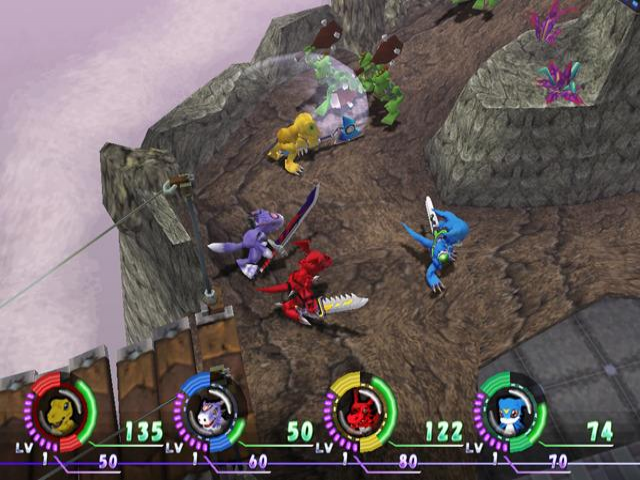
Heads-Up Display
Reading the Screen
•
Press L1 to open / close Item Window.
•
Press R2 to open / close Status Effects Window.
Home Server
This is the home server where the D.S.G. is based. You will be able to strengthen your Digimon or shop for Items.
Terminal Area Transportation Methods
Passageways
Use the passageway to go to another area. When changing areas, a message will appear; select "Go to destination" and press.
Gate Circle
To go to the Commander Room or other servers, use the "Gate to Commander Room" or "Gate to Outside Worlds" portals. When you stand in the gate, a message will appear, so select "Go to destination" and press.
Heal Circle
When you step inside, HP and/or MP will automatically recover.
Call a Digimon
Invite another player to join you.
Commander Room
This is where you'll find the D.S.G. Commander Ophanimon, and where you'll be informed of your missions. The Digi-Elves in the Commander Room will explain the mechanics of the home server and game system.
Emergency Gate
When you use the Gate Disk at the Security Hole, you will return here. At this time, since the Security Gate and Emergency Gate are connected, you will be able to continue the game from the Security Hole just once. Connection to the Emergency Gate will not be saved, so beware.
Central Area
Conduct various adjustments and settings.
Digi Lab Attendant
Talk to the Digi Lab Attendant to Digivolve or change your equipment.
Digivolve Digimon
If you have learned Digivolve Techniques, a Digimon list will appear. Select the Digimon you wish to Digivolve to and press to confirm. You will not be able to Digivolve unless you have learned Digivolve Techniques.
When you Digivolve, your specs will change and your Armor Units will be detached from the Armor Slot and Sub Slots. Your Weapon Units will be reset and the most powerful weapon that can be equipped with your new form will be equipped. Once you are done Digivolving, check the status screen to adjust your equipment.
Remove Equipment
Remove Weapon Units from the Weapon Slot and place them back into the Device Folder. Once you are done customizing your Digimon, exit the Digi Lab and select "Initiate Digimon Change" from the menu. This will activate your changes and return you to the Central Area.
Appraiser
If you have Items marked with the symbols "????????", talk to the Appraiser. Select the unknown Item and pay the required BITS to find out what the Item is.
Exchange Weapon Unit (WU)
Choose and configure your WUs.
Equip Weapon Unit
Select the Weapon Slot you wish to equip, and then choose the desired Weapon Unit. If there is an existing WU in that slot, it will be replaced with the new one. Edit Slot
Equip Weapon Units or Armor Boards with Mods to improve your performance.
Bank Keeper
If your inventory is full, you will not be able to pick up any new Items! Deposit BITS and Items in the bank to prevent this from happening. Anything you deposit at one bank can be retrieved at any other bank.
Deposit
First select if you want to deposit an Item or BITS. Select the Items or how much to deposit and press.
Withdraw
First select if you want to withdraw an Item or BITS. Select the Items or how much to withdraw and press.
X Data Keeper
Sometimes you will obtain the mysterious X Data. You can use this to increase the power of your Digimon or your Chips.
Increase Digimon Parameters
Select which parameter you wish to increase. The amount of X Data needed is different for each parameter.
Increase Ability Chip Parameters
Select the Ability Chip you wish to strengthen. The amount of X Data needed is different for each parameter. Note: There are some Chips that cannot be strengthened!
Card Keeper
You may occasionally find Booster Packs in the Outside Server. Booster Packs contain Digimon cards that you can collect. The Card Keeper will let you open Booster Packs or view which cards you already have.
View Booster Packs
Open the Booster Packs you have collected and view your collection.
View Album
View all collected cards.
Save Keeper
**Save
.png)


.png)



_1.png)











_1.png)

_1.png)