GETTING STARTED
Set up your PlayStation®2 computer entertainment system according to its Instruction Manual. Ensure the MAIN POWER switch (on the back of the console) is on.
Press the RESET button. When the power indicator lights up, press the open button to open the disc tray.
Place the Haven: Call of the King disc on the disc tray with the label side facing up. Press the open button again to close the disc tray. Attach game controllers and other peripherals as appropriate. Follow on-screen instructions and refer to this manual for software information.
MENU/SUB-MENU NAVIGATION
Throughout this manual, ↑, ↓, ←, and → signify pressing Up, Down, Left and Right on the directional button.
To navigate through game menus (e.g., Options), use the directional button (↑, ↓, ←, or → depending on the menu) to highlight a selection.
To activate a selection or access the next menu, press the ✕ button. To go back to the previous menu and/or cancel the previous selection, press the △ button.
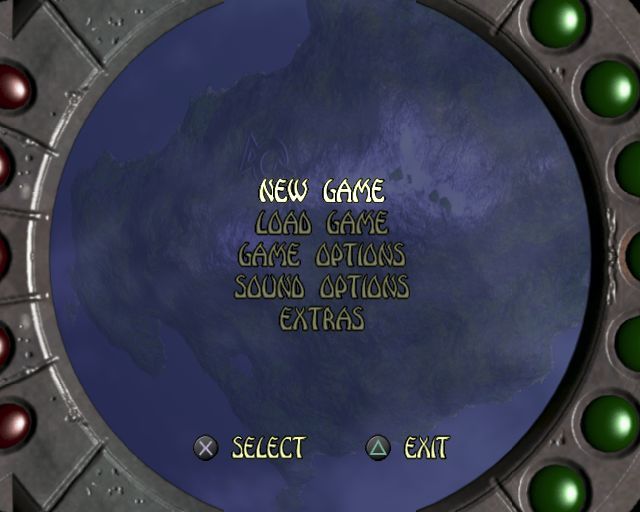
MAIN MENU SCREEN
NEW GAME
Selecting New Game will allow you to start a new Haven journey. LOAD GAME
This will allow you to load a saved game from your Memory Card.
GAME OPTIONS
Allows you to choose Vibration on/off and to center the screen.
SOUND OPTIONS
Gives you the ability to control the volume for speech, music, sound effects, and ability for surround sound on/off.
EXTRAS
Access to concept art and "Making of Haven" feature. GOALS/OPTIONS MENU
•
ESCAPE THE COLLAPSING MINE
OPTIONS MENU
GAME OPTIONS
Allows you to choose vibration on/off, and to center the screen.
SOUND OPTIONS
Gives you the ability to control the volume for speech, music, sound effects, and ability for surround sound on/off.
LOAD / SAVE
Where you'll be able to save, load, or delete a current saved file off of your Memory Card.
REPLAY A LEVEL
You'll be able to replay a level that you've already accomplished.
QUIT GAME
Allows you to quit the current level that you're playing.
Exit
You'll be able to exit out of the Options Menu and return to your current game.
.png)

.png)


.png)
.png)
.png)
.png)



.png)

.png)



.png)
