Getting Started
Set up your PlayStation®2 computer entertainment system according to its Instruction Manual. Ensure the MAIN POWER switch (on the back of the console) is ON.
Press the RESET button. When the power indicator lights up, press the OPEN button to open the disc tray. Place the HUMMER®: Badlands disc with the label side facing up. Press the OPEN button again to close the disc tray.
Attach game controllers and other peripherals as appropriate. Follow on-screen instructions and refer to this manual for software information.
Memory Card (8MB)(for PlayStation®2)
To save game settings and progress, insert a memory card (8MB)(for PlayStation®2) into MEMORY CARD slot 1 of your PlayStation®2 system.
You can load saved game data from the same memory card or any memory card (8MB)(for PlayStation®2) containing previously saved games.
HUMMER®: Badlands
When there's tough terrain to be mastered, hill climbs to conquer, and challenges requiring on and off-road power, the HUMMER® is the only vehicle for the job.
Race across tarmac and dirt trails, tackle extreme off-road challenges like inclines and shifting terrain, power through low-gear hazards, and sweep away the opposition to prove your ultimate driving skills in HUMMER®: Badlands.
Starting the Game
Press the START button to choose between creating a New Profile or loading an existing one. Your profile logs your successes, best times, and records.
Creating a Profile
To create a Profile, enter your name using the on-screen keyboard. Select DONE to create your new Profile. Your game progress is autosaved to the Profile, and achievements are recorded upon successful event completion.
Player Mode Menu
Your first option is to choose your Player Mode: Single Player or Multiplayer. From this menu, you can also adjust sound and other options via the Options menu selection.
•
Single Player: Select this option to play alone.
•
Multiplayer: HUMMER®: Badlands supports Two-Player, Head-to-Head gaming. To compete against a friend, select this option. A second controller must be connected to your console for Multiplayer Mode.
•
Options: Change your sound settings, controller configuration, and more using the Options Selection.
•
Load Replay: Players can load, review, and delete saved replays from the Load Replay screen. Use the directional buttons to scroll. Press X to load a replay; press △ to delete a replay.
Single Player Menu
Extreme Off-Road Challenges
HUMMER®: Badlands includes two Extreme Off-Road Challenges in Single Player:
•
Granny Gear: The ultimate test of control and balance! You'll face an increasingly difficult assortment of trials and obstacles – speed-sapping climbs, uneven terrain, river-crossings, and more. You're against the clock, but flat-out speed isn't always the answer. Keep your gearing low and the power constant to conquer each challenge.
•
Pike's Peak: The extreme off-road challenge. Battle to the summit, through dense undergrowth, up extreme gradients, and over shifting road surfaces. It's a high-speed climb against the clock; follow the navigation prompts and check out the best route. The clearest route isn't always the quickest.
Beat the Clock
In this mode, you're racing against the clock! To continue racing, you must reach the Checkpoint within the designated time. Doing so grants a Time Bonus to continue to the next Checkpoint. Failure ends your race.
Championship
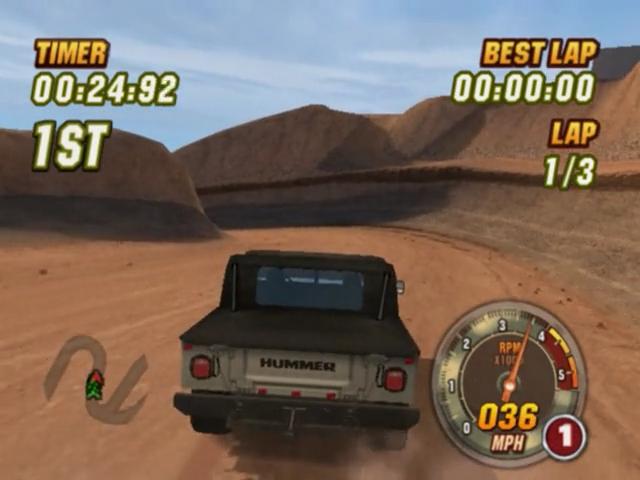
Championship is the heart of HUMMER®: Badlands. Here you compete in a series of races against 3 rival drivers. Your goal is to finish in first place in each race, unlocking further challenges and Hummer® Vehicles.
As you race, watch for off-road shortcuts, obstacles, and more, as they can mean the difference between success and failure. There are five locations, each with five races. Your ultimate objective is to rank first place at each.
Quick Race
This mode allows you to replay any races you have unlocked in Championship Mode.
Time Trial
The aim here is simple: set the best possible lap time you can, within the 3 lap limit and with no opponents to obstruct you. Your best times are then recorded and saved with your Profile.
Multiplayer Menu
Quick Race
Here two players compete against each other in a one-off race. Any Race unlocked in Championship Mode may be raced here.
Pursuit Race
In this mode, both players start on opposite sides of the track. The goal is simple: close the gap on your opponent! Whichever player has made the most headway by the end of the final lap is declared the winner.
Tug O' War
The ultimate head-to-head challenge! Slam into reverse and drag your opponent towards you. Flooring the gas pedal isn't the answer! Control your revs to hold your position and use strategic bursts of speed to overpower your opponent. The outer circular traction gauge lights up showing your traction - attempt to hold the lights on your gauge at the vertical position to ensure maximum traction.
Starting a Single Player Game
Begin by selecting
.png)

.png)
.png)
.png)


_1.png)


.png)



.png)


_1.png)