MAIN MENU
After the game loads, press the START button to get to the Main Menu. From here you can start a new game, view clips in Jimmy's Secret File, view a saved game, load a previous game or change the game settings. PLAY GAME
This is where players can select which level they want to play.
SECRET FILES
This is where players can view clips that have been unlocked during gameplay. To access movie clips you've unlocked during gameplay, character bios, and game credits, walk Jimmy up to the Secret Files cabinet using the directional buttons or left analog stick. OPTIONS
This is where the player can make adjustments to music, sound-effect levels and customize the controller. To change the controller configuration, turn on the vibration function and adjust the sound settings, walk Jimmy up to the Options doorway using the directional buttons or left analog stick, and walk through. LOAD/SAVE
This is where you can load previously saved games and can save a game in progress. To load a previously saved game or to save your progress in a current game, walk Jimmy up to the Load/Save monitor using the directional buttons or left analog stick. •
Press the directional buttons Up/Down to select Save or Load.
•
There are four Save slots and four Load slots to choose from.
•
Press the button to exit.
MOVIE CLIPS, MOVIE TRAILERS AND MORE
To access movie clips, movie trailers, and more, walk Jimmy straight down the runway to the two red doors and enter the movie theater. •
Once inside, you can view all the movie clips you've unlocked by using the directional buttons or left analog stick to select the clip and by pressing the button.
•
To exit the room, press the button.
PRODUCER AND GAME CREDITS
To view producer and game credits, walk Jimmy up to the control panel and screen located next to the movie theater. •
The credits will begin automatically.
•
To exit, press the button.
CHARACTER BIOS
To learn about your favorite characters, like Jimmy Neutron and Goddard, and all the nasty villains, including King Goobot and Poultra, walk over to the left side of the room to the screen near the Jimmy in the display case. •
To switch between characters, press the directional button or left analog stick to the Left/Right.
•
Once you've come to the character you want to read about, press the directional buttons or left analog stick Up/Down to scroll through the text.
•
To exit, press the button.
CONTROLLER CONFIGURATION
To change the Controller Configuration, walk to the right-hand side of the room to the floating green controller icon and stand in front of the screen.
•
You can select between different Controller Configurations by pressing the directional buttons Up/Down.
•
To exit, press the button.
VIBRATION FUNCTION
Walk over to the screen with the controller icon in the center and stand on the platform.
•
Press the directional buttons Up/Down to turn the vibration function ON/OFF.
•
Press the A button to exit.
STEREO/MONO SOUND
To select Stereo or Mono sound, walk over to the screen with the headphone icon and stand on the platform.
•
Press the directional button Up/Down to choose between Stereo and Mono sound.
•
Press the button to exit.
BACKGROUND MUSIC
To adjust the Background Music volume, walk over to the screen with the musical note icon in the center.
•
To increase the volume, stand on the platform with a "+" in the center and press the button to jump up and down.
•
To decrease the volume, stand on the platform with a "-" in the center and press the button to jump up and down.
SOUND EFFECTS
To adjust the Sound Effects volume, walk over to the screen with the speaker icon in the center.
•
To increase the volume, stand on the platform with a "+" in the center and press the button to jump up and down.
•
To decrease the volume, stand on the platform with a "-" in the center and press the button to jump up and down.
LEVELS
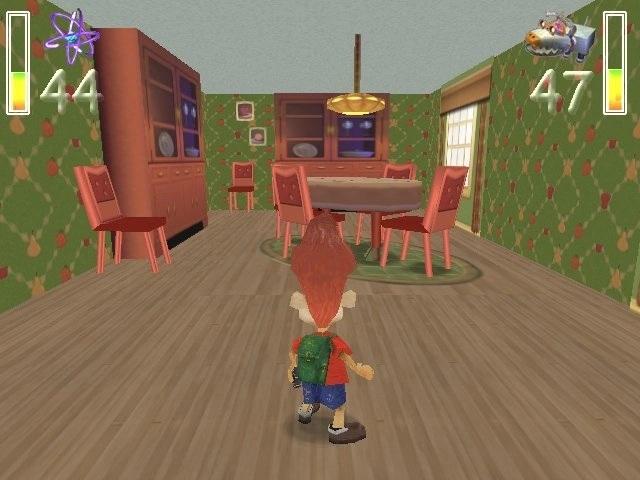
Using the directional buttons or the left analog stick, walk Jimmy over to the level you want to play and enter the portal. Throughout each stage, Jimmy is required to find key items and prizes. Only then can he complete the level and move on to the next. Keep your eyes open for seemingly hard-to-reach areas and other secret hiding places. Only by searching every nook, cranny, crevice, and ledge will you find all the items you're looking for. Some areas within a level will only be accessible after all the appropriate items have been found.
•
You must finish the levels in order before you can move on.
THE LEVEL SCREEN
•
Items or people to rescue
RETROLAND
Jimmy starts his adventure in the Retroland Amusement Park. The objective here is to grab six prizes that Nick has challenged you to find. Guide Jimmy through the different areas of Retroland to locate the goods, and then report back to Nick once you're through. Not all the areas in Retroland are immediately accessible. To complete a thorough search, Jimmy must first find Key Items that his friends need. THEME PARKS
Within Retroland, Jimmy will need to visit four Theme Parks to find the hidden prizes: Mummy Area, .png)


.png)
.png)


.png)


.png)
.png)


_1.png)






.png)
.png)

.png)