Getting Started
Set up your PlayStation®2 computer entertainment system according to its Instruction Manual. Ensure the MAIN POWER switch (on the back of the console) is on.
Press the RESET button. When the power indicator lights up, press the open button to open the disc tray. Place the Mojo! disc label-side up, then press the open button again to close the tray.
Attach game controllers and other peripherals as needed. Follow on-screen instructions and refer to this manual for software information.
Gameplay Elements
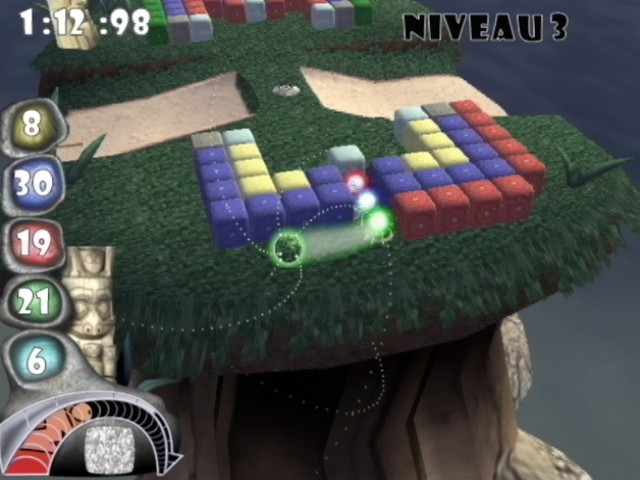
As you travel, you'll encounter new barriers, hazards, power-ups, and enemies. Some barriers allow one-way passage or contain hidden Mojo.
Hazards and power-ups range from Reverse Controls to the Spectrum. Enemies evolve from simple skulls to rolling spheres and hunter spheres.
Each stage has a target time. Beating this time earns a bonus infuser, usable at any time. Bonus infusers cannot be carried between worlds.
Collecting all four bonus infusers (red, blue, yellow, green) by the end of a world earns something even more powerful. Completing the journey unlocks a bonus game of Mojo Golf.
On-Screen Display
Saving and Loading
To save your progress, insert a memory card (8MB) (for PlayStation®2) into MEMORY CARD slot 1 or slot 2. Press the START button to bring up the in-game pause menu. Select "Save" to save your game.
Load a saved game from the Main Menu by selecting "Load Game," or from the in-game pause menu by selecting "Load." You will start at the beginning of the stage you were on when you last saved.
Your time records for each stage will be automatically saved by enabling the Autosave function from the options menu.
Mojo! to Mojo! (The Multiplayer Battle Mode)
The chaotic force that scattered Mojo across the universe will sometimes pit Mojo masters against each other. In this mode, Mojo can be destructive, allowing you to cripple foes.
Up to four players can battle using up to four DUALSHOCK®2 analog controllers with a multitap (for PlayStation®2). Insert a multitap into controller port 1, then insert controllers sequentially into controller port 1-A, 1-B, 1-C, and 1-D.
Your goal is to be the last ball with Mojo, or to destroy the most blocks if multiple balls remain after all blocks are gone.
Multiplayer Strategies
1.
Get powered-up!
At the start of each stage, you'll be told what power-up is available. Break the last block of the indicated color to gain an advantage.
Power-ups include:
•
Spectrum - Break blocks of any color
•
Drain Power - Steal Mojo from other players
•
Freeze - Freeze other players
You can also get power-ups from special blocks in the stage:
•
Steel Ball - Knock into other players and send them flying
•
Shield - Protects you from adversities
•
Kill enemy - Destroy enemy spheres
•
Magnet off - Turns off attractors/repulsors
You keep a power-up permanently unless hit by an adversity or falling off the stage.
2.
Knock your opponent into an adversity block.
Adversities confuse and delay opponents, but can also affect you, so be careful. When an adversity is triggered, its icon appears in the affected player's window with a countdown timer.
Adversities include:
•
Drain - Mojo drains faster
•
Small - Ball shrinks, unable to break cells
•
Magnet - Ball attracts other Balls
•
Slow - Ball moves at half speed
•
Reverse controls - Up is down and left is right
3.
Knock your opponent off the platform.
Each time an opponent reappears, their Mojo diminishes substantially. Not many falls are needed to reduce a Mojometer to nothing.
4.
Destroy the most blocks.
While opponents are busy knocking each other off the stage or into adversity blocks, quickly break as many blocks as possible. If two or more players remain when all blocks are destroyed, the player who destroyed the most blocks wins the stage.
THE FIRST PLAYER TO WIN THREE STAGES IS THE MOJO MASTER!
Mojo Risin' (Stage Editor)
The Stage Editor allows you to design new puzzles. Prove your worth as a Mojo Maestro by creating challenging worlds.
The Puzzle Builder lets you make your own Mojo.
•
Choose a stage and world as the basis for your puzzle, then select Continue.
•
Use the D-pad or left analog stick to place items.
•
Use the right analog stick, R1, and L1 buttons to move and zoom the camera.
•
Scroll through items using the button and buttons.
•
Press the A button to place an item.
•
Pressing the button will remove an item.
Stage Editor Items
•
Red Block - Places a Red Mojo Block
•
Green Block - Places a Green Mojo Block
-
.png)

.png)