GETTING STARTED
Note
Illustration may not match all PlayStation 2 console types. For owners of SCPH-70000 series PlayStation 2 systems, refer to the setup instructions supplied with your system. Set up your PlayStation®2 computer entertainment system according to the instructions in its Instruction Manual. Make sure the MAIN POWER switch (located on the back of the console) is turned ON.
Press the RESET button. When the power indicator lights up, press the OPEN button and the disc tray will open. Place the Psychonauts disc on the disc tray with the label side facing up. Press the OPEN button again and the disc tray will close.
Attach game controllers and other peripherals, as appropriate. Follow on-screen instructions and refer to this manual for information on using the software.
Memory Card (8MB) (for PlayStation®2)
To save game settings and progress, insert a memory card (8MB) (for PlayStation®2) into MEMORY CARD slot 1 of your PlayStation®2 system.
You can load saved game data from the same memory card or any memory card (8MB) (for PlayStation®2) containing previously saved games.
STARTING UP
DUALSHOCK 2 ANALOG CONTROLLER CONFIGURATIONS
•
left analog stick (L3 button when pushed down)
•
right analog stick (R3 button when pushed down)
MAIN MENU
Choose from the following at the Main Menu:
•
New: Start a new adventure. Raz picks a bunk then designates his camp nickname. You will also choose default camera controls during set up. Once you make these choices, your profile is complete.
•
Continue: Loads the profile/game/bunk name most recently played.
•
Load: Load a saved game from your bunk in the bunkhouse.
HEADS UP DISPLAY
•
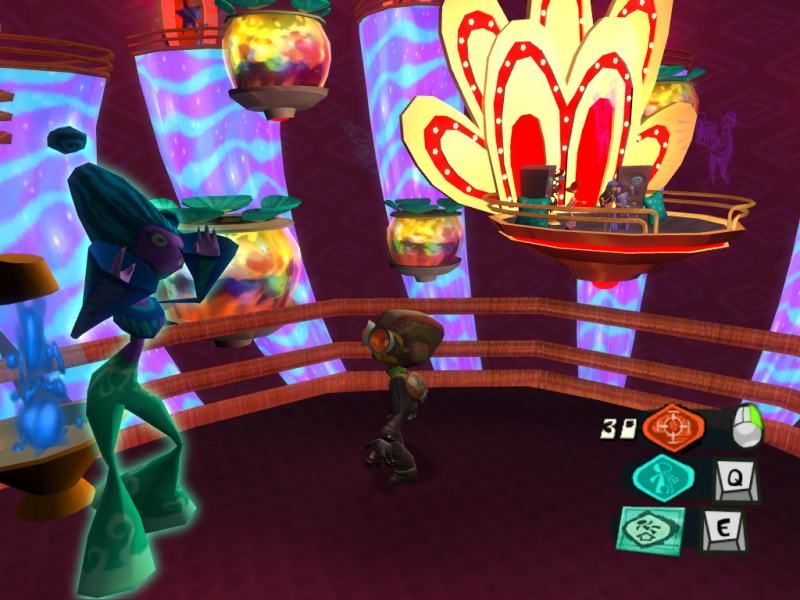
Player Assigned Hot Buttons
Mental Health
Indicates Raz's available mental health. See Recharging and Increasing Mental Health on page 9.
Astral Layers
Shows available astral layers. When these run out, Raz is booted from the mental world back into the real world. See Mental World Items on page 18.
Figments of Imagination
Indicates total number of figments collected within the current area. Collect 100 figment points to upgrade Raz's PSI Cadet Rank. See Mental World Items on page 18.
PSI Cadet Rank
Shows your current PSI Cadet Rank. The highest rank Raz can achieve is 100. See PSI Cadet Rank on page 9.
Arrowheads
Tallies number of collected arrowheads. See Collectibles on page 17.
PSI Cards
Tallies number of collected PSI cards. See Real World Items on page 18.
Player Assigned Hot Buttons
You can customize the R1, R2 and L2 buttons by assigning to them the PSI Powers you use most frequently.
Press on the directional button to bring up the PSI Power menu, highlight a Power using the left analog stick, then press the button you want that power mapped to.
The Heads Up Display will automatically appear once any of the items on it are affected by gameplay. However, you can also bring it up at any point by pressing down on the left analog stick.
RAZ'S BACKPACK
Raz has room for sixteen different items in his backpack. To access his backpack, press [button icon].
To toggle between his Backpack Inventory and Power Menu, press [button icon] or [button icon] on the directional button. To toggle within each menu, rotate either the right or the left analog stick in the desired direction, then press the [button icon] button to select the backpack item for Raz to use.
Note
Some of the items in Raz's backpack can be used in both worlds; some may only work in one. Some real world items may not be available to Raz when he's in the mental world.
JOURNAL
The Journal Raz carries with him throughout the game is a valuable tool. There are six different tabs in the Journal including the main tab.
Choose from Options, Load, Save, Credits and Exit.
OPTIONS MENU
CAMERA
Allows you to invert the game camera's horizontal view, vertical view and first-person vertical view. The default selections are based on the initial profile choices you designated at the start of the game.
SOUND
Adjust volumes via a slider bar for Master, FX, Music and Voice. The default level for each is 100%. You can also designate whether subtitles appear during play (they will not appear by default).
CONTROLLER
Select "N" to turn vibration off. The default is on.
LOAD
Select to load a previously saved game from the bunk originally selected.
SAVE
Select to save the current game file. Psychonauts will also auto-save at key checkpoints in the game and at every loading screen.
CREDITS
Select to view the credits for Psychonauts
.png)

.png)