PlayStation 2 Setup
Set up your PlayStation®2 computer entertainment system according to its Instruction Manual. Ensure the MAIN POWER switch (on the back of the console) is ON.
Press the RESET button. When the power indicator lights up, press the OPEN button to open the disc tray. Place the SEVEN SAMURAI disc on the disc tray with the label side facing up. Press the OPEN button again to close the disc tray.
Attach game controllers and other peripherals as appropriate. Follow on-screen instructions and refer to this manual for software information.
Console Ports
Saving Your Game
To save game settings and progress, insert a memory card (8MB) (for PlayStation®2) into MEMORY CARD slot 1. You can load saved game data from the same memory card or any other memory card (8MB) (for PlayStation®2) containing previously saved games.
You can save your game when you clear each chapter. Insert a memory card into MEMORY CARD slot 1 and select the file to save. Choose YES at the confirmation message.
At least 115Kb of free space is required on the memory card to save the game.
Opening Movie
Once you get started, the opening movie will play. You can press the START button during the movie to go directly to the Title screen.
Game Mode Menu
•
NEW GAME - Start a new game, with your difficulty level set at NORMAL.
•
NOTE: The HARD difficulty level is an unlockable option.
•
LOAD GAME - Load a previously saved game and continue play from where you left off. Select a file to load the game.
•
CONTINUE - If saved continue data is present on the memory card (8MB) (for PlayStation®2), the game will restart at the beginning of the last saved Map.
•
OPTIONS - Adjust various game settings.
•
GAMEPLAY INSTRUCTIONS - Browse through an overview of gameplay information, including Battle mode commands.
Options Menu
Use the Options Menu to change various game settings. Move the left analog stick/directional buttons ↑/ to select items, and / to change the settings. Highlight the EXIT icon and press the button to save your settings and return to the Title screen.
•
CONTROLLER - Change the controller settings. Select an action, and then press a controller button to assign it to that action. •
GUARD - Block an attack.
•
STEP - Perform quick steps and somersaults.
•
NITOH-RYU MODE - Engage Nitoh-Ryu mode. You can assign this item to one button press or two simultaneous button presses.
•
DEFAULT - Revert to default button settings.
•
AUDIO - Select STEREO or MONO.
•
MASTER VOLUME - Adjust the overall sound volume of the game.
•
MUSIC - Adjust the background music and movie volumes.
•
SOUND EFFECTS - Adjust the sound effects volume.
•
VIBRATION - Toggle the controller's vibration function ON/OFF.
•
DEFAULT - Revert to default Options settings.
•
EXIT - Return to the Title screen.
Game Flow
General game flow follows the progress shown below:
•
EVENT/MOVIE (different for each chapter)
•
RESULTS SCREEN/WEAK POINT COVERAGE SCREEN
Game Over
When your character's HP reaches 0, the game is over. At this point, you can select these options:
•
CONTINUE - Resume gameplay at the starting location of the current Map. (You're unable to save at this point.)
•
RETURN TO TITLE - End the game. Save your game data by selecting YES in the confirmation message.
Main Menu
Press the SELECT button during play to view the Main Menu. Use the Menu Controls to choose options. Press the SELECT button again to return to the game screen.
•
MAP - Check the Map to confirm your character's direction and location. (You can view the Map during the game by pressing down the R3 button.)
•
KATANA - Display information about weapons you've acquired.
•
ENEMY - Display information about enemies you've encountered.
•
SKILL - Review the Skill commands.
•
OPTIONS - Adjust various game settings.
•
STATUS - Check your character's status.
Recovery Items
Recovery Items can appear when you defeat your enemies, and in certain locations. Recovery Items can restore your HP depleted in battle. You cannot carry Recovery Items or use them when your HP is full.
Battle Mode
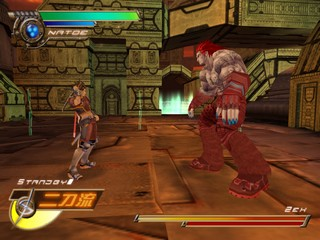
When you encounter an enemy, you enter Battle mode. You can use the command attacks described in the Game Instructions option in the Game Mode Menu. You can also use the moves below.
Just Attack
Use Just Attack to advance rapidly toward an enemy in order to attack. Perform Just Attack by moving the left analog stick exactly in the enemy's direction and pressing the Attack button.
When Just Attack is successful, the enemy cannot guard against it. When you use Just Attack, the Two Sword Timer recovers a set amount.
Just Guard
Use Just Guard to generate a counter-attack opportunity. To perform
.png)

.png)
