Starting the Game
After the introductory logos, the Title Screen will appear. Select a mode using the Directional buttons or left analog stick. Enter your selection with the X button or START button.
Arcade Mode
Select ARCADE MODE to play the Arcade version of Silent Scope. Training Mode
Select TRAINING MODE to improve your skill level.
Options
Select OPTIONS to modify game settings. Game Settings can also be modified during gameplay by pressing the START button to pause the game.
Ranking
Displays the player rankings for each mode.
The Screen
•
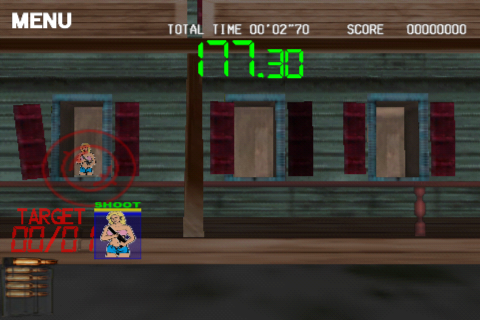
Magazines (remaining ammo; reloading is automatic)
The Scope
Using the O button, you can toggle the scope on the screen. Adjust the sights quickly when the scope is off, then turn the scope on by releasing the O button to make fine adjustments over a target. Shots can be fired without making scope adjustments if necessary.
Mode Select
Choose your game mode and shoot to decide. Selecting ARCADE MODE from the Main Menu will display the Mode Select menu screen. Select Shooting Range, Story or Time Attack using the Directional buttons or left analog stick. Enter the selection with the X button or START button.
Shooting Range
In this mode, the player practices sharpshooting at a shooting range. The player scores points for speed and accuracy within a set time limit. Select between an indoor or outdoor range.
Story Mode
In this mode, the player advances through a total of six stages while trying to rescue the President and his family. The story changes according to the progress made during the game.
Time Attack
In this mode, the player must try to clear stages within a set time limit.
Shooting Range Basic Rules
In both the indoor and outdoor shooting ranges, the player must shoot all enemy targets within a specified time limit to move on to the next stage. Be careful not to hit any innocent bystanders, otherwise the player's score is penalized.
After completing each stage or running out of time, the player's performance will be ranked based on score. Additional time remaining at the end of each stage is added to your point total. The player cannot proceed to the next stage if time runs out.
Story Mode Basic Rules
The President and his family have been kidnapped by lethal terrorists. The government turns to a professional sniper to rescue the President and his family. In each stage, the player must carry-out a specific mission while taking out enemies and the level boss within a specified time limit.
Each time an enemy hits the player, the player's life is decreased by one. Accidentally shooting an innocent bystander will also decrease the player's life. However, throughout each stage, special Life-Up girls can increase the life gauge by one if the player spots them in the scope.
The game ends if time runs out or if the player loses all lives. It is possible to continue playing from the last scene provided all continues have not been used. It is not possible to continue after the time runs out when confronting the final boss.
Time Attack Basic Rules
In each stage, you have a mission and must eliminate all the enemies and defeat a boss character within a specified time limit. After clearing certain stages, your performance will be ranked based on your time.
You do not incur damage from enemy fire in Time Attack, nor are you penalized for shooting innocent bystanders. There are three levels of difficulty in Time Attack, allowing the player to progress through different stages in the game.
Stages
Downtown
Downtown Chicago, Illinois (Mission: Rescue the First Lady)
The President of the United States and his family have been kidnapped by terrorists, who now occupy the entire downtown area of Chicago.
Football Stadium
Downtown Chicago, Illinois (Mission: Rescue the President's daughter)
You have intercepted information indicating that the terrorists are holding the President's daughter as hostage at the football stadium! Rush to the stadium and rescue the girl!
Highway
Chicago, Illinois (Mission: Rescue the President's daughter)
The terrorists have been spotted on the highway attempting a getaway! Get over there and take down those terrorists! Shooting at terrorists in moving cars is extremely difficult. You must take into account the speed of their movement and shoot ahead of them! Lead your shots.
Options
Game options can be accessed through the Title Screen, Main Menu or by pressing the START button during gameplay to pause the game. Press the left/Right Directional buttons or left analog stick left/right to cycle through the desired options subscreen. Press the Up/Down Directional buttons or left analog stick Up/Down to select from the options available.
After all settings have been adjusted, press the START button to confirm the settings and return to the previous menu. Press the O button to cancel your selection.
Game Config
•
Difficulty: Set the difficulty level.
•
Player Life: Set the number of lives the player has at the start of the game.
•
Branch Select: Set whether the player selects a path at branch points or whether they are selected randomly (for the Story Mode).
•
Continue: Set the number of times a game can be continued in the Story Mode. If the "EXTRA" option is selected, the number of continues can be increased during the game based on the player's performance.
•
Time Limit: Set the time limit imposed from the start of a game or the start of a continuation (for Story Mode).
Sound Config
•
Sound: Toggle the sound between Stereo/Mono
.png)


.png)
