Getting Started
Set up your PlayStation®2 computer entertainment system according to its Instruction Manual. Ensure the MAIN POWER switch (on the back of the console) is turned on.
Press the RESET button. When the power indicator lights up, press the open button to open the disc tray. Place the SPEED KINGS™ disc on the disc tray with the label side facing up. Press the open button again to close the disc tray.
Attach game controllers and other peripherals as appropriate. Follow on-screen instructions and refer to this manual for information on using the software.
Console Ports
Memory Card
SPEED KINGS™ only supports MEMORY CARD slot 1. To save game settings and progression, insert a memory card (8MB) (for PlayStation®2) into MEMORY CARD slot 1.
Controllers
SPEED KINGS™ is a one or two-player game played using the DUALSHOCK®2 analog controller. Connect the controller to be used to controller port 1. In a two-player game, connect controllers to controller ports 1 and 2.
Main Menu
At the Title Screen, press the Start button to advance to the Main Menu. You will see these choices:
•
License: Strongly recommend that before you take to the road you spend some time learning your trade and complete these skill building tasks.
•
Single Player: Play a variety of games against CPU opponents.
•
Multiplayer: Play a variety of games with up to 2 players.
•
Lap Times: View the current lap time records.
•
Options: Adjust settings to suit your preferences.
•
Speed Kings Mag: Enter the Mag to view unlocked bikes and stats.
Bike Selection
Once you choose your mode, you will select a bike to race. Initially, there are five basic bikes to choose from. You will need to unlock better bikes to beat the later stages and to earn Best Time on various tracks. You unlock bikes by completing meets, earning respect, and setting new best times.
Each bike is rated in various performance categories:
•
Top Speed: the fastest speed the bike can achieve.
•
Acceleration: how fast it gets up to speed from standing still.
•
Handling: how easy and predictable it is to control.
•
Braking: how fast it gets down from top speed to standing still.
Try to pick a bike with characteristics that match the track you will be racing on. You can view stats on any bike in the Bike Select screen or Speed King Mag area. To select a bike, press up or down on the directional buttons until the desired bike is highlighted. You can then select the bike color by pressing right or left on the directional buttons. Then press the button to confirm your selection.
Once you have completed a race in any game mode except Meets, you can drop back to the bike selection screen and choose a different bike. In Meets mode, a player must go through the entire Meet with the bike he initially selected.
Player Setup
Once you've got your bike squared away, you can choose your rider's Leathers and Lid (your helmet). Speed Kings has many cool Alpinestars leathers and Shoei helmets to choose from, and there's more waiting to be unlocked.
Input Name
Once you select handle on the Player setup screen, you will advance to the input name screen where you can enter a player name. Press any direction to move the highlight to the desired character, then press the button to enter it.
Selecting ABC will change the display to uppercase letters. When you're satisfied with your name, highlight END and press the button.
Track Selection
Tracks are unlocked in Meets mode; you need to complete an entire meet in order to unlock the appropriate 3 tracks. In Meets mode, you race on the tracks as presented. In other modes, you can select any available track to race on.
Initially, you can only race on the Hambusters track. Once you select a track, you will advance to a screen giving the details of the race, any Respect Challenges, and a map of the track layout.
Game Modes
License
Before you get your race on, take some time getting down the biking basics in License mode. You will be presented with several tasks, and depending on how well you do, you will earn a bronze, silver, or gold rating for each task completed. See if you can be the teacher's pet by earning all gold stars!
Single Player Modes
There are many modes you can play against computer opponents. These games are available from the beginning:
•
SINGLE RACE: Race three laps against five computer riders. You can take on Respect Tasks here to earn points towards a Respect Bike.
•
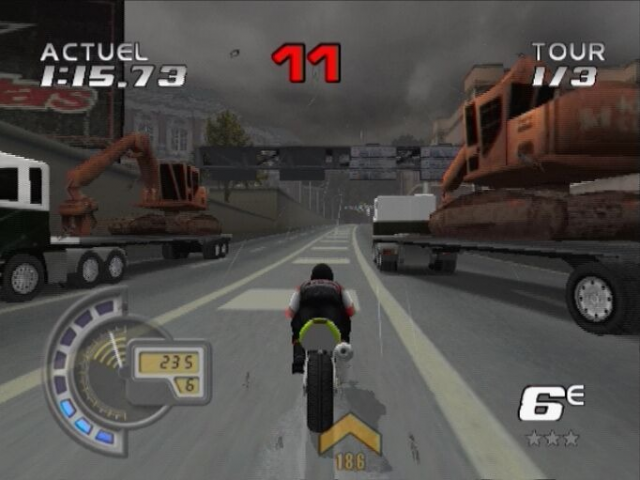
MEETS: Meets mode features a series of races on various international tracks. This is the main mode of the game where you progress through the game unlocking bikes and tracks. Each meet consists of 3 races.
You have to earn a required number of points to continue; the number of points earned depends on the position obtained in the Race.
-
.png)

.png)




.png)

.png)



.png)




.png)