GETTING STARTED
*Note: Illustration may not match all PlayStation 2 console types. For owners of SCPH-70000 series PlayStation 2 systems, refer to the setup instructions supplied with your system. Set up your PlayStation®2 computer entertainment system according to the instructions in its Instruction Manual. Make sure the MAIN POWER switch (located on the back of the console) is turned on.
Press the RESET button. When the power indicator lights up, press the open button and the disc tray will open. Place THE WARRIORS disc on the disc tray with the label side facing up. Press the open button again and the disc tray will close.
Attach game controllers and other peripherals, as appropriate. Follow on-screen instructions and refer to this manual for information on using the software.
HEADS UP DISPLAY
Ground Level Attacks
•
Press to mount a downed opponent.
•
Press again to pick your opponent back up.
•
Press or to execute ground level attacks.
•
Press + to perform a power move.
Moving Attacks
To perform a moving attack, use the left analog stick and press or.
For a more powerful moving attack, move towards the enemy while holding down the L2 button (sprinting) and press to do a cross body attack or press for a shoulder charge attack.
Snap Attacks
To hold off enemies approaching from behind or to the side, press and use the left analog stick in their direction to throw a snap attack. This will buy you some time when overwhelmed by incoming threats.
Counterattacks and Reversals
By repeatedly pressing the R1 button the player may be able to reverse an opponent's grab. The player may also press or to attack and struggle.
Counterattacks can be performed in two situations. If the player is about to be grabbed or tackled, press the or button at the exact time to break the attack. Players are also able to counterattack from a block.
Getting Busted and Cuffing Characters
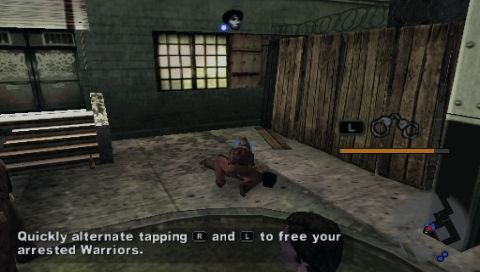
In some missions, the cops will try to bust you (and your Warriors) via cuffing. If a fellow Warrior is busted, walk over to them and press to initiate the mini-game. The player will then need to press the L1 button and R1 button alternately in order to break the cuffs. This is displayed by an on-screen meter that will fill up based on the player's progress. If the player is busted, then other Warriors will come to their aid.
The player may also find handcuffs and cuff keys on fallen cops. To use the handcuffs on an enemy, the player must mount them and press the R1 button. To use the cuff keys press to instantly free your Warriors.
Rage Mode
Build up your Rage Meter by pulling off a variety of combos and "style" moves (wall smashes, tossing enemies through windows/off rooftops/into breakable objects). In Rage Mode you will be temporarily invincible.
Press the L1 button and R1 button simultaneously to enter Rage Mode once your Rage Meter has filled. In Rage Mode the basic attacks or, cause more damage and pressing and simultaneously will now perform a full 360 degree clearing move.
If you grab or mount someone and press + then you will perform a finishing move. A finishing move is lethal and will do serious damage to an opponent.
Combo Attack
Standard combos have varying effects. Depending on which Warrior executes the move, certain combos result in quick stuns, knockbacks, knockdowns or extreme knockdowns (send the victim flying into crowds). The less health your opponent has, the greater the effectiveness will be.
Warchief Commands
The player at anytime can give 6 commands to their fellow Warriors. To initiate Warchief commands, hold down the R2 button. Once it is pressed the 6 commands will appear in a ring on the bottom part of the screen. Use the right analog stick to select a command and then release the R2 button.
•
WRECK 'EM ALL: Warriors will look for an enemy to attack or ready themselves with weapons.
•
MAYHEM: Warriors will smash up anything in sight (cars, stores, street objects...).
•
LET'S GO: Warriors will follow the player.
•
SCATTER: Warriors will split up and look for hide areas when chased by cops.
•
WATCH MY BACK: Warriors will defend the area where the player is standing.
•
HOLD UP: Warriors will stand their ground.
Mugging
Grab your victim by pressing and to initiate mugging, press . Once initiated, two status bars will appear: the player's mugging progress (top bar) and the victim's struggle progress (bottom bar). In order to complete the mugging, the player's bar must be filled before the victim's. By rotating the left analog stick, the player must find and hold the vibration to complete the mugging process.
Breaking and Entering
Some buildings can be entered by either smashing the windows or if gated, the player can pick the locks.
To initiate






.png)



.png)
.png)
.png)


_1.png)