Grind Controls
To perform a basic grind, press and hold the button when in the air near a rail, edge, or lip.
•
50-50: When parallel to rail, press and hold the button.
•
Nosegrind: Up on the directional button + the button.
•
5-0: Down on the directional button + the button.
•
Boardslide/Lipslide: Rotate board perpendicular to rail and press the button.
•
Noseslide/Tailslide: Press Left or Right on the directional button + the button. Rotate the part of the board you want to slide on into the rail.
•
Smith/Feeble: Press diagonally Down on the directional button + the button.
•
Crooked/Overcrook: Press diagonally Up on the directional button + the button.
•
Nosebluntslide: Tap Up-Up on the directional button + the button.
•
Bluntslide: Tap Down-Down on the directional button + the button.
Lip Tricks
To perform a lip trick, skate straight up a ramp or quarterpipe. At the lip of the ramp, press the button + a direction on the directional buttons. Up and Down on the directional buttons must then be used to balance the lip trick.
Lip tricks vary by skater. You can configure your lip tricks in the Edit Tricks menu.
Hidden Combos
Look for hidden combos by trying different button combinations while doing standard tricks. For example, holding Left and pressing + button will do a double kickflip.
Special Tricks
Start with a few special tricks and expand your trick list as your career progresses.
Scoring Tips
Every time you repeat a trick during a run, that trick's point value will decrease. To get a top score, you're going to have to think about your "line" and mix up your tricks.
•
Try to trick into and out of every grind.
•
Use special tricks for huge scores.
•
Big spins (540, 720) will net bigger scores. Use the R1/L1 buttons to spin faster.
•
Every trick in a combo adds to your multiplier.
•
Use manuals to keep your combo going across flat ground sections.
•
Use reverts to keep your combo going from big air tricks off ramps.
•
Switch tricks are worth more and devalue separately from regular tricks.
•
Nollie tricks score more points.
•
Trick across gaps (the blue text) to maximize combos.
•
Look for hidden combos to find new tricks.
•
You can combo every type of trick - lip tricks, manuals, vert tricks, grinds, etc. in Tony Hawk's Pro Skater™ 3 and use Revert to link them all together.
The Special Meter
Score points to fill up your Special Meter. When it's glowing yellow, your adrenaline's pumping and you'll be able to perform your special tricks. In Tony Hawk's Pro Skater™ 3, the Special Bar increases in real time, so you'll be able to bust specials in the middle of your first combo.
Main Menu
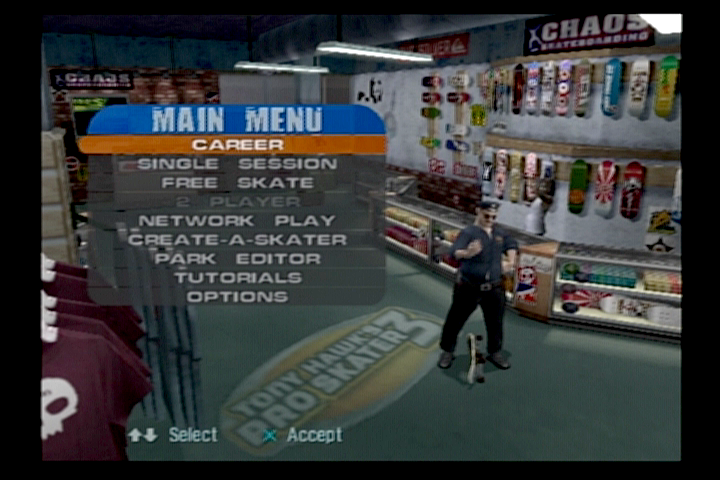
Choose from the following options to begin play. Pressing Up/Down on the directional buttons, choose the type of game you want to play. Press the button to start the game. Two controllers must be plugged into the PlayStation®2 to play in the two-player mode.
Single-Player Modes
Career Mode
You're a professional skater now, and pros tour the world's top skate spots looking to improve their skills and gain exposure. Complete the goals in each level to advance to the next, and to earn your way into the elite competitions. Increase your stats and learn new tricks as you go.
You're not going on vacation until you beat all eight levels. Some of the goals and bonus icon locations will change for each of the pro skaters. Try to clear the game with all 13 pros!
Single Session
Choose a single level and skate all-out in a two-minute session in an effort to set high scores and new records. Only one level is opened at first, The Foundry. As you complete your goals in Career Mode, you earn access to other levels.
Free Skate
For some, it's practice. For others, it's life. Choose a level and skate as long as you like. Hit the obstacles over and over and over again until your tricks are ready for competition. Unlock other levels in the Career Mode then Free Skate them to learn the terrain.
Save
To save a game and one custom skater, you'll need at least 87K of free space available on your Memory Card (8MB) (for PlayStation®2). To check your free memory and/or delete existing games, use the PlayStation®2 Internal Memory Card Manager.
Tutorial
Whether you're new to Tony Hawk's Pro Skater™ or a cagey veteran, visit the tutorials to get tips from the man himself - Tony Hawk. Tony will walk you through a series of lessons, teaching you all about the basics of controlling your skater, and offering some advanced tips along the way.
Multiplayer Modes
Network Play
Hook your PlayStation®2 to the Internet or a Local Area Network (LAN), and play up to four-player games simultaneously. If you've got Internet access and either a modem or Ethernet adaptor, you can challenge skaters across the country.
If you don't have Internet access, you can always play in Two-Player split-screen.
2-Player
Hook two controllers up and you can play against a friend in
.png)

.png)
.png)
.png)

.png)





.png)


.png)
.png)


