Starting Up
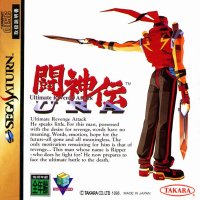
Set up your Sega Saturn system as described in its instruction manual. Plug in Control Pad 1. For two-player games, plug in Control Pad 2. Note: Toshinden URA™ is for one or two players.
Place the Toshinden URA disc label side up, in the well of the CD tray and close the lid.
Turn on the TV or monitor and the Sega Saturn. The Sega Saturn logo appears on screen. If nothing appears, turn the system off and make sure it is set up correctly before turning it on again. If you wish to stop a game in progress and return to the on-screen Control panel, simultaneously press Buttons A, B, C and Start on the Sega Saturn Control Pad. When the game Title screen appears press A, B, C and Start again to go to the on-screen Control panel. Your Sega Saturn CD contains a security code that allows the disc to be read. Be sure to keep the disc clean and handle it carefully. If your Sega Saturn system has trouble reading the disc, remove the disc and wipe it carefully, starting from the center of the disc and wiping straight out toward the edge. Non-default Controls
Many of the Command Buttons (i.e, DASH Button) listed on pages 11-13, and Special Buttons 3 and 4 listed on pages 14-24 are not default controls. Refer to the Control Type option on page 7 to access these controls.
Getting Started
After the Sega™ and Takara™ logos, the Toshinden URA intro begins. Watch the characters in action and then access the Title screen, or skip the intro and go directly to the Title screen by pressing Start. Press Start from the Title screen to bring up the Mode Select screen.
On the Mode Select screen, select one of the battle modes or access the game Options. Press the D-Pad UP or DOWN to highlight, and Start or Button A or C to select.
1P Game
The way to win in this mode is pretty simple: don't lose a match. The more opponents you defeat, the closer you'll get to the final showdown.
VS Human
One match determines the winner in this two-player fighting mode.
VS Computer
Try a little training with the character of your choice. You also get to select your computer-controlled opponent.
Options
Change the settings for selected features of the game.
Battle Modes
1P Game
One by one your opponents come at you with a single goal in mind, to knock you out of the tournament. After all, you're in their way on the path to the final showdown. Guess that's just too bad for them, because they're in your way too.
Choose your fighter from the Player Select screen. Press the D-Pad LEFT or RIGHT to highlight a fighter, then Button A, B, C, X or Y to select. The computer then selects your first opponent.
Should you lose a match you can still keep going. To continue, press Start before the countdown reaches zero. There is no limit to the number of times you can continue your game.
VS Human
Players select fighters at the same time on the Player Select screen. Press the D-Pad LEFT or RIGHT to highlight, then Start or Button A, B, C, X or Y to select. If desired, both players can select the same fighter.
Note: Your fighter's appearance depends on the button you press to select him/her.
After the fight, a screen appears showing the breakdown of wins, losses, total number of times played for all fighters, and who controlled them (either Player 1 or 2).
Press Start or Button C to return to the Player Select screen. Press Start and Buttons A, B and C at the same time to return to the Title screen.
VS Computer
Select your fighter first, then select the fighter for the computer. Press the D-Pad LEFT or RIGHT to highlight, then Button A, B, C, X or Y to select. You can continue a game by pressing Start before the countdown reaches zero.
Options
•
VS. COMPUTER BUTTON EXIT Z-HELP
Press the D-Pad UP or DOWN to highlight an option and LEFT or RIGHT, or Button A or C to change the setting.
•
LEVEL (1-8): Set the skill level for computer-controlled opponents. The higher the number, the more talented your opponent.
•
BOUT TIME (0, 60, 99): Select the length (in seconds) for the round.
•
SET POINT (1-3): Use this feature to set the number of rounds needed to win the match.
.png)

.png)
_2.png)
_3.png)
.PNG)
.png)
.jpg)