Setup Instructions
Set up your Sega Saturn game console according to the instructions in its Instruction Manual. Make sure the power is off before inserting or removing a compact disc. Insert the MARVEL SUPER HEROES disc and close the disc cover. Insert the game controllers and turn on the Sega Saturn game console. Follow the on-screen instructions to start a game. Game Modes Overview
There are 2 modes of play and 2 setup modes for MARVEL SUPER HEROES. To adjust your button configuration during gameplay, press the START button to pause the game, then press any button to bring up the pause menu. Select KEY CONFIG from the menu to adjust your buttons, then EXIT when you are finished.
When configuring your buttons, use the Directional Button to highlight the function, then press the button you want to perform that function. Note that turning SHORTCUT to “on” in the OPTION MODE bypasses the MODE SELECT screen.
Arcade Mode
From the title screen, press START to see the MODE SELECT menu. Use the Directional Button to highlight this mode, then press the START button to select it. You will then see the character select screen.
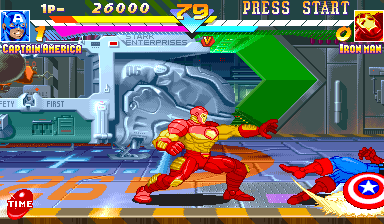
Use the Directional Button to highlight a character, then press START to select it. Then use the Directional Button to highlight either NORMAL or TURBO speed mode, then press START to select it and begin the match. Select a Marvel character and fight your way through 8 other computer-controlled characters. This is a one-player game, but a second player can join in at any time by pressing the START button on the opposite controller.
VS. Mode
VS. MODE is the classic 2-player contest. Use the Directional Button to highlight this from the MODE SELECT screen and press START to select it. You will then be presented with the character select screen. Select a character and game in the same manner as the ARCADE mode.
Option Mode
To adjust the options in your game, from the MARVEL SUPER HEROES title screen, use the Directional Button to highlight OPTION and press the START button. Highlight one of the following by pressing the Directional Button ↑ or ↓ then change the option by pressing the Directional Button ← or →:
•
DIFFICULTY: There are 8 levels of difficulty available for ARCADE MODE. Adjust the number of stars for the difficulty from 1-8 (Low to High).
•
TIME LIMIT: You can set the time limit to ON or OFF.
•
ROUNDS: You can adjust the number of rounds per match.
•
TURBO SPEED: You can adjust the game speed. There are 2 levels of TURBO speed.
•
SHORTCUT: Set this to “on” and you can bypass the MODE SELECT screen in ARCADE MODE and jump right to the character select screen.
•
SOUND: Adjust the sound on your game for stereo or monaural sound, depending on the capabilities of your sound system.
•
KEY CONFIGURATION: You can choose any button for your punch/kick functions.
•
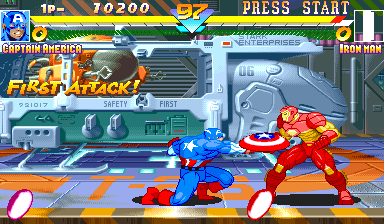
PANEL: You can turn your character's on-screen face panel on or off.
When finished, return to the MODE SELECT screen by highlighting EXIT and press the START or X button.
Backup Data
This allows you to save your game data to your Saturn built-in memory. HIGH SCORE and OPTION MODE settings will be saved. To save your game, select BACKUP from the MODE SELECT screen. Then highlight SAVE DATA and press START, A or C to select SAVE. Your game will automatically save your settings. Follow the on-screen instructions to return to the OPTION MODE. Load Data
After saving to memory, you can LOAD your settings and play with those settings intact. Select BACKUP from the MODE SELECT screen. Highlight LOAD and press START, A or C to select it. Your saved data will automatically load. Follow the on-screen instructions to return to the MODE SELECT screen.
.png)

.png)
.png)